- DATE:
- AUTHOR:
- Cvent Product News Team

SPOTLIGHT: Launch Vendor RFPs Directly from Meeting Request Form with Reposite
Across meeting programs, we kept hearing the same pattern: once a meeting request was approved, vendor sourcing often branched into its own manual workflow. Planners and sourcing teams were copying details out of requests, recreating them in other tools, and tracking status in separate spreadsheets and email threads.
To simplify that handoff, we've connected the Meeting Request Form directly to Vendor Marketplace powered by Reposite—so vendor RFPs can begin where internal demand is captured.
A Day in the Life: Vendor Sourcing, Connected
When Jordan, a meetings manager, receives an approved request for a regional leadership offsite, they know vendor sourcing will ramp up quickly. In the past, Jordan would:
Open the submitted meeting request.
Re-enter dates, locations, and attendee counts into Reposite.
Track which vendor RFPs were sent in a separate spreadsheet
Field emails from stakeholders asking, "What's the status with AV? Décor? Ground transportation?"
Each new request meant more setup and another place to look for answers. Now, that flow is consolidated.
Start Vendor RFPs from the Meeting Request
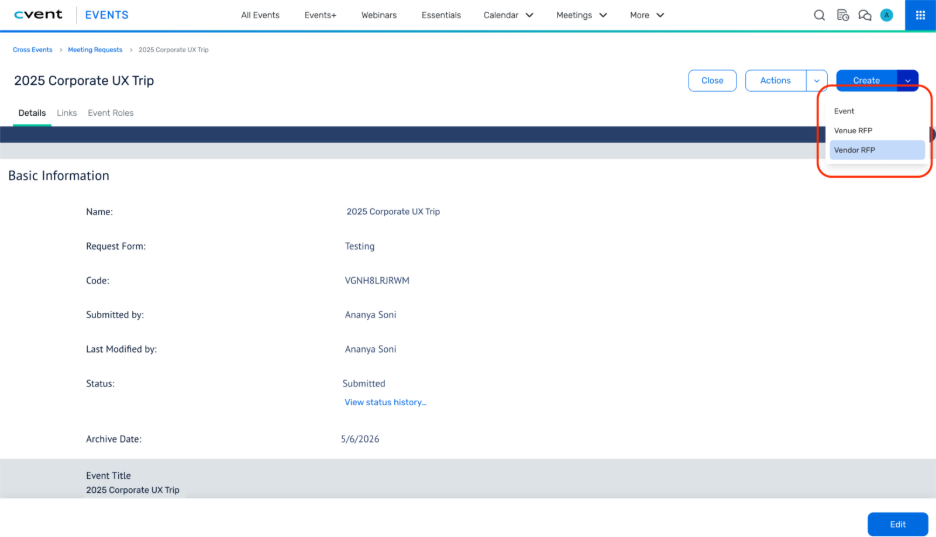
From the approved meeting request, Jordan selects Create → Vendor RFP. Instead of starting from a blank slate, a Reposite project is created using key details from the request. Jordan lands in Reposite to choose categories and build vendor RFPs—without retyping core information.
Behind the scenes, that Reposite project is linked to both the meeting request and its associated event, so the same sourcing work stays connected across intake and execution.
See All Vendor RFPs in One Place
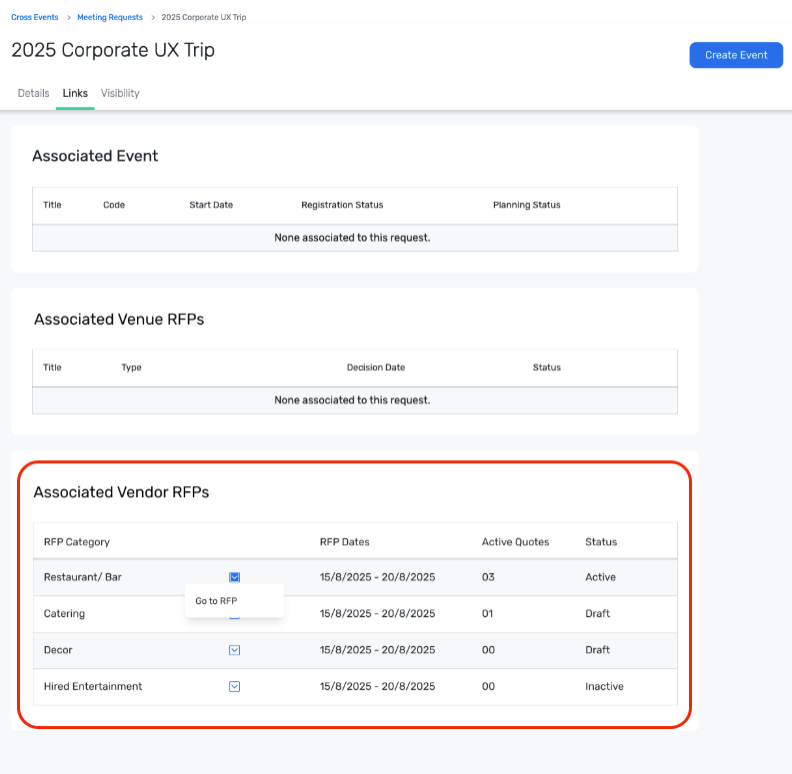
As RFPs go out and responses come in, Jordan doesn't have to dig across systems to understand what's happening. On the Links tab of the meeting request, the Associated Vendor RFPs table displays the connected RFPs in a single view, including their current state.
From there, Jordan can:
See which vendor RFPs are tied to the request.
Understand which RFPs are active, draft, inactive, or awarded.
Use a single-click "Go to RFP" action to open each one directly in Reposite
When an executive sponsor asks for a status check, Jordan opens the meeting request, scans the table, and jumps straight into the relevant RFP to review quotes.
Benefits
Fewer manual steps: Launch vendor RFPs directly from submitted meeting requests, rather than recreating project details in Reposite.
Better visibility: See which vendor RFPs exist for a request from a single table, with quick navigation to Reposite when deeper detail is needed.
Alignment between intake and sourcing: Keep the original business request, the downstream event, and vendor RFPs connected as one workflow.
Lower risk of missed or duplicated work: Linking Reposite projects to both the meeting request and event helps prevent orphaned RFPs or parallel sourcing efforts.
Use Cases
Centralized vendor sourcing for internal meetings: Sourcing teams pick up approved meeting requests and launch vendor RFPs from the same place where demand is captured.
Tiered meetings programs: For higher-value or higher-risk meetings routed through MRF, planners can immediately spin up vendor RFPs once a request is approved, without switching contexts.
Stakeholder status checks: Approvers and business sponsors can look at the meeting request (or linked event) and quickly understand which vendor RFPs are in motion, then click into Reposite if they need details.
Program reporting foundations: Because vendor RFPs tie back to specific meeting requests and events, organizations have a clearer path to understanding which internal requests drive which vendor engagements.
Bottom Line: Vendor Sourcing Where Requests Begin
With Vendor Sourcing in the Meeting Request Form, planners and sourcing teams can move from approved requests to vendor RFPs without breaking their workflow.
By connecting meeting requests, events, and Reposite projects—and making them accessible from a single view—this integration helps teams work from one consistent starting point, with less manual effort and clearer visibility into how internal demand translates into vendor sourcing activity.
To use this capability, accounts and users need access to both Meeting Requests and Reposite, with Reposite SSO enabled for the users who will create or manage vendor RFPs from meeting requests.