- DATE:
- AUTHOR:
- The Supplier & Venue Solutions Product News Team

Attract Group Business Releases for November 18, 2026
Cvent Supplier Network
Protecting Proposal Details
Expected Release Date: Live Now
What's Changed: When planners open a proposal link from a Cvent email, they need to be signed in to Cvent before they can access the proposal details. If they aren’t already signed in, they’ll be prompted to log in; Cvent then checks their access before opening the proposal.
This update adds protection for the proposal information suppliers share with planners.
Benefit: Your proposal details aren’t available through an email link alone. Requiring an authenticated Cvent session and checking access before showing the proposal helps protect your information while letting authorized planners continue to review it.
Secure NSO Proposal Access
Expected Release Date: Live Now
What's Changed: NSO contacts will need to sign in before opening links in RFP or proposal emails, including Download Proposal, Change the NSO, Forward RFP, and Change My Email Settings. Links in emails received after November 3, 2026 will take contacts to the NSO login page. Links in emails received on or before that date will take them to the Cvent login screen.
Contacts can verify with a one-time code sent to the email address the link was sent to—no Cvent account is required—or sign in with their Cvent credentials. If they use a Cvent account, the email on their profile must match the link’s recipient email. Access is limited to the NSO contact selected when the proposal was submitted or updated; contacts who weren’t selected or who removed themselves using Change the NSO won’t be able to access it.
Benefit: This sign-in step helps protect proposal access while giving NSO contacts a simple way to verify their identity, even if they don’t have a Cvent account.
You can help the right contact access the proposal by keeping the NSO contact selected when you submit or update it.
Let your NSO contacts know they’ll need to sign in, and that a one-time email code is available if they don’t have Cvent credentials.
If someone opens a link sent to another email address in the same browser, they’ll be asked to sign in again with the email address associated with that link.
Planner Navigator (Group Pipeline Intel)
Product Update Title
Expected Release Date: 11/18/2026
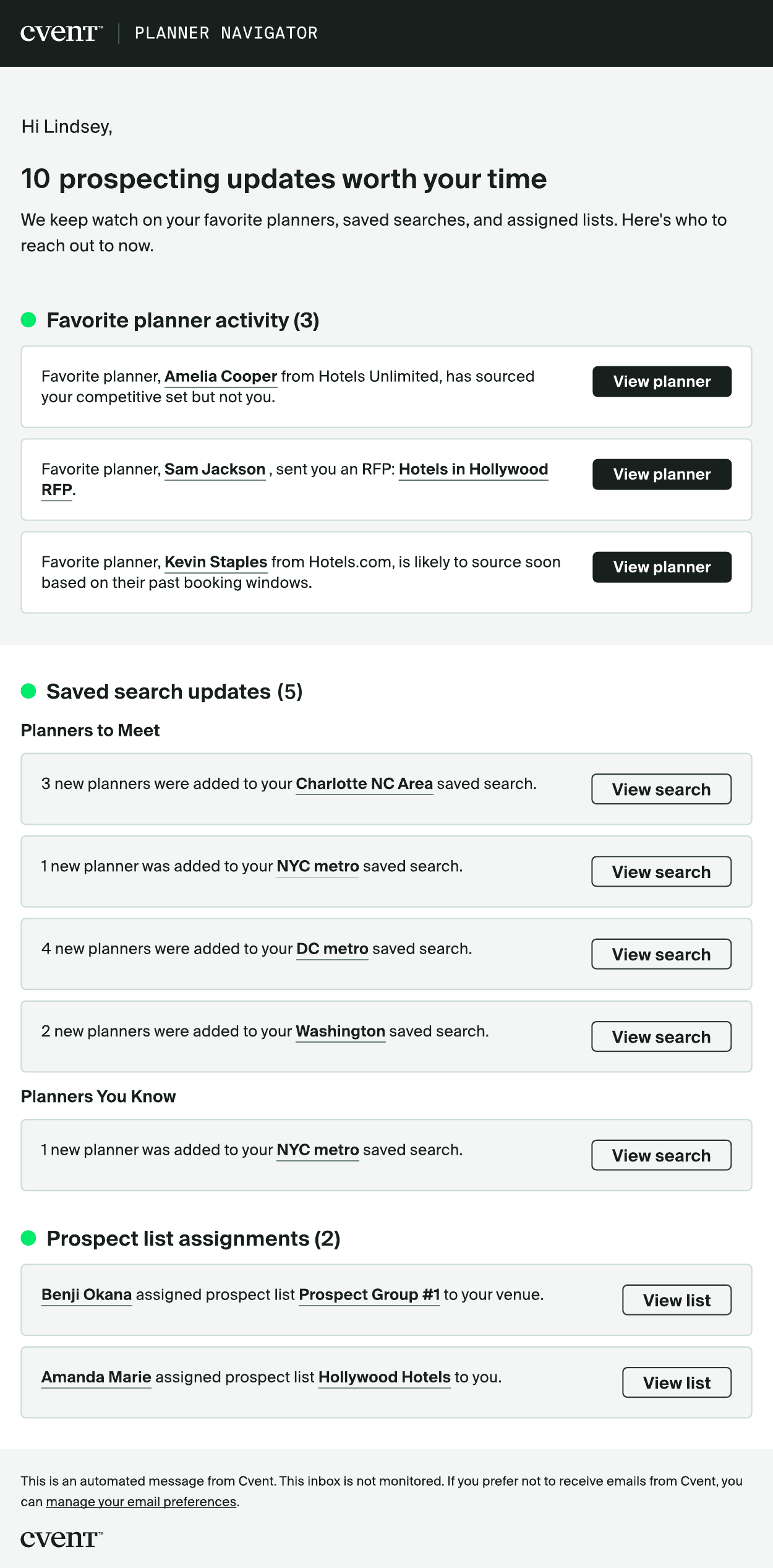
What's Changed: Planner Navigator is introducing a personalized weekly activity summary email to help you keep up with changes to the planners and searches you follow. The email arrives on Wednesdays when there’s at least one update to share; if there are no updates, you won’t receive an email.
Each email can include:
Favorited planner activity: Get an alert when a planner you’ve favorited sends you an RFP or may be sourcing soon, based on past booking windows.
Saved search updates: See how many new planners were added to your saved searches over the previous week, with a link to open the search and see the new planners at the top.
Prospect list assignments: See the list name, who assigned it when available, and whether it was assigned to you or your venue, with a direct link to the list.
The email is available to Planner Navigator users on property and above-property teams, as well as users at destination marketing organizations and convention and visitors bureaus.
No setup is needed. You’ll be enrolled automatically, and you can unsubscribe at any time using the Manage email preferences link at the bottom of the email.
Benefit: Stay up to date on new planner activity and prospecting opportunities without having to check each planner, search, or list. Direct links in the email take you to the relevant place in Planner Navigator so you can follow up quickly.
Visual Element:
Visit our Community with questions
Do you have questions about anything we’ve rolled out this window?
As always, get questions answered in the Community via the Open Forum.