- DATE:
- AUTHOR:
- Cvent Product News Team

Actionable Insights Releases for July 22, 2026
Integrations
Microsoft Dynamics 365 Integration
The Cvent and Microsoft Dynamics 365 integration connects Cvent’s industry-leading event management platform to Microsoft Dynamics 365, helping organizations streamline event operations, automate data synchronization, and track event ROI across systems.
Quick overview
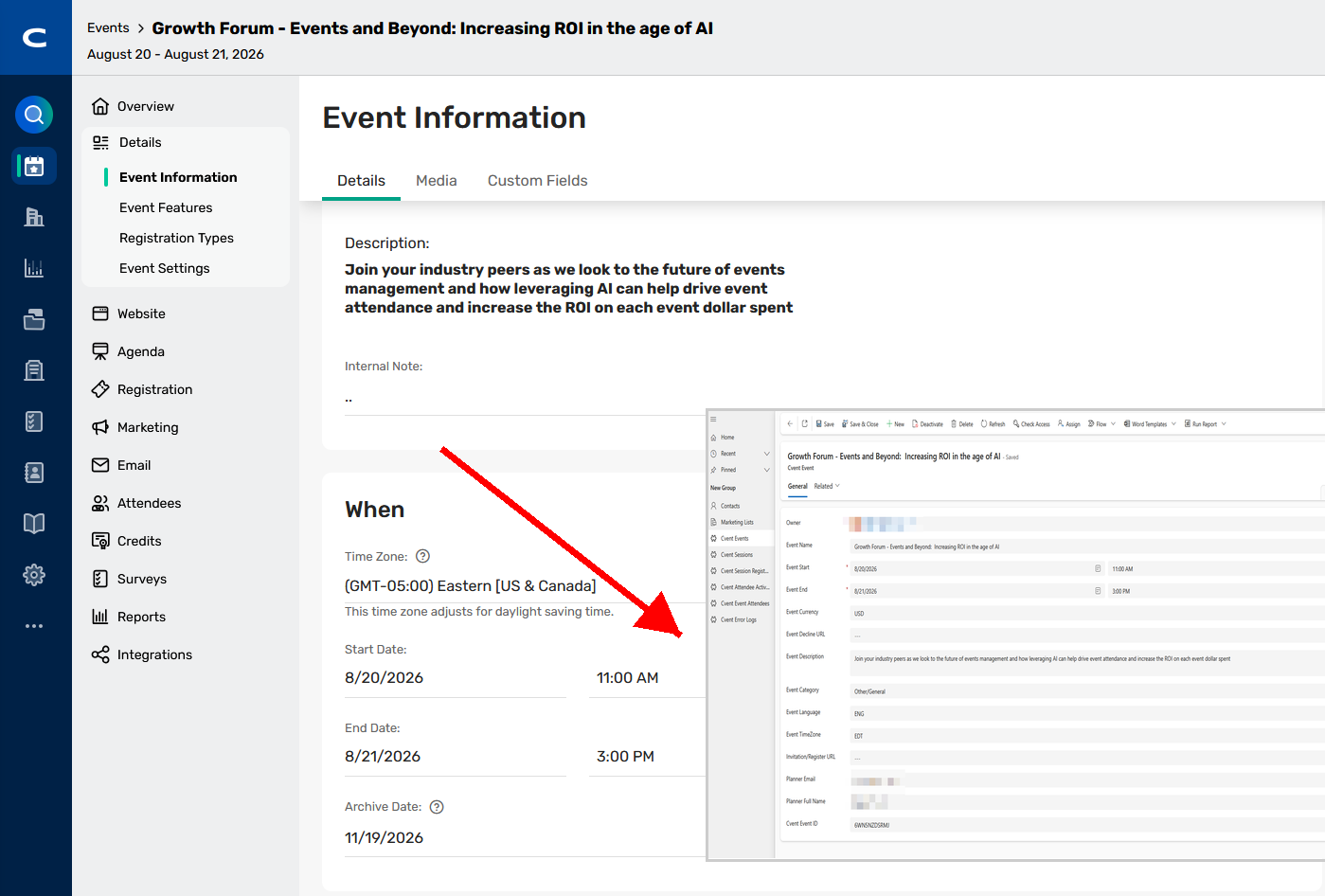
View Cvent Events and Sessions in Microsoft Dynamics 365
Send Microsoft Dynamics 365 Marketing List members as Cvent Event Invitees
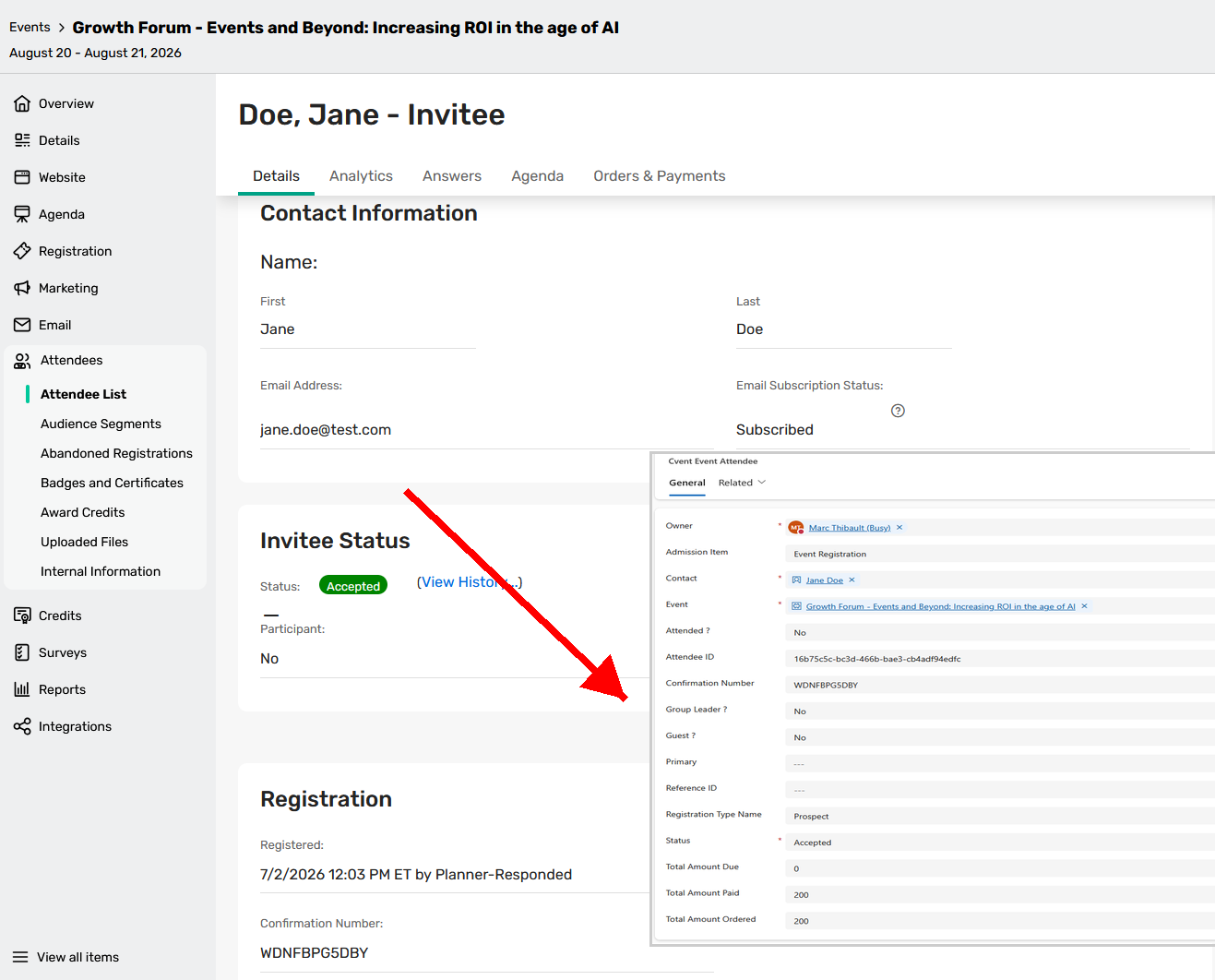
Capture the Cvent Event Attendee journey, including registration status and activity
Track Cvent Session Registrations in Microsoft Dynamics 365
Benefits
Unified visibility into events and attendees across systems to support outreach, communication, and reporting.
Reduced manual effort through automatic synchronization of event, session, and attendee information.
Consistent approach to tracking event and attendee data across mission-critical systems.
Business value
Event attendance is one of the strongest buying and engagement signals a contact can send, yet that signal is often lost when event data resides in a separate system from where sales and marketing teams work. By connecting Cvent with Microsoft Dynamics 365, organizations bring event participation directly into the records their teams already use, turning event activity into measurable business outcomes across the customer lifecycle.
Measure event impact and ROI by linking event and session participation to Contacts and Cvent Event Attendees in Microsoft Dynamics 365, giving leadership a clear view of how the events program contributes to pipeline and revenue.
Accelerate follow-up by getting qualified event attendees to sales teams faster, with registration status, session interest, and activity available directly in the CRM.
Build richer contact profiles by enriching Microsoft Dynamics 365 records with event and session engagement data, enabling more informed conversations and better segmentation.
Deliver more targeted outreach by using Marketing List membership, attendance status, and session-level interest to drive relevant pre- and post-event campaigns from within Microsoft Dynamics 365.
Eliminate manual data entry by automatically synchronizing event, session, and attendee information, reducing duplicate work, improving data accuracy, and ensuring no attendee slips through the cracks.
Align sales and marketing around a single, consistent source of event engagement data, keeping both teams working from the same view of attendee behavior across mission-critical systems.
Implementation information
Prerequisites
Installation of the Cvent Integration PowerApp – this managed package will present your customers Cvent data in the cleanest way possible.
Configuration of proper permissions and visibility to installed custom entities
Microsoft Dynamics 365 API credentials with proper roles and permissions
Review and approval of integration field mappings
How it works
Creates and updates Events in Microsoft Dynamics 365 as Cvent Events are created or updated
Creates and updates Sessions in Microsoft Dynamics 365 as Cvent Sessions are created or updated
Adds Microsoft Dynamics 365 Marketing List members as Cvent Event Invitees
Searches for existing Contacts in Microsoft Dynamics 365 in a hierarchical order by:
Microsoft Dynamics 365 Contact record ID
Email address
Writes Cvent Attendee records with Event details to matched Cvent Event Attendee records in Microsoft Dynamics 365
Maps Cvent Session Registrations with Session details to Cvent Session Registration records
Records Cvent Attendee Activities to the Cvent Attendee Activities custom entity
Displays Total Amount Paid and Total Amount Due for each Attendee on the Cvent Event Attendee record
Basic field mapping is provided, and customers can map custom contact fields in Cvent via the Integration Tile.
When your customer purchases this integration, it will be automatically provisioned. An Integration Hub Project Manager will contact your customer to assist with the Power App deployment in their MS Dynamics 365 tenant
Additional Resources
Cvent Community: Questions about the above updates? As always, get answers in the Community via the Open Forum.
Beta Opportunities Page: Try new features and products out before full launch availability. Join Beta Programs.