- DATE:
- AUTHOR:
- Cvent Product News Team

Attendee Engagement Releases for April 22, 2026
Attendee Hub
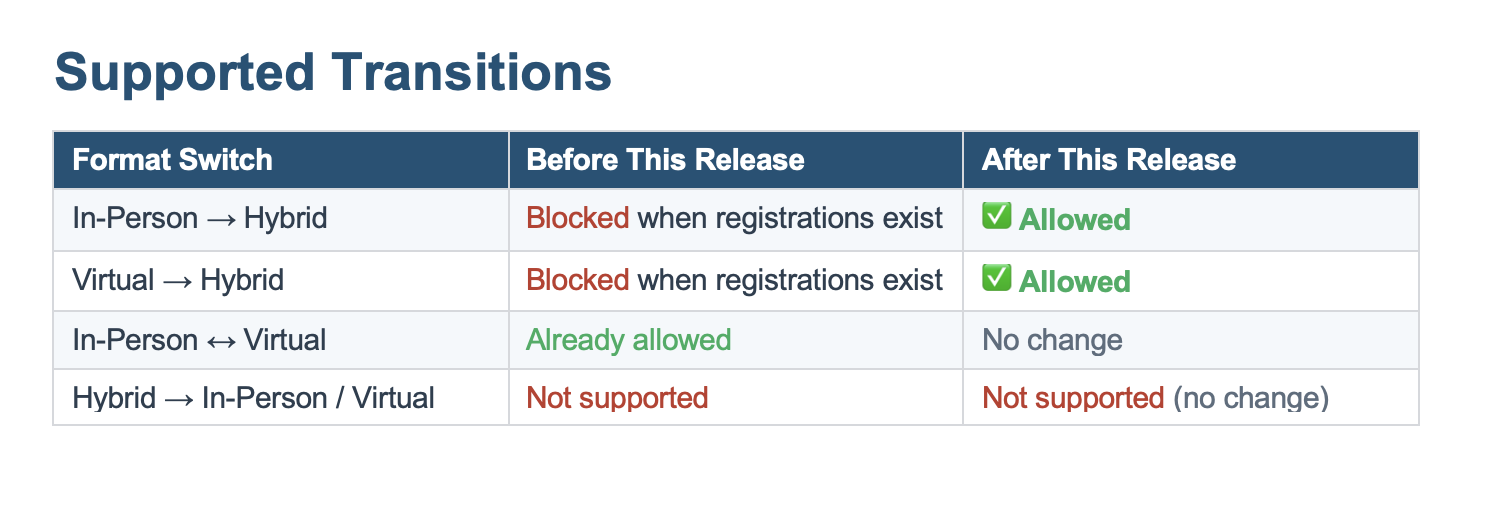
Event Format Switch to Hybrid After Live Registrations
What's Changed: You’ll be able to switch an event’s format from In‑Person or Virtual to Hybrid, even after registrations have already started—without copying the event or re‑importing registrations. Existing registration data, capacities, and reporting remain intact, so you can make the change with confidence.
Benefit: If travel, health guidelines, venue capacity, budgets, or sponsor requests change, you can pivot to a hybrid experience in minutes instead of rebuilding the event from scratch. Attendees keep their confirmations and links, reducing confusion and keeping their experience seamless. This helps you respond quickly to real‑world changes while Cvent manages the complexity behind the scenes.
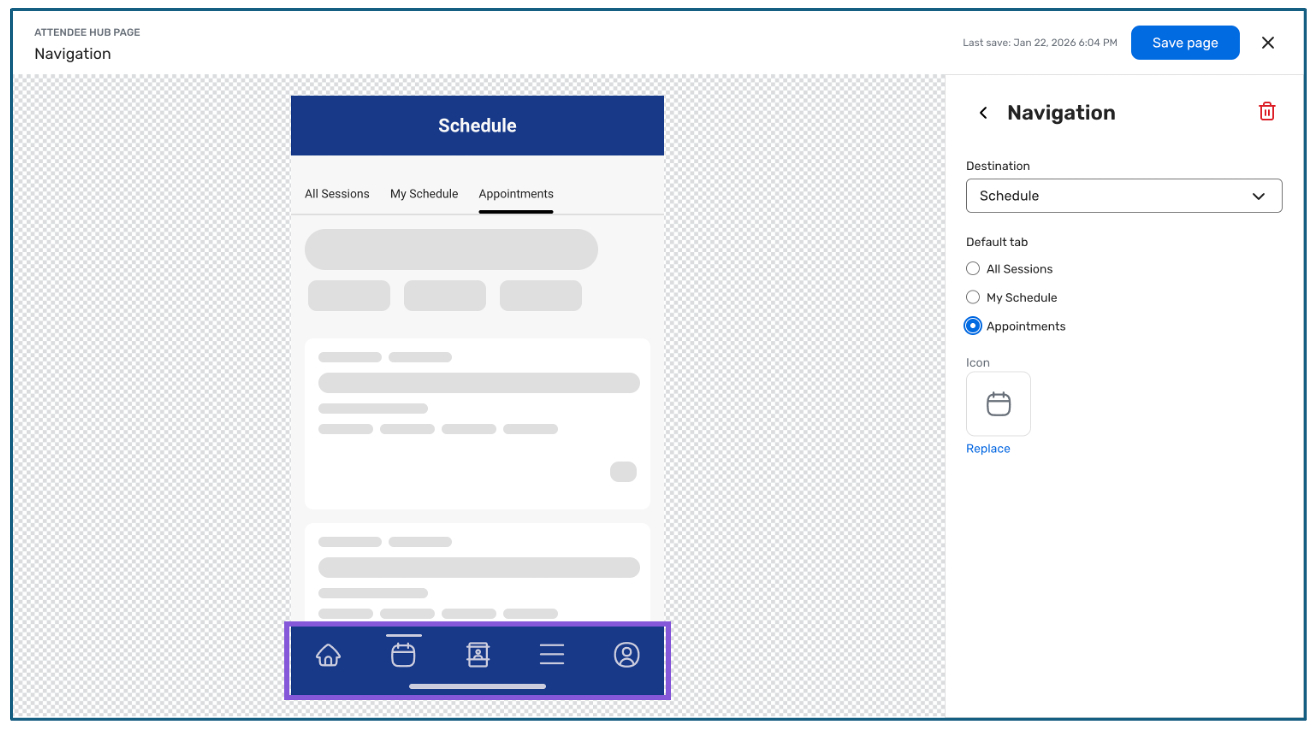
Set Appointments as the Default Schedule Tab in Attendee Hub App
What's Changed: For appointment‑focused events, you can now set Appointments as the default landing tab under Schedule in the Attendee Hub app navigation, for both built‑in Appointments and Appointments Premium. When attendees tap “Schedule”, they’ll go straight to their meetings instead of first seeing sessions or another schedule view. Existing events retain their current behavior unless you update the navigation settings.
Benefit: This gives you tighter control over the attendee journey so the app immediately reflects what matters most at your event—your meetings. Attendees get instant clarity on where they need to be, with fewer taps and less hunting around the app. That focus helps drive higher appointment engagement and keeps the experience feeling simple and intentional.
Attendee Hub Event App Updates
See a summary of the app enhancements rolled out in each release window here.
Remember, Attendee Hub customers - If you have an active event between Wednesday and Sunday after this release date, you will not see these new features until Monday after the release. This is to ensure we are not releasing features into active, ongoing events.
Appointments
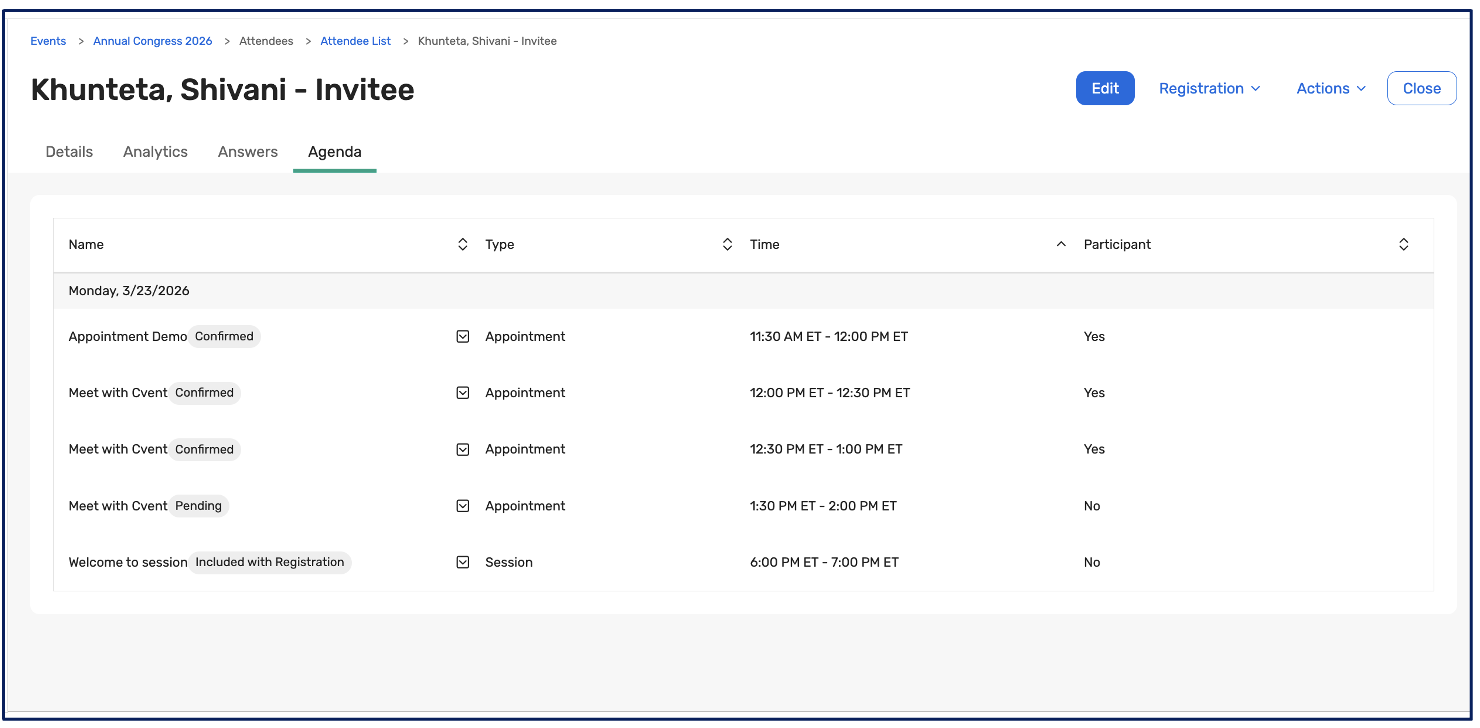
Appointments Now Visible in Invitee Agenda
What's Changed: Planners will now see an attendee’s appointments right alongside their sessions in the Invitee Agenda in Event Management, filtered by date for easy review. Each appointment shows a clear status pill (Confirmed or Pending), while canceled and declined appointments are excluded to keep the view clean. When you print or email an invitee’s agenda, their appointment details are included, so shared schedules tell the full story.
Benefit: You get a single place to understand an attendee’s true event experience—sessions and meetings—without jumping between multiple screens or tools. That makes it easier to spot conflicts, back‑to‑back commitments, or gaps in the day, and to quickly see where appointments are still pending. For programs that rely heavily on appointments, this closes a key visibility gap and turns the Invitee Agenda into a more powerful planning and support tool.
OnArrival
Removing iOS 17 & Socket Mobile Support
What's Changed: The OnArrival iOS app will support iOS 18 and newer operating systems only, and iOS users will need to be on App version 4.16 or higher. OnArrival will continue to support the current iOS version and one version prior to help deliver faster, safer, and more reliable performance when managing your event.
Benefit: Our systems indicate low usage of this feature. To simplify our supported hardware stack and pass these cost savings back to our customers. If you rely on Socket Mobile today and need help planning an alternative, please contact your Cvent account team or Customer Support.
Additional Resources
Cvent Community: Do you have questions about the updates we've rolled out this window? As always, get questions answered in the Community via the Open Forum.
Beta Opportunities Page: Help us make Cvent Products better by being the first to test products before they're widely available. Join Beta Programs.
UX Research Panel: Be part of a select group of users who will help guide the future of Cvent's products. Join the UX Panel.