- DATE:
- AUTHOR:
- Cvent Product News Team

Attendee Engagement Releases for January 14, 2026
Attendee Hub
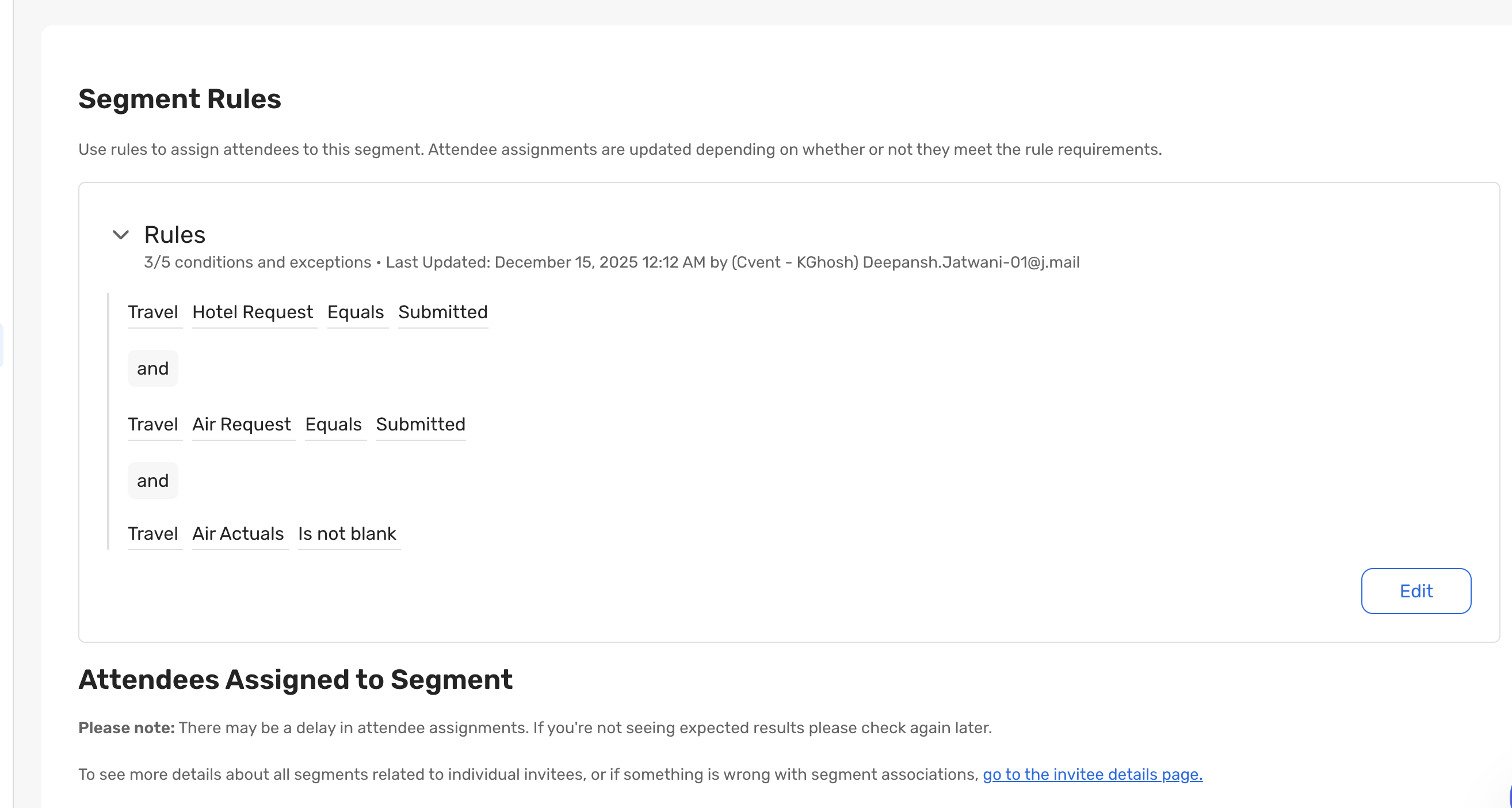
Dynamic Segments: Hotel & Air Travel Data Support
What's Changed: Create Dynamic Segments using attendee travel information, making it easier to coordinate hotels and flights without manual tracking or spreadsheets.
Benefit: Enjoy real-time visibility into travel readiness and communicate more effectively—without manual tracking or last-minute scrambling. Dynamic Segments now provides smoother arrivals, fewer errors, and a seamless experience for you and your attendees.
Attendee Hub Event App Updates
View a summary of the app enhancements rolled out in each release window here.
Remember, Attendee Hub customers - If you have an active event between Wednesday and Sunday after this release date, you will not see these new features until Monday after the release. This is to ensure that we do not release features into active, ongoing events.
Appointments
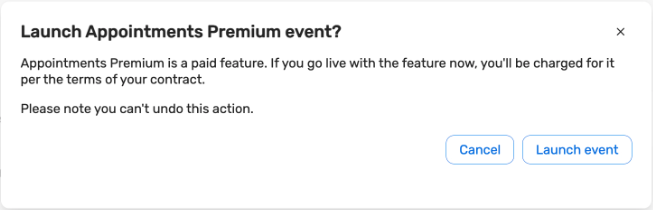
Updated Launch Confirmation
What's Changed: When an appointment premium event moves from Pending to Active, you will now see a confirmation that increases transparency and aligns with the experience of the OnArrival Premium and Attendee Hub "Go Live" flows.
Benefit: Enjoy a more consistent launch experience, ensuring you have full visibility into the implications of launch and make informed decisions with confidence.
OnArrival
New Badge Designer Availability for OnArrival Basic Customers
The new OnArrival Badge Designer will soon be available to OnArrival Basic customers. This enhanced tool empowers planners to create and customize professional event badges with a modern, visually updated, and feature-rich design experience.
The new Badge Designer features an updated interface with additional visual elements, including shapes, advanced rulers, alignment tools, and expanded options for text and object styling.
Advanced customization allows planners to specify which fields and images are printed on each badge. Conditional logic can be applied based on registration, contact, internal information fields, and other criteria.
Users can generate print-ready PDF badges in advance, making it simple to prepare for events and streamline onsite check-in processes.
The Badge Designer is fully integrated into the Event Management workflow, allowing planners to preview and print a badge for a single attendee while designing, or print pre-assigned badges in bulk from the Attendee List.
Note: On-demand badge printing from the OnArrival app is not supported for OnArrival Basic customers.
PDF Printed Badges in the OnArrival Badge Designer
Event planners can now export badges created in the OnArrival Badge Designer as PDFs, enabling printing on any printer. This new feature supports both bulk and individual printing with preset or custom templates—streamlining the process from design to print and reducing reliance on specialized hardware.
Planners can generate badges directly from the attendee record, during badge preview, or in bulk from the attendee list. With the new "Download badge[s]" option, available in all OnArrival Premium events using the OnArrival Badge Designer, badges can be exported for primary badge printing, backup printing, stakeholder proofs, or testing—giving planners more flexibility and control over their badge workflows.
Webinar and Essentials
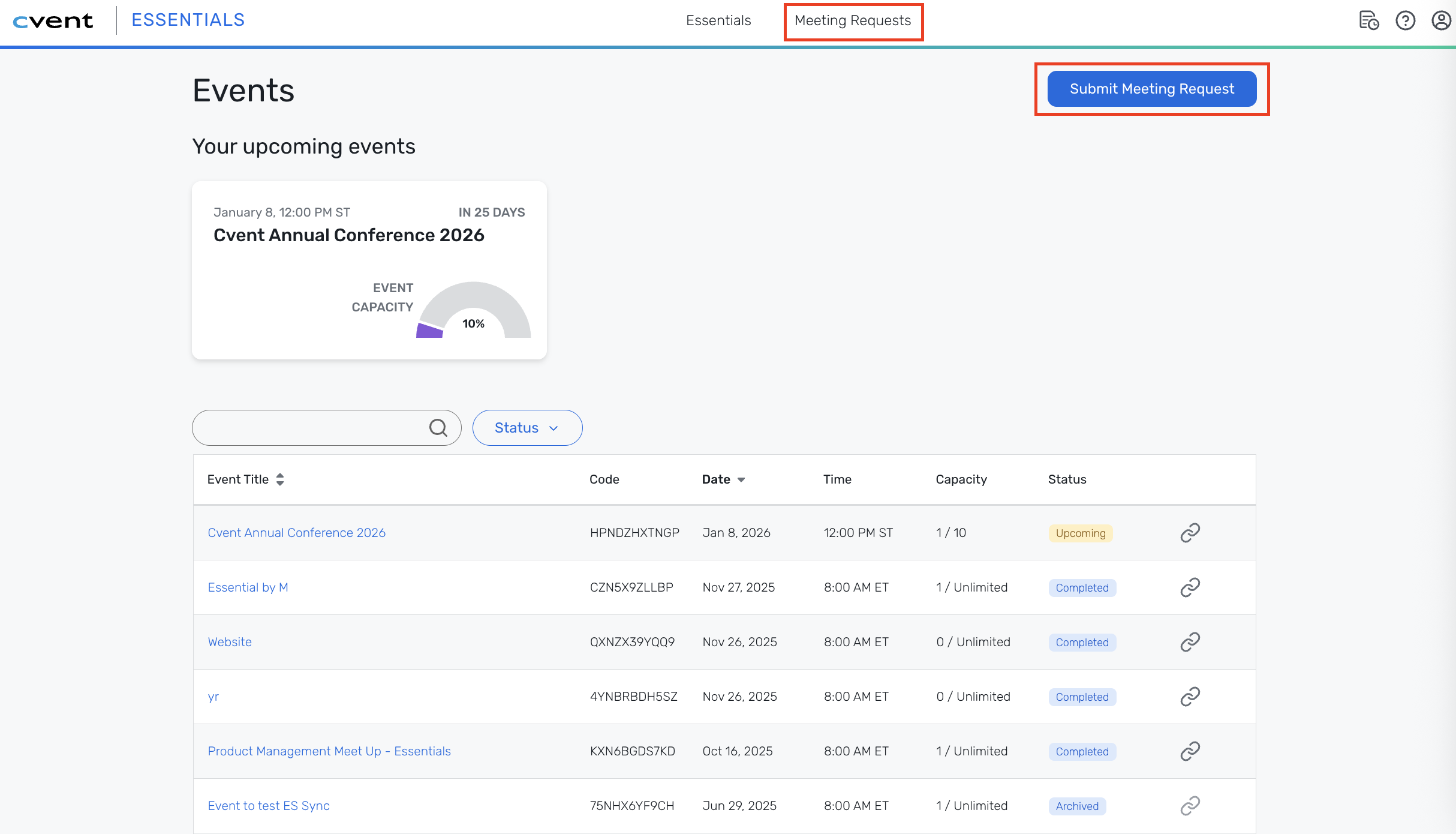
Create Events through Meeting Request Form
What’s changed: Webinar and Essentials users can now initiate the event creation process through the Meeting Request Form, eliminating the need for manual event setup by starting everything with a simple, policy-aligned request. This allows admins to maintain control, ensuring that every event follows organizational rules and is linked back to its original request for full traceability from start to finish.
Benefit:
Save time: Events are auto-created based on the request details, so planners and admins spend less time on manual work.
Stay compliant: Every event begins with your organization’s policies built in.
See the full picture: Track requests and events together for better reporting and peace of mind
Additional Resources
Cvent Community: Do you have any questions about the updates we've rolled out this window? As always, get questions answered in the Community via the Open Forum.
Beta Program Opportunities: Help us make Cvent Products better by being the first to test products before they're widely available. Join Beta Programs.
Q4 Quarterly Product News Webinar: If you missed our Q4 Product News Update webinar, catch up on all things product via the recording. Watch On-Demand Here.