- DATE:
- AUTHOR:
- Cvent Product News Team

Attendee Engagement Releases for June 3, 2026
Attendee Hub
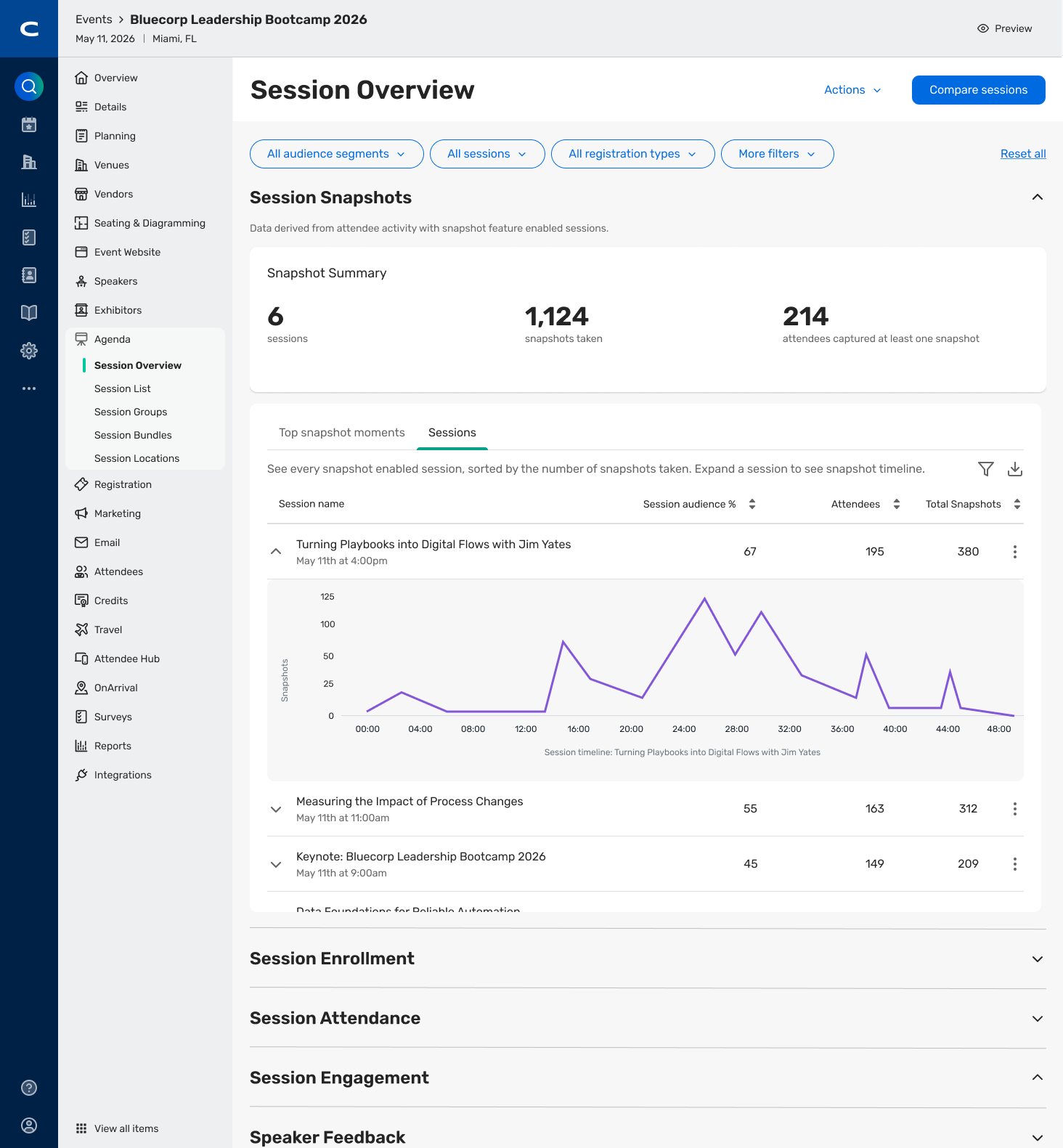
Session Snapshots Insights
What's Changed: Session Snapshots Insights gives planners and marketers a clearer view into the moments that resonated most with attendees. The new insights experience highlights top snapshot moments across the event, snapshot usage by session, and a timeline view that shows how snapshots were used throughout each session.
Benefit: his makes it easier to understand which content connected most strongly with attendees and where engagement was highest. That added visibility can help teams measure content impact more clearly and make smarter decisions for future events.
'My updates' Modernization in Event App
What's Changed: Attendee Hub is updating the My updates experience in the Event App to feel more familiar and easier to use. Attendees can swipe to view or dismiss alerts and bulk dismiss notification categories, replacing the older button-based flow with a cleaner, more modern experience.
Benefit: Attendees can review important updates faster and manage notifications with less effort. The result is a smoother in-event experience that feels more intuitive from the start and helps attendees take action more quickly.
Attendee Hub Event App Updates
See a summary of the app enhancements that have been rolled out in each release window here.
Remember, Attendee Hub customers - If you have an active event between Wednesday and Sunday after this release date, you will not see these new features until Monday after the release. This is to ensure we are not releasing features into active, ongoing events.
Essentials and Webinar
Registration Question Tags
Tag registration questions in Essentials and Webinar for cleaner data, easier reporting, and smoother integrations.
What's Changed:
Organizers can now tag individual registration questions in Cvent Essentials and Webinar.
Teams can create new question tags for each event or use tags from the Question Tags Library.
Tagged questions support cleaner cross-event reporting across the Cvent product suite.
This release helps close the data gap between Essentials and Webinar, making the experience more seamless across platforms.
It also reduces the need to export and manually reconcile registrant reports for each event.
Benefit: If your team runs multiple events, this update makes it much easier to keep registration data consistent from one event to the next. That means cleaner reporting, easier syncing with integrated systems, faster lead follow-up, and a clearer view of program ROI across your events.
Essentials
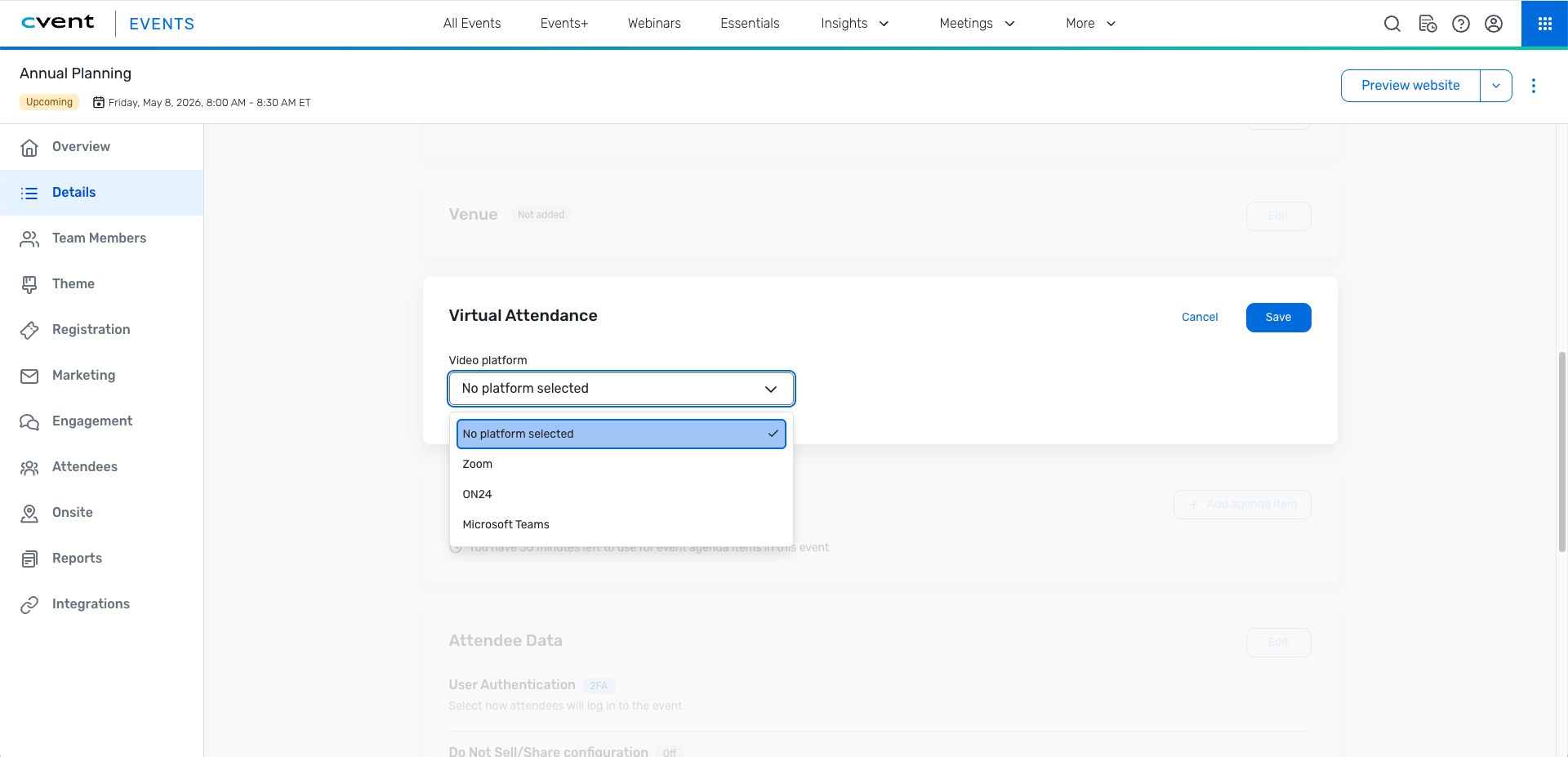
Virtual Attendance
Add virtual attendance to any Essentials event with automated join links and unified attendance tracking.
What's Changed:
Organizers can now add a virtual component to any Cvent Essentials event using Zoom, ON24, or Microsoft Teams.
Registrations, communications, and attendance data are managed in one place instead of across separate systems.
Attendees and team members automatically receive personalized join links in confirmation emails, reminder emails, and calendar invites.
After the event, reporting includes a new Joined Virtually field, and organizers can also view each attendee’s personalized URL and password in the Registrant report.
This release is built for teams running field events, hybrid meetings, and marketing programs that want to add a virtual experience without adding more manual work.
Benefit: Virtual Attendance makes it easier to run hybrid events from one place instead of stitching together separate tools. That means less manual setup, smoother attendee communications, and clearer visibility into who actually joined online after the event. Join links are generated automatically within up to 15 minutes, helping teams move faster while cutting down on admin work.
Additional Resources
Cvent Community: Do you have questions about the updates we've rolled out this window? As always, get questions answered in the Community via the Open Forum.
Beta Opportunities Page: Help us make Cvent Products better by being the first to test products before they're widely available. Join Beta Programs.
UX Research Panel: Be part of a select group of users who will help guide the future of Cvent's products. Join the UX Panel.