- DATE:
- AUTHOR:
- Cvent Product News Team

Attendee Engagement Releases for September 2, 2026
Products covered under Attendee Engagement are Attendee Hub, Events+, Appointments, OnArrival, LeadCapture, Webinar and Essentials.
Attendee Hub
Attendee Assistant and Event Knowledge Base (Open Beta)
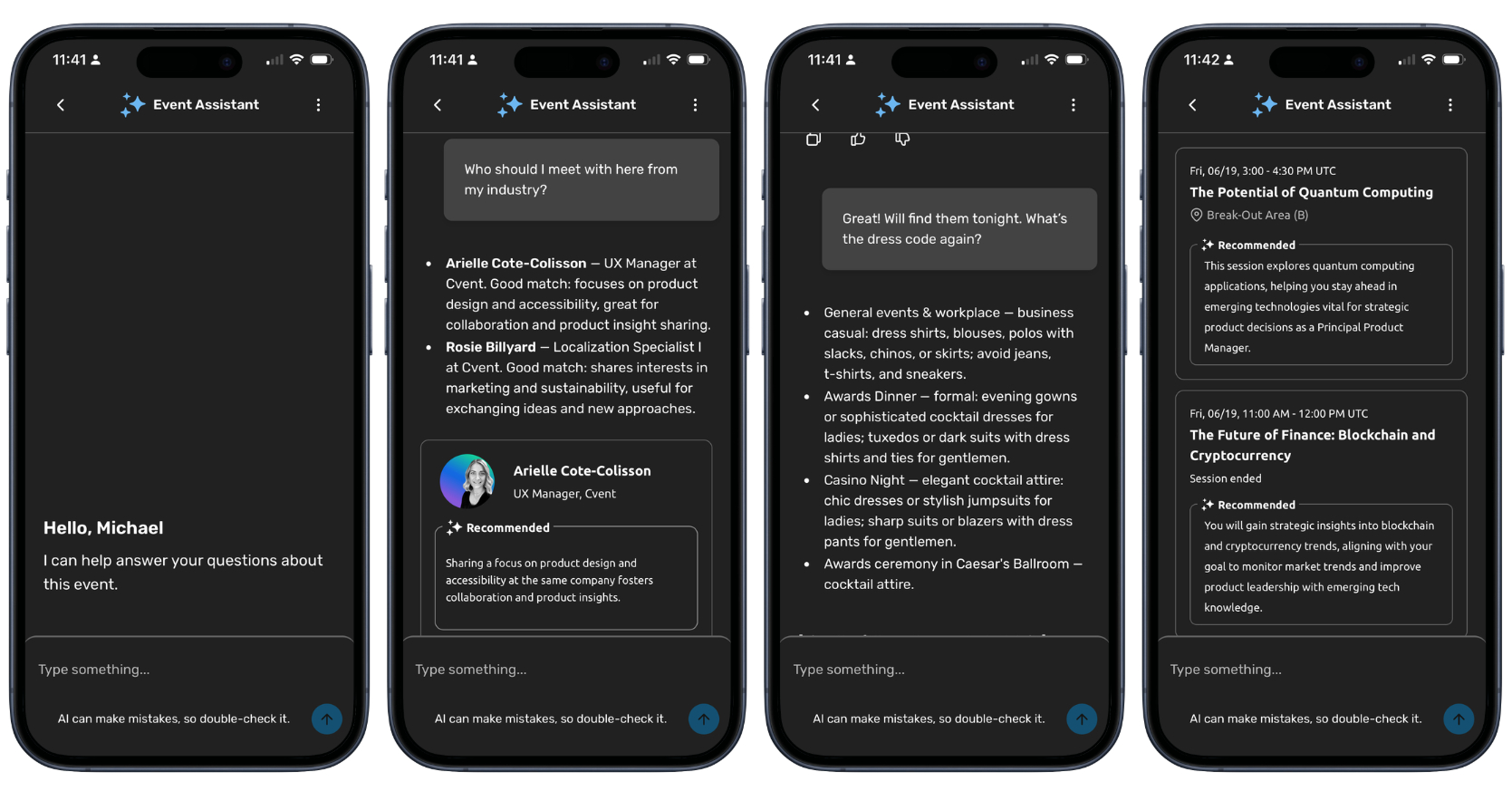
What's Changed: An all-new AI-powered companion built directly into the Attendee Hub Event App that gives every attendee a personalized, knowledgeable guide to your event. This assistant provides attendees with clear answers, helpful links, and the right details, tailored to them.
The assistant is paired with the Event Knowledge Base, a companion feature that lets you upload event-specific content that might traditionally live outside Cvent's ecosystem — such as venue guides, travel policies, organizational glossaries, and more. Once uploaded, FAQs are automatically generated and can be easily reviewed by you prior to publishing the content.
Benefit: You can help attendees find event information, sessions, speakers, exhibitors, and connections when they need it. The AI assistant respects your existing content-visibility rules and attendee privacy settings, so people see only the information they are permitted to access. This ensures attendees have answers to all their event questions at their fingertips, and you can rest easy knowing your AI assistant is providing accurate information tailored to each and every attendee.
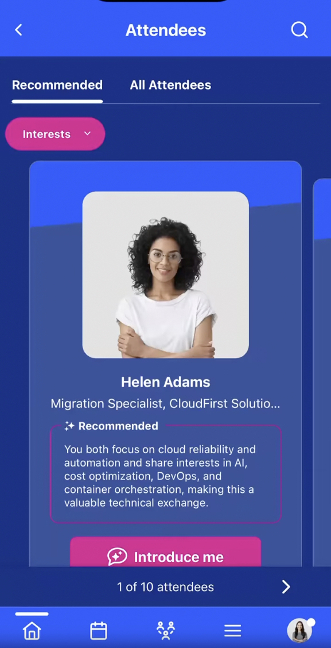
Warm Introductions
What's Changed: You’ll be able to help attendees turn recommendations into real conversations with Warm Introductions. When an attendee taps “Introduce me,” Event Assistant uses the shared interests or goals behind the match to draft a personalized introduction, shows the exact message for approval, and, once confirmed, starts a shared conversation thread between both attendees.
Benefit: Your attendees get a lower-friction way to connect without cold outreach or hesitation, while you create a more personal and differentiated networking experience. This feature will honor existing profile visibility settings, limits each attendee to 10 introductions, and requires no separate planner setup when Network Builder and Messaging are already in use.
Train Details in Attendee Hub Event App
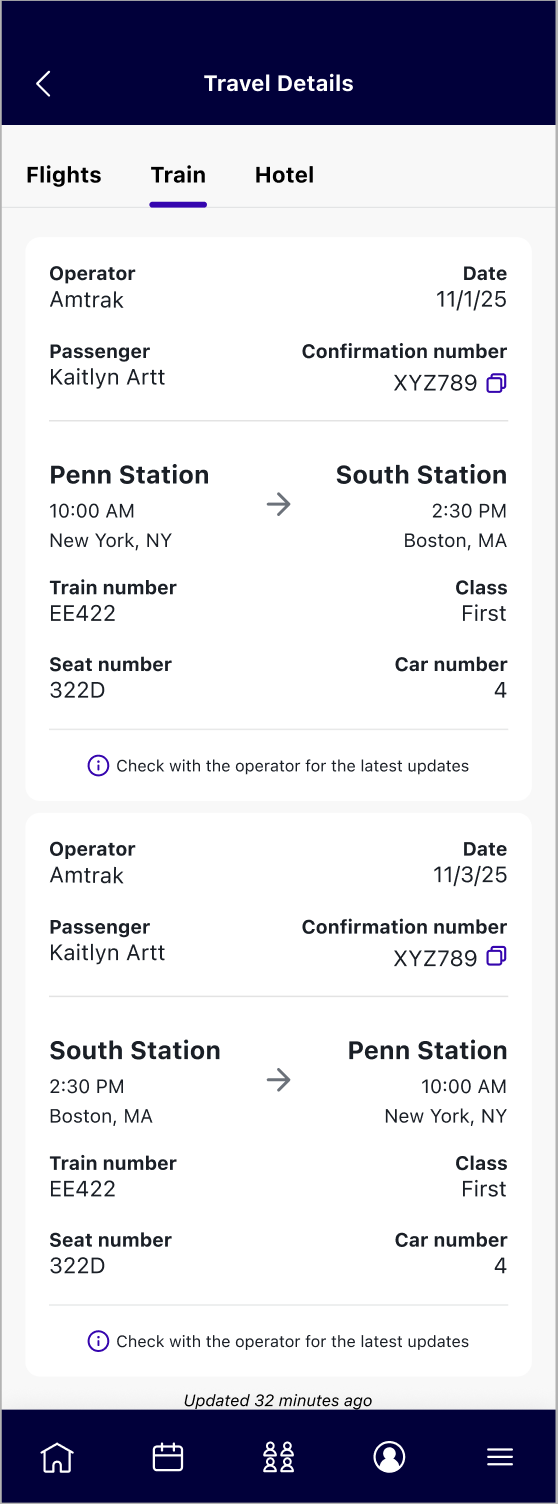
What's Changed: You’ll be able to give attendees a clearer view of their event travel. When you enable Train Details in Attendee Hub Builder and import confirmed train bookings, eligible attendees can view their train operator, schedule, station, seat, confirmation number, and other available booking information in a new Train tab within the Attendee Hub Event App
Benefit: Your attendees can find their confirmed train, flight, and hotel details in the same place instead of searching through emails or contacting your team. That means a more organized travel experience for attendees and fewer last-minute travel questions for you.
Tag Translations
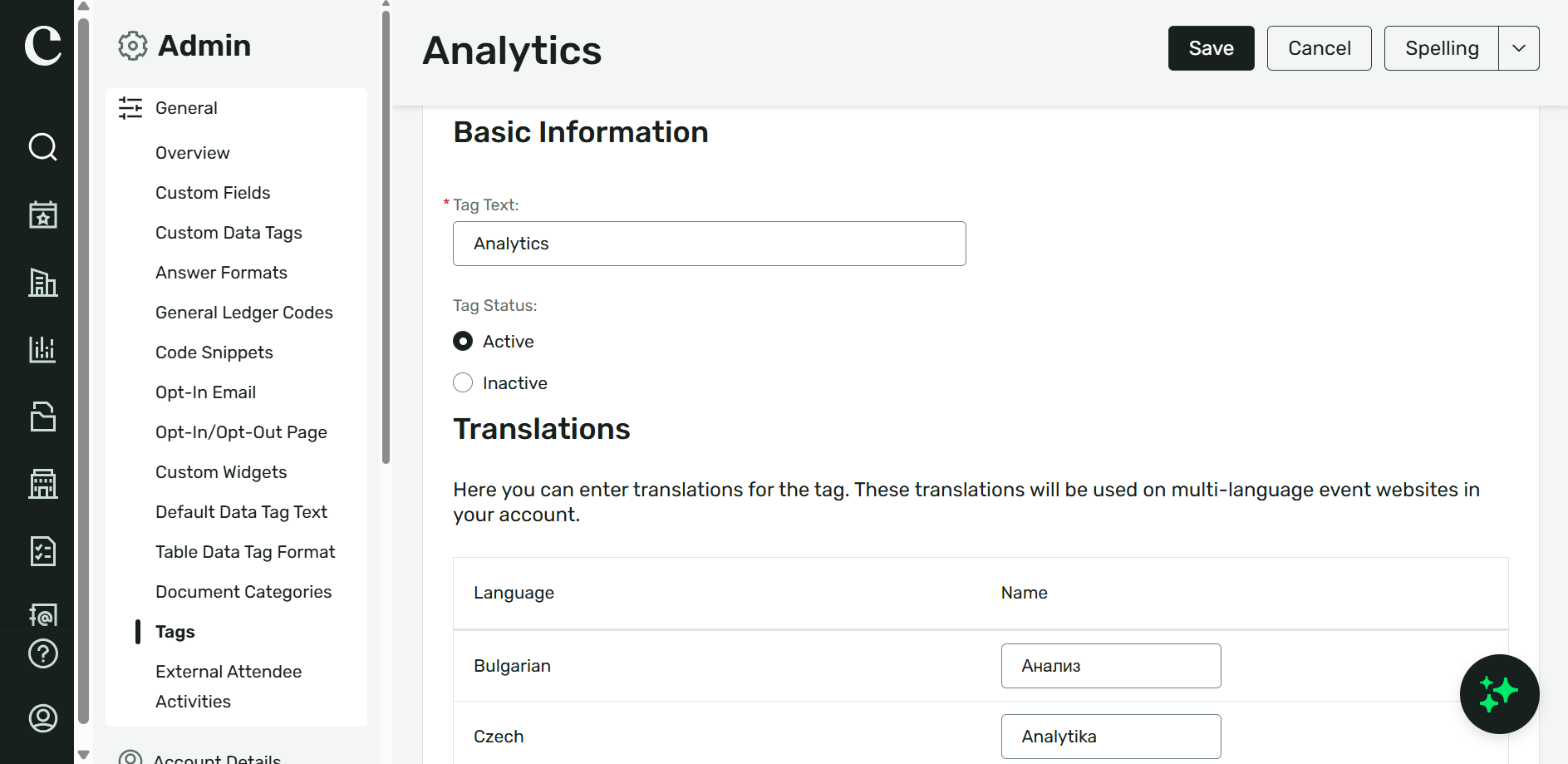
What's Changed: You’ll be able to translate tags for sessions, speakers, and attendee interests in the Admin area. Those translations will appear in Attendee Hub Web and the Event App based on each attendee’s language preference, and attendees can select translated interest tags for recommendations in Agenda Builder and Network Builder.
Benefit: You can make content and networking easier to navigate for multilingual attendees. By helping attendees understand and select the interests that matter to them, you can support more relevant session and connection recommendations.
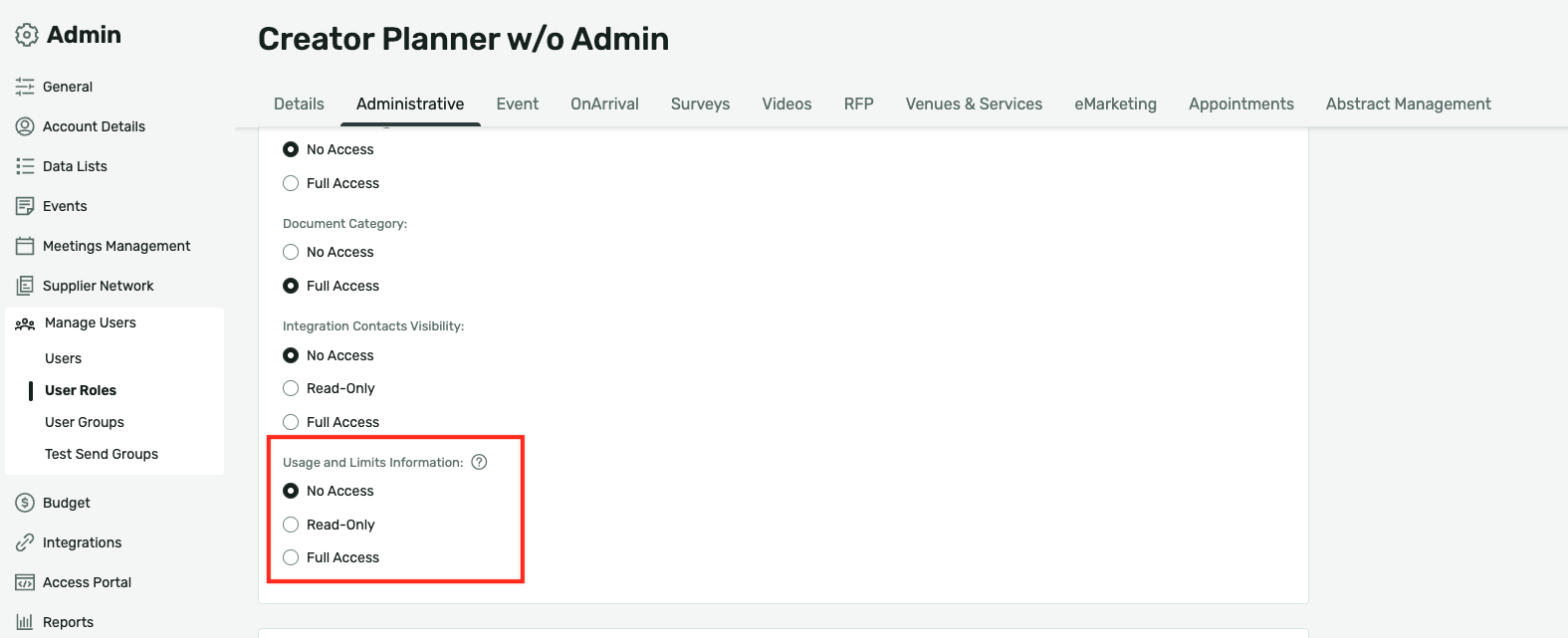
New user Role for Contract and Usage Visibility
What's Changed: You’ll have a new Usage and Limits Information permission in user role management. Administrators can assign No Access, Read-Only, or Full Access to control who can view contract and usage information across the product.
Benefit: You can give the right people visibility into contract and usage information while keeping that data appropriately governed. Clear role-based access helps you prepare for future areas of the product where this permission will manage visibility.
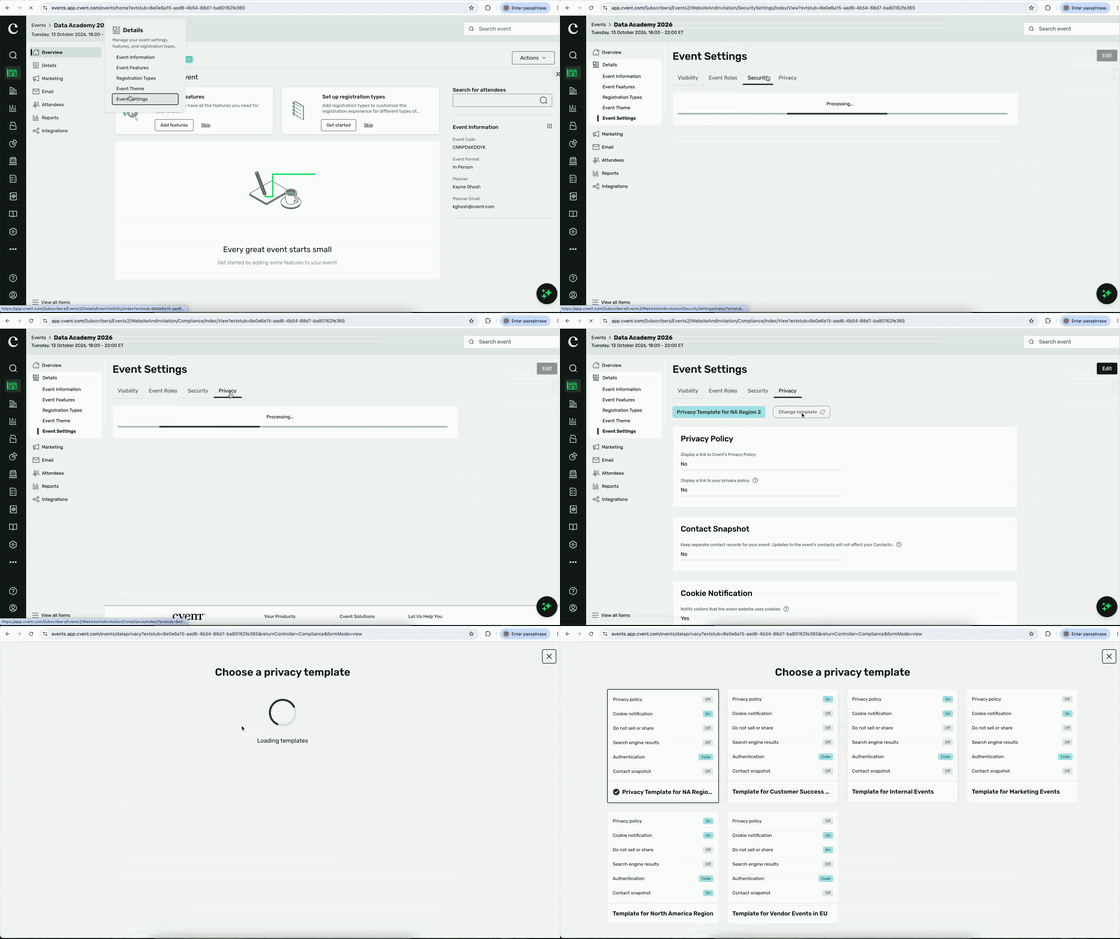
Data Privacy Templates: Standard Events
What's Changed: You’ll be able to create Data Privacy Templates that apply approved privacy and security settings to eligible Standard Events automatically. When you update a template, its changes will carry over to associated events, while template-controlled fields remain locked unless an authorized administrator overrides them.
Benefit: You can start events with the right privacy configuration already in place instead of rebuilding the same settings each time. That helps you standardize privacy practices, reduce manual setup, and keep active events aligned when policies change.
Attendee Hub Event App Updates
See a summary of the app enhancements that have been rolled out in each release window here.
Remember, Attendee Hub customers - If you have an active event between Wednesday and Sunday after this release date, you will not see these new features until Monday after the release. This is to ensure we are not releasing features into active, ongoing events.
Essentials and Webinar
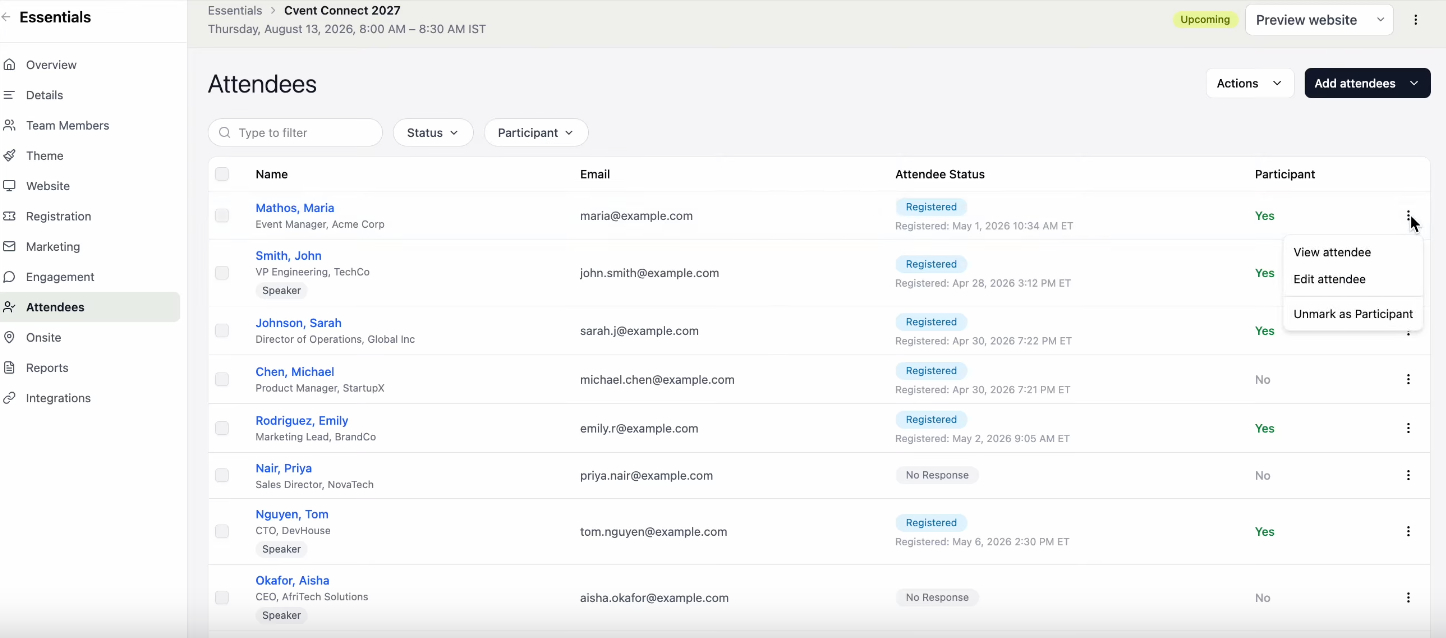
Manual Participation Tracking in Attendee List
Mark, correct, and audit attendee participation directly from the Attendee List.
What's Changed:
Organizers using Cvent Essentials and Cvent Webinars will be able to mark registered attendees as participants directly in the Attendee List—one at a time or in bulk.
A new Participant column will show a clear Yes or No status for every registered attendee.
Combined attendee-status and participation-status filters will make it easier to find the exact group you need.
Every manual update will capture the date, time, and user who made the change. This history is visible in the attendee record and can be exported in the Participation Report.
Bulk actions will help prevent mistakes: if you select attendees with different participation statuses, the update option is disabled until the selection is corrected.
Benefit: Attendance records are not always final the moment an event ends. With Manual Participation Tracking, you can quickly correct or confirm participation from the planner backend—without relying solely on check-in activity or webinar join data. Get a more complete view of who participated, make updates efficiently at any point before the event is archived, and maintain a clear record of every change.
Pre-Fill Registration Form
Speed up registration by automatically adding known invitee details right into the form.
What's Changed:
Registration forms for Webinar and Essentials events will pre-fill for invitees whose contact information is stored in the Address Book.
Invitees can review and edit their pre-filled information before they register.
No additional setup is needed to use this feature.
Pre-fill only works when the invitee’s information is already populated in the Address Book.
Benefit: Less typing makes it easier for invitees to complete registration. By removing manual entry for known contacts, you can create a smoother registration experience while still giving invitees control to update their details.
An attendee spot is not reserved until the invitee completes and submits the registration form.
Event Approval
Keep Essentials and Webinar events on-brand, compliant, and approved before they go live.
What's Changed:
Administrators can create approval rules for Essentials and Webinar events based on event category and custom fields, then assign the right approvers.
Set up to 10 approval rules, each with up to five conditions and AND/OR logic.
Event organizers can submit events for review, add comments, and track approval status in real time.
Events that require approval can’t be published, open registration, or have attendees added or imported until they’re approved.
Approvers receive email notifications with direct links to review submissions, approve or deny events, and share feedback. Organizers can revise and resubmit denied events.
Once approved, the event automatically goes live and the relevant event capabilities become available.
Copied events go through a fresh approval process when they meet configured approval rules.
Benefit: Stop chasing approvals across inboxes, spreadsheets, and side conversations. Event Approval brings the review process into Cvent, giving central teams control while enabling distributed organizers to keep creating events confidently.
With a clear checkpoint before an event goes public, you can help ensure branding, content, and required disclaimers meet your organization’s standards—without slowing down the people building the event.
Role-Aware Event Website Preview
See your event website’s true state—by role—before attendees do.
What's Changed:
Admins and Organizers now get role-aware website previews for events using the new website design experience.
Quickly see which Event Information widgets are on your site and whether they’re Visible (complete and shown to attendees) or Hidden (empty and not yet shown).
Organizers see the unlocked widgets they can edit, while Admins see the full list—including locked and non-content widgets.
This update applies automatically to new and existing events. No action is required.
Benefit: A clearer preview makes it easier to catch missing event details before your site goes live. Admins have the full picture, while Organizers can focus on the content they own—helping teams reduce guesswork, avoid unnecessary handoffs, and publish with confidence.
Essentials
New user Role for Contract and Usage Visibility
Control access to contract and usage information with a new, role-based permission.
What's Changed:
Administrators can set access for each user role from the Administrative tab.
Choose the right level of visibility: No Access, Read-Only, or Full Access.
Administrators receive Full Access by default. Non-admin custom roles receive No Access by default.
Configure permissions now, ahead of future releases that will use this setting to control access to contract and usage information across Cvent.
Benefit: Put sensitive contract and consumption information in the right hands—without managing access person by person. Set a single role-based permission and apply consistent visibility across the platform wherever usage and limits information appears.
OnArrival
New SSO Login Method for OnArrival | Android
We will introduce a new SSO login method for OnArrival that uses Organization ID. This method already exists for app.cvent.com/Cvent Event Management and the OnArrival iOS login, and support is now being added for OnArrival Android users.
If a user currently uses SSO to log in to OnArrival on an Android device, the login process will change slightly. After clicking "Log in with SSO", users must select "Domain name" before entering their credentials.
However, if a user already uses Organization ID to log in to app.cvent.com/Cvent Event Management, they will now be able to log in to OnArrival on Android devices the same way. They would simply select "Organization ID" after clicking "Log in with SSO" and then enter their credentials.
This update will streamline the login process across all Cvent platforms, delivering a consistent experience for our users.
This feature already exists on OnArrival iOS
Additional Resources
Cvent Community: Questions about the above updates? As always, get answers in the Community via the Open Forum.
Beta Opportunities Page: Try new features and products out before full launch availability. Join Beta Programs.