- DATE:
- AUTHOR:
- Cvent Product News Team

Exchange Solutions Releases for February 25, 2026
Passkey
Launch Multi-Room Booking Directly from Passkey
Overview:
You can now launch the Multi-Room Booking (MRB) tool directly from the Passkey manage site, so you no longer have to click through additional portals to manage bulk reservations.
When you open an event in Passkey, you’ll now see a “Manage Bulk Reservations” link in the left navigation, and you can also access MRB from the Frequent Tasks section on the Event Overview page. From there, you can quickly create, modify, or cancel multiple reservations at once within your event.
Previously, you had to go into the Planner Portal to use MRB, which added extra steps to a task you do all the time. With this update, you can:
Save time by jumping straight into MRB from where you already manage your events
Reduce clicks and unnecessary navigation
Work more efficiently when handling high volumes of reservations
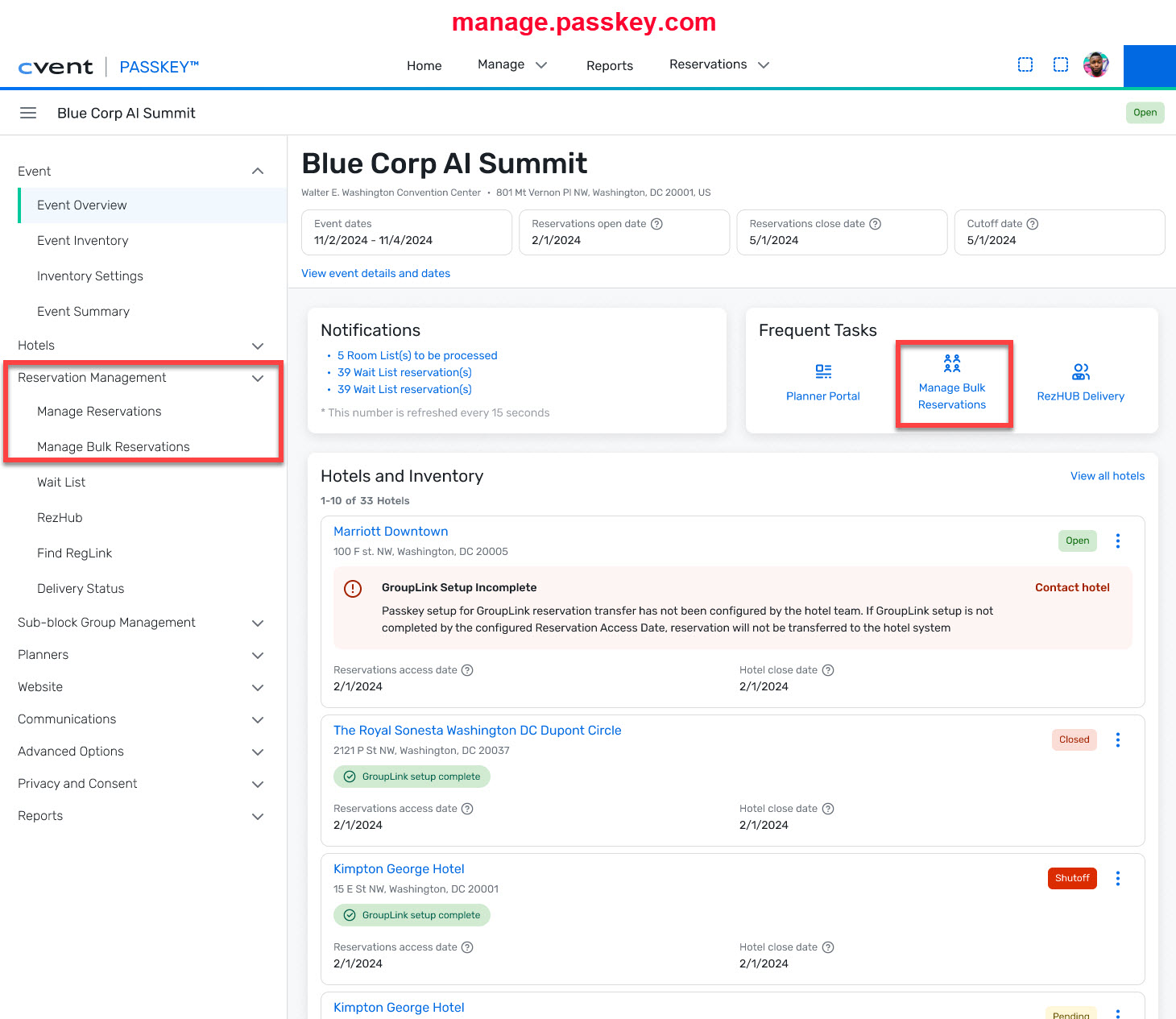
When you open the Multi-Room Booking tool, it will launch in a separate browser tab so you can easily toggle back to your event.
To support this change, the “Find” link in the event's left navigation has been renamed to “Manage Reservations.” The functionality of this link has not changed—you can still use it to find reservations just as you did before.
This enhancement is part of our ongoing effort to make Passkey work the way you do—so you can get through daily tasks faster and focus on delivering great events.
Access the Multi-Room Booking tool directly from Passkey Manage at manage.passkey.com.
Changes to event room type creation in Passkey
Overview:
You’ll soon see a change to how room types are created for certain hotels in Passkey.
Licensed and GroupLink-enabled (integrated) hotels have told us they prefer that you do not create custom, event-level room types for their properties. Custom room types can create confusion for hotel teams executing the event and add extra work to correctly map those event-level types to the hotel’s physical room types.
At the same time, we know you rely on Passkey to represent rooms in a way that best supports your event goals. Now that Room Categories are available to all customers, we can give hotels the control they need while still preserving the flexibility you expect in Passkey.
With this release, you will no longer be able to create custom room types for Integrated/Licensed Passkey hotels.
How it will work
For Licensed and GroupLink-enabled (integrated) hotels on city-wide events:
You will no longer see the “New Room” option during block setup.
Instead, you will select from room types in the hotel’s Room Type Library.
The “New Room” (custom room) option will still be available when:
You’re an organizer at a sister property, creating blocks, or
You’re working with one or more non-licensed or non-integrated hotels.
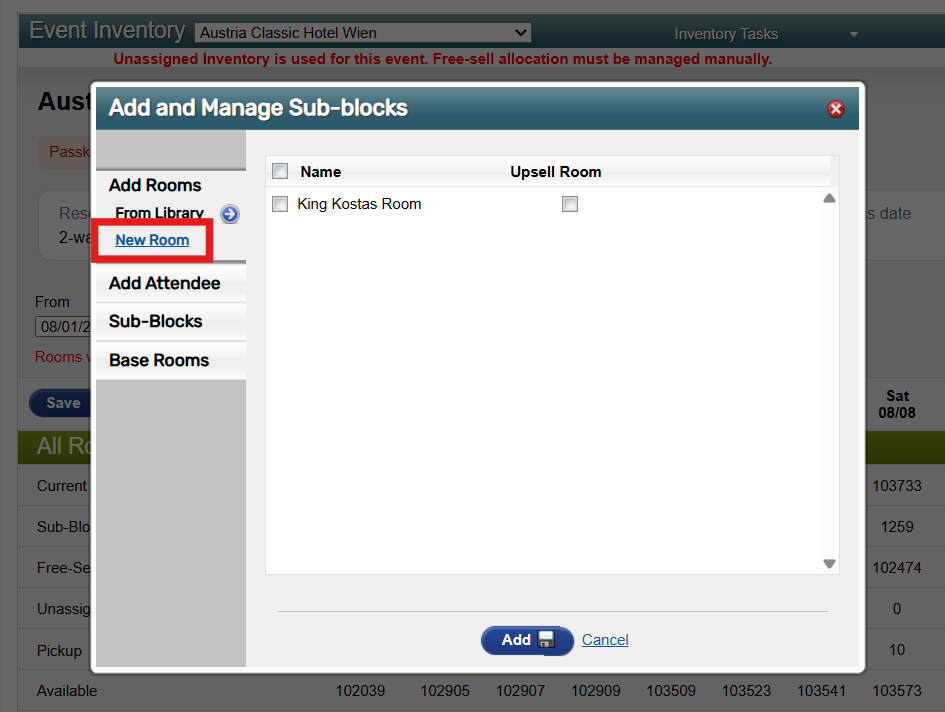
If you want to adjust how rooms appear on the attendee booking website, you should use the new Room Categories feature instead of creating custom, event-level room types. Room Categories allow you to:
Group one or more room types into a single category
Control the sell order when multiple room types are configured within a category
Update the display name and description for the category shown to attendees
This gives you flexibility in how rooms are presented to attendees, without creating event-only room types.
What’s next?
We’re continuing to enhance the Room Categories experience. Upcoming improvements will include the ability to manage and upload custom images at the Category level, so selling by Room Categories can be even more customizable and visually compelling for organizers and planners.
This change helps hotel teams execute more accurately while you continue to configure your events to achieve your objectives—now with Room Categories as your primary tool for customization.
Date Change
RezHUB Room List Download Simplification will now be released on February 25(original release link here).
Additional Resources
Cvent Community: Do you have questions about the updates we've rolled out this window? As always, get questions answered in the Community via the Open Forum.
Beta Opportunities Page: Help us make Cvent Products better by being the first to test products before they're widely available. Join Beta Programs.
Quarterly Product News Webinar: Register now for our upcoming Q1 2026 Product News webinar planned for March 4. Secure your Spot.