- DATE:
- AUTHOR:
- Cvent Product News Team

Exchange Solutions Releases For January 28, 2025
Cvent Passkey
Planner Portal Update - Share Event Summaries with External Stakeholders
You can now share or download summaries of your closed events directly from the new Passkey Planner Portal—making it easy to keep stakeholders informed, even if they don’t have Planner Portal access.
This update modernizes the former Event Certificate feature from the previous Planner Portal experience, giving you a more flexible and shareable way to communicate event performance.
What’s New:
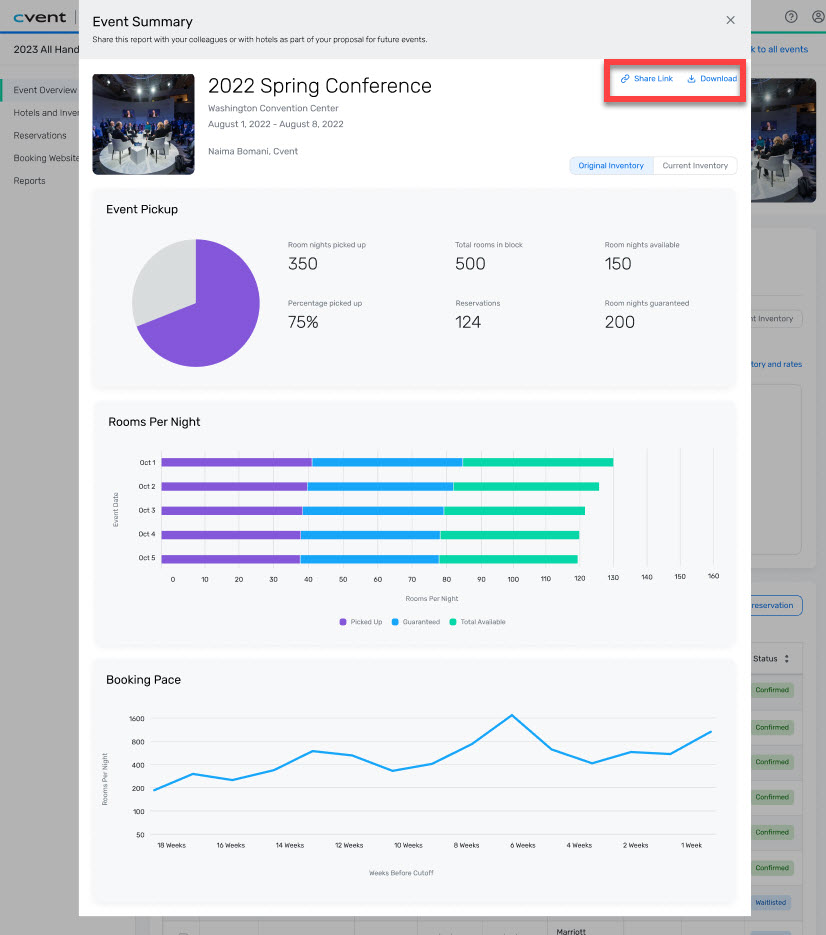
From a closed event, you can view a clean, high-level event summary that highlights key metrics such as:
Pickup
Rooms per night
Booking pace
You can then download or share this summary with external stakeholders, including those who do not have a Planner Portal account.
How to Access:
Open a closed event in the Planner Portal.
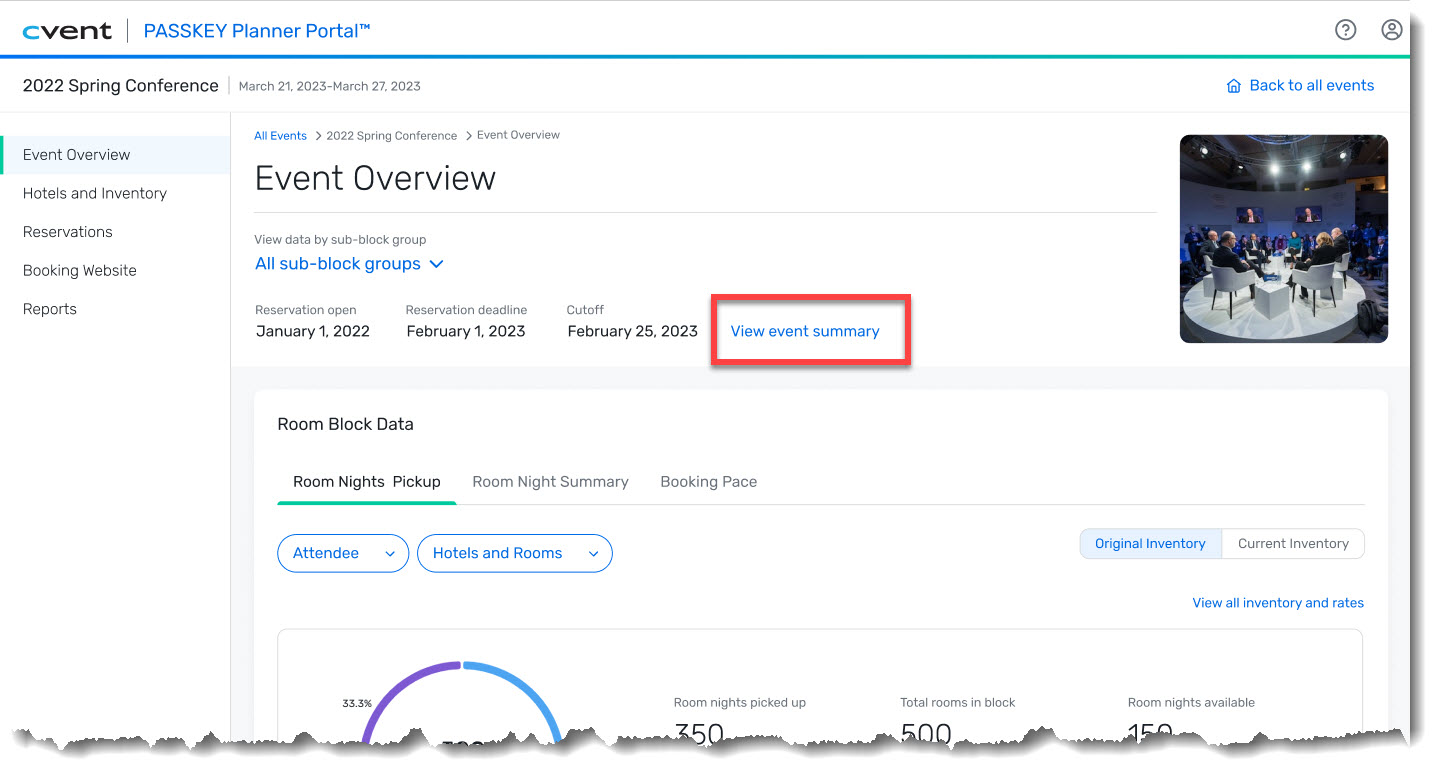
From the Event Overview screen, click View event summary.
A modal opens, displaying the event’s key performance metrics, ready to be shared or downloaded.
This update makes it easier to communicate results, streamline reporting, and extend visibility beyond the Planner Portal—without requiring additional steps or access.
Click the Share link to generate a URL you can send to anyone. Recipients do not need a Planner Portal account to view the summary, and their access is limited to the key event metrics shown in the modal. They won’t be able to navigate to other events or access additional pages within the Planner Portal.
Click Download to generate a PDF of the same key event metrics displayed in the modal. You can then share the PDF via email or another preferred method.
Upcoming Enhancements to Event Activity Report
What’s New:
The Event Activity Report now provides expanded insights into reservation modifications and cancellations across all Passkey reservation channels. These enhancements provide a more comprehensive view of how reservations evolve over time—not just where they were originally created.
With this update, you can analyze activity in two distinct modes:
Reservations by Creation Date
You can see:
How many reservations were created within your selected date range
How many of those reservations were later modified or canceled (including changes made after the selected date range)
The channel responsible for the last modification or cancellation
Note: The number of modified or canceled reservations will always be equal to or less than the number of reservations created.
Reservations by Activity Date
You can see:
How many reservations were created within the selected date range
How many reservations were modified or canceled during that same timeframe
The channel responsible for the last modification or cancellation
Note: In this mode, the number of modified or canceled reservations may exceed the number of reservations created in the same date range.
Together, these updates help you understand not only where reservations originate, but also how and where they’re being modified or canceled—giving you deeper insight into channel performance and customer behavior.
How to Access:
Navigate to the Event Activity Report.
Select your desired date range.
Choose between Creation Date or Activity Date mode to view reservation creation, modification, and cancellation activity by channel.
These new views are available automatically as part of the enhanced Event Activity Report.
Additional Resources
Webinar Invite: Must-Know Event Trends for 2026 – Join us Thursday, January 15, to learn more about the top event industry trends of 2026. Register Here.
Q4 Product News Webinar: If you missed our Q4 round-up webinar, listen on demand HERE.
Cvent Community: Do you have questions about the updates this window? Get questions answered via the Community Open Forum.
Beta Opportunities: Help us test products/features before they're launched. Join Beta Programs.