- DATE:
- AUTHOR:
- Cvent Product News Team

Exchange Solutions Releases for October 21, 2026
Products covered under Exchange Solutions are Cvent Supplier Network, Event Diagramming, Passkey, Travel, Instant Book, Vendor Marketplace powered by Reposite.
Cvent Supplier Network
From Event Brief to RFP with AI
Expected Release Date: 10/22/2026
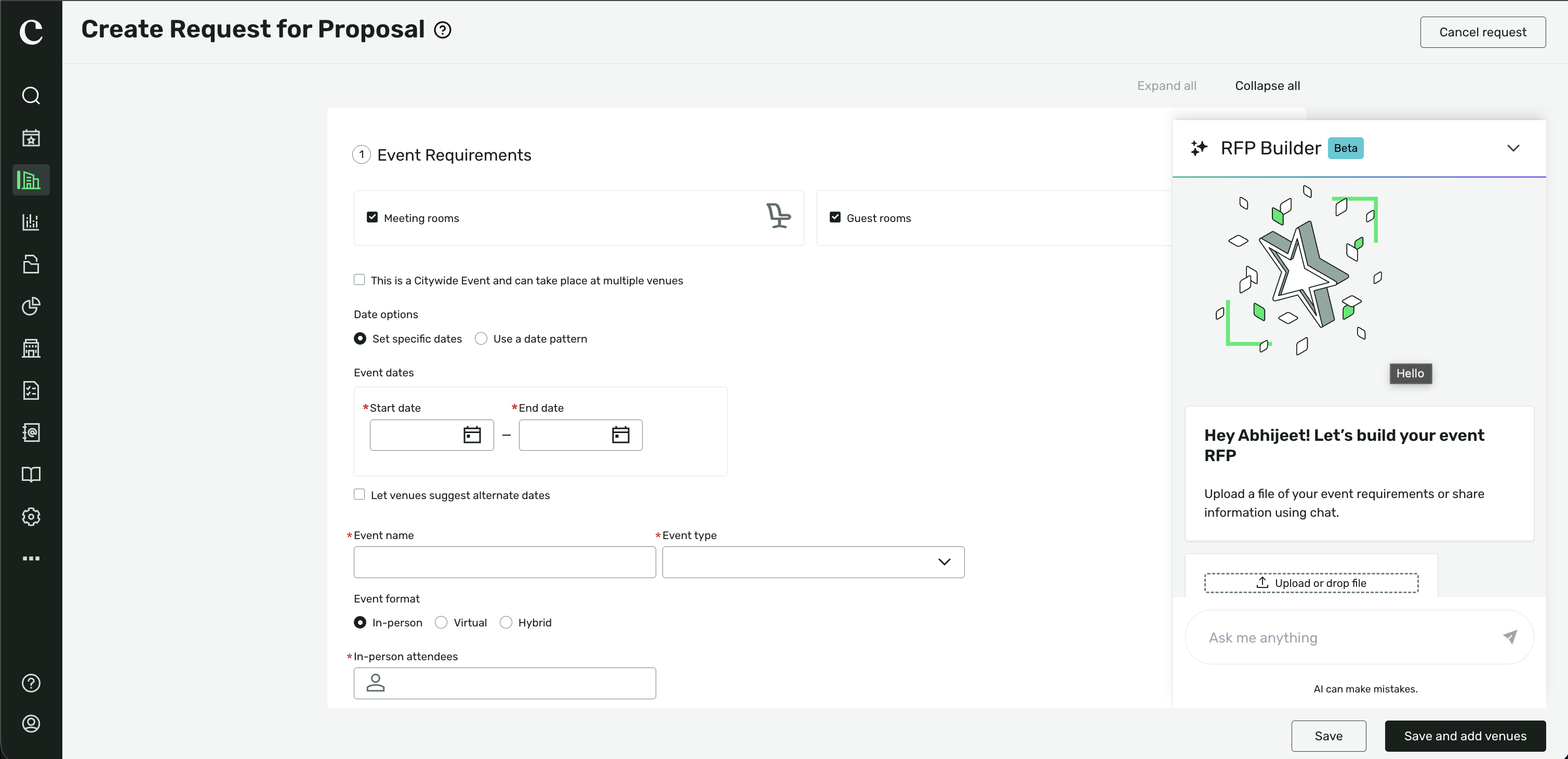
AI RFP Builder helps event planners turn event requirements into a draft RFP with less manual data entry, while keeping them in control of what gets saved or sent.
What's Changed: AI RFP Builder is expected to enter open beta on October 22, 2026. Upload an event brief (DOC, DOCX, PDF, XLSX, or TXT, up to 10 MB), describe your event in chat, or use both. It drafts the RFP with event details, dates, guest rooms, meeting space and agenda, contacts, budget and billing information, and venue questions. You can refine the draft by chatting with the AI. An account administrator must enable AI RFP Builder in the AI Features tab; then open it from Sourcing → RFPs when creating, editing, or copying an RFP.
Benefits: Spend less time re-entering event requirements and more time planning. Review and edit every AI-filled field, ask for changes in chat, or reset a field, section, or the full form. If a requirement is unclear, the AI asks a clarifying question. Nothing is saved or sent to venues until you choose to do so.
Personalized Supplier Outreach
Expected Release Date: 10/22/2026
Cvent helps you discover supplier opportunities that are more relevant to your events. If you opt in, you can receive personalized messages through Cvent from suppliers whose venues are a strong fit for your programs, including information about future hosting opportunities or relevant promotions.
What's Changed:
If you opt in to supplier communications, you may receive personalized messages in your email inbox.
Messages may come from suppliers you’ve worked with before or from new suppliers whose venues align with your sourcing patterns.
Cvent uses event and sourcing data to match outreach to your actual programs—not generic lists.
Messages are sent through Cvent, not as direct emails from suppliers, and are not shared with third-party marketing tools.
This feature is available to you if you use Cvent Supplier Network. You don’t need to take action when you receive a message, and you can unsubscribe from messages of this type.
Benefits:
Spend less time sorting through supplier outreach that isn’t relevant to you.
Discover venue opportunities and promotions that better fit your events.
Stay in control of the supplier communications you receive, with the option to unsubscribe.
Sustainability Details, Faster
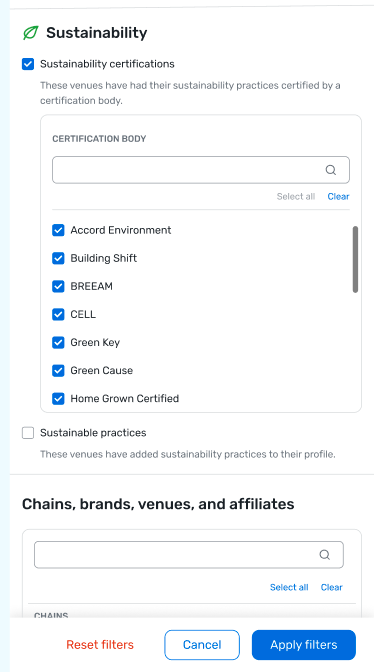
You can use a unified Sustainability filter on the Cvent Supplier Network search results page to find venues that share sustainability practices or hold recognized sustainability certifications.
What's Changed:
The new Sustainability filter replaces the standalone Sustainable Practices filter and gives you two options:
Sustainable Practices helps you find venues that have completed the Sustainability FAQs in their profile.
Sustainability Certified Venues helps you find venues with at least one valid, recognized sustainability certification.
When you filter for certified venues, you can narrow results by certifying agency, such as Green Key or LEED. Agencies are listed alphabetically.
Updated icons appear on qualifying search result cards: a leaf indicates sustainable practices, and a green filled leaf indicates a certified venue. You can view certification details in the icon’s tooltip.
These icons can appear whether or not you apply a Sustainability filter.
You can use the filters as a guest or while logged in, and combine them with other search filters.
Benefits:
Tell the difference between venues that share sustainable practices and venues with recognized certifications.
Narrow certified-venue results by certifying agency.
Spot sustainability information while reviewing search results and explore venue details in completed Sustainability FAQs.
Cvent Passkey
Room Categories in Multi-Room Booking
Expected Release Date: 10/22/2026
What’s Changed:
Passkey’s multi-room booking workflows now support Room Categories when you create or update reservations. Event-level planners and sub-block group contacts managing reservations in the Planner Portal can see and manage rooms by category, where applicable, in line with the options shared with attendees.
You can also use Room Categories in bulk reservation workflows and keep category details in view when creating, updating, or cancelling reservations. Room Types that belong to a Room Category can no longer be selected individually; choose the Room Category instead.
Benefit:
Room Categories make it easier to work with room options the way you and your attendees think about them. You can manage reservations more consistently and spend less time repeating steps when handling multiple bookings.
Additional Resources
Cvent Community: Questions about the above updates? As always, get answers in the Community via the Open Forum.
Beta Opportunities Page: Try new features and products out before full launch availability. Join Beta Programs.