- DATE:
- AUTHOR:
- Cvent Product News Team

Plan & Promote Releases for December 2, 2026
Products covered under Plan & Promote are Registration, Abstract Management, Speaker Resource Center, Exhibitor Management, and Payments.
Registration
Custom Email Sending Domain: Self-Serve Authentication
We are introducing self-serve Custom Email Sending Domain configuration, giving account admins full control over how emails sent from Cvent are authenticated and delivered on their behalf. Admins can now add, verify, and manage their organisation’s sending domains directly in the product, no support ticket required.
Why Email Authentication Matters
Inbox providers and anti-spam authorities now treat email authentication as a baseline requirement, not a best practice. Gmail and Yahoo mandate DKIM authentication and DMARC policies for bulk senders — and organisations like Spamhaus explicitly require ESPs (Email Sending Providers) to ensure all customers have SPF, DKIM, and DMARC configured before they are permitted to send. When emails are sent from a shared platform domain without customer-level authentication, inbox providers cannot distinguish legitimate senders from abusive ones — meaning a single bad actor on a shared domain can damage deliverability for everyone on it. Without your own authenticated domain, event emails risk landing in spam, being rejected, or being flagged as spoofed — directly impacting attendee engagement and your organisation’s sender reputation.
For Cvent customers, the only path to configure this has been opening a support ticket, waiting for Cvent’s Cloud Infrastructure team to manually provision DKIM keys and DNS records on the backend — a process that could take days, with no self-serve UI to track progress, verify status, or make changes independently.
What Each Layer Does
DKIM (DomainKeys Identified Mail) Cryptographically signs every email at the point of sending. Inbox providers use this signature to verify the email genuinely came from your domain and wasn’t tampered with in transit. Required for DMARC alignment and the strongest signal of sender legitimacy.
SPF (Sender Policy Framework) Authorises which mail servers are permitted to send email on behalf of your domain. For emails sent through Cvent, SPF is automatically handled by Cvent’s infrastructure — no customer action required. Configuring a custom envelope domain ensures your return-path domain aligns with SPF, strengthening overall authentication.
Envelope Domain (Bounce Routing) Controls where email delivery failures are returned. Configuring a custom envelope domain routes bounces back to infrastructure you control, giving you clean, accurate bounce data and helping you maintain a healthy recipient list.
DMARC (Domain-based Message Authentication, Reporting & Conformance) A policy layer that tells receiving mail servers what to do when an email claiming to be from your domain fails authentication checks. Start with Monitor mode to observe traffic, then escalate to Quarantine or Reject as confidence grows — protecting your attendees from spoofed emails and your brand from impersonation.
What You Gain with a Custom Sending Domain
Sending emails from your own authenticated domain separates your reputation entirely from shared infrastructure. The recommendation is that each customer on a sending platform use a dedicated domain as both the 'From' domain and the DKIM signing domain — so that domain reputation can be tracked, protected, and built independently. Also, when attendees see emails arriving from a trusted domain (e.g. event@companyname.com) rather than a generic platform address, trust goes up.
Key capabilities include:
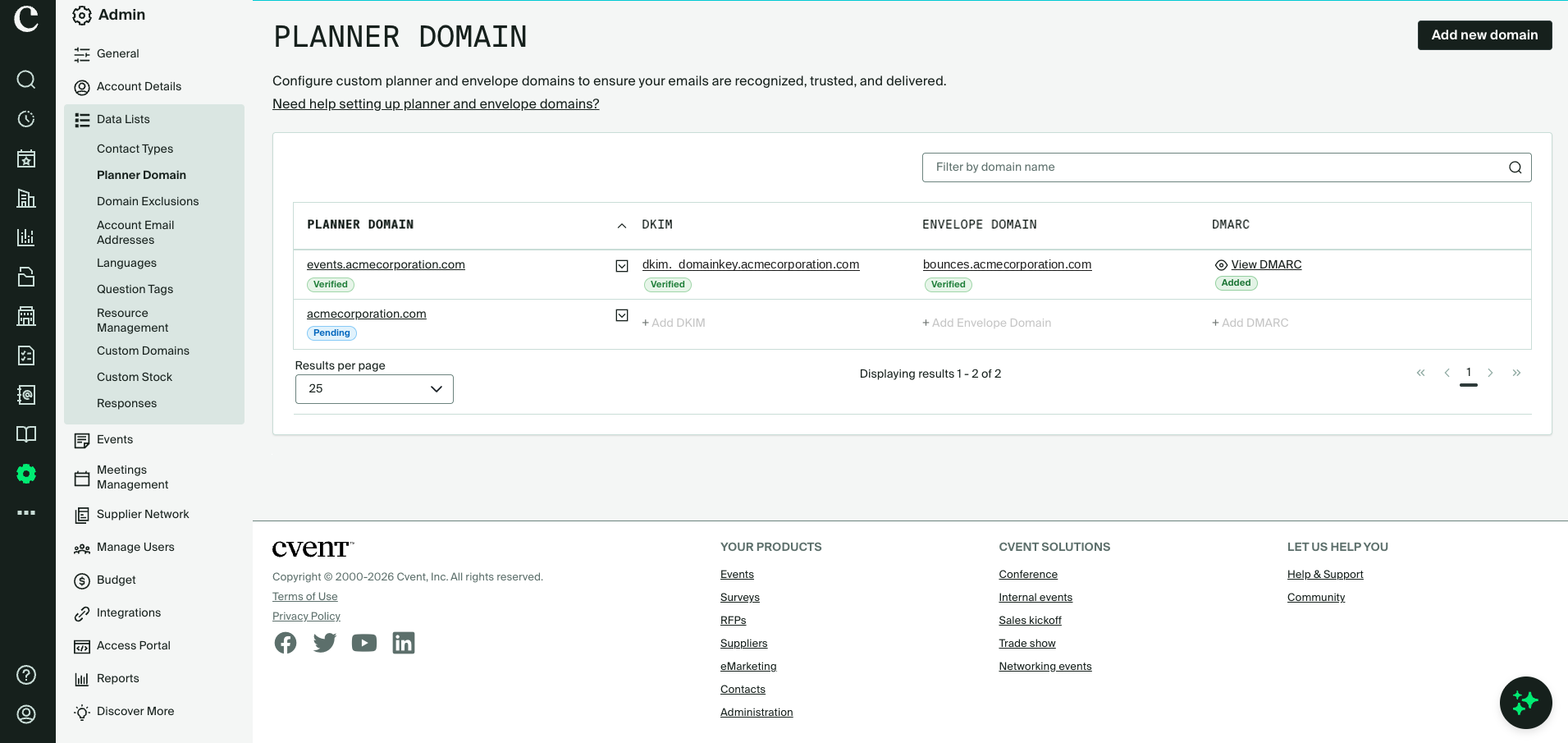
Self-serve setup of Planner Domain: Admins can access the Custom Email Sending Domain configuration from Admin > Data Lists > Planner Domain. Add and manage all sending domains for their account — including domain verification, DKIM, Envelope Domain, and DMARC.
Add Domain and verify ownership: Admins add their sending domain (e.g.
company.com) and verify ownership by publishing a Cvent-generated TXT record in their DNS. The domain status moves to Verified, and all further configuration steps are unlocked. Only verified domains can be used to send email through Cvent.DKIM authentication: Once a domain is verified, admins can configure DKIM by publishing two CNAME records provided by Cvent. Once verified, Cvent cryptographically signs every outgoing email from the domain, meeting Gmail, Yahoo, and Outlook’s bulk sender authentication requirements and improving inbox placement. Major inbox providers have made DKIM mandatory for bulk senders — emails sent without it risk being filtered to spam or rejected outright, regardless of content quality. Cvent strongly recommends all customers configure DKIM for any domain used to send emails through the platform.
Custom Envelope Domain: Admins can configure a custom subdomain (e.g.
bounces.company.com) to receive email delivery failures instead of Cvent’s default bounce handling. Once verified, bounces are routed directly to infrastructure the customer controls, providing access to raw delivery data for list hygiene and compliance reporting. If not configured, Cvent continues to handle bounces automatically.DMARC policy management: Admins can review their domain’s DMARC policy directly in the product. If an existing DMARC record is already published in DNS, Cvent detects and displays it automatically for review. If no DMARC record exists, Cvent recommends a starting policy — typically Monitor (
p=none), which allows admins to observe email traffic and receive reports without impacting delivery.Multi-account domain awareness: For organizations running multiple Cvent accounts within the same region, this feature is designed to prevent duplication and conflicts.
Domain ownership verification is per-account; each account independently verifies ownership using its own unique TXT token.
DKIM is globally scoped; the first account to configure DKIM for a domain establishes it for all accounts in the region, with configuration automatically propagated and status synchronized across accounts.
DMARC follows the same global model.
Envelope Domain remains per-account; each account can configure its own subdomain independently, either reusing a previously verified subdomain or defining a unique one.
Granular disable controls: Admins can disable individual authentication components without affecting the rest of the domain configuration.
Disabling the domain is a broader action — it disables the domain and clears all downstream configuration, including DKIM and Envelope Domain. Re-enabling requires reconfiguring from scratch.
Disabling the Envelope Domain removes custom bounce routing for that account only — domain verification, DKIM, and DMARC remain active and unaffected.
Things to Know
Envelope Domain warm-up period: When a custom Envelope Domain is configured for the first time, a two-week warm-up period is applied to gradually build the domain's reputation. During this ramp-up, emails within the designated sending limit will be delivered using your custom envelope domain. Emails that exceed the limit during the warm-up period will temporarily fall back to Cvent’s default envelope domain. There is no impact on email delivery at any point.
Disable DKIM: The ability to disable DKIM independently is not available in this release and is planned for a future update.
Domain deletion: The ability to delete a configured domain is not available in this release. This capability is planned for a future update.
Migration of existing DKIM configurations: Customers who currently have DKIM configured through the Cvent support process will be migrated seamlessly to the self-serve product. Migration will preserve their existing Verified status — no DNS changes and no impact on email sending. The migration date will be communicated separately after release.
Email Open and Click Tracking Suppressed for France and Italy
Cvent no longer records email opens or link clicks when an email is opened or a link is clicked from within France or Italy. This applies to emails sent through Cvent's email platform. This responds to regulatory guidance from France's CNIL and Italy's Garante.
The recipient experience is unchanged — the email renders normally, and links redirect to their destinations as before. Only the recording of the open or click is skipped. The change is automatic and needs no setup from you.
Please note: This release does not add a way to request tracking consent from recipients or record their choice. Instead, it applies one rule to everyone: opens and clicks from France or Italy are not recorded, whether or not a recipient has agreed to tracking. If you collect tracking consent through your own process, Cvent cannot yet use it to enable or disable tracking for individual recipients.
Key capabilities include
Automatic suppression for France and Italy: Opens and clicks from France or Italy are not recorded. No setup or configuration is needed.
Both tracking types covered: Suppression applies to open tracking (the tracking pixel) and click tracking (tracked links).
Unchanged recipient experience: The email renders normally, and links redirect to their destinations as before
No new personal data collected: Location is based only on the country the request comes from, which our content delivery network (CDN) already provides. Cvent does not collect any new data to make this check.
Reporting context: For all email reports that include open and click tracking data, tracking events from France and Italy are suppressed, so lower engagement figures for those audiences are to be understood in context.
Things to Know
Based on where the open or click happens, suppression uses the country the request comes from, not where the recipient lives or works.
A recipient based in France or Italy who opens an email while traveling elsewhere will still be tracked.
VPNs and proxies can hide the real country and may bypass suppression.
France and Italy only: Opens and clicks from other EU countries are still tracked.
Lower engagement in reports: Open and click reports will show less or no engagement data for audiences in France and Italy.
Turn off tracking for all recipients: If you want to disable open and click tracking for all recipients in your account, contact your Account Manager or Cvent Support.
Products not covered: This release does not apply to emails sent from Splash, Goldcast, ON24, Jifflenow, iCapture, Passkey, Prismm, Venue Directory, Social Tables, Reposite, and Business Transient. Contact your Account Manager for the tracking options available in those products.
Event Images in the List Events APIs
The List Events API endpoints can now return each event's image. Integrations, mobile apps, and partner listings can show event branding straight from Cvent. Before this, you had to find workarounds or omit the image.
Key Things to Know

What's new: Add
expand=imageto a Get Event or List Events request, and each event comes back with animageobject containing the image's original file name (name) and a full HTTPS link to it (url).Opt-in only: If you don't request
image, it's left out of the response entirely. Current integrations keep working without changes.Events without an image: When you request
image, and the event has no image uploaded,imagecomes back asnull.What isn't changing: You still upload and manage event images in Cvent, not through the API. The API returns the original image only, with no resized versions, one primary image per event, and no extra details like dimensions, file type, or alt text.
Use Case Examples
Association running a member events app: Their mobile app requests images when pulling upcoming events from List Events and shows each event's banner, with no manual image syncing.
Corporate events team feeding an intranet calendar: Their internal portal shows event cards with the same branding planners set in Cvent, so the calendar stays on-brand as images change.
Partner listing events on a third-party marketplace: The partner receives each event's image link and other details, so listings go live with images rather than placeholders.
Additional Resources
Cvent Community: Questions about the above updates? As always, get answers in the Community via the Open Forum.
Beta Opportunities Page: Try new features and products out before full launch availability. Join Beta Programs.