- DATE:
- AUTHOR:
- Cvent Product News Team

Plan & Promote Releases for January 14, 2026
Registration
Sponsored Sessions in the Exhibitor Widget
Empower attendees to discover and engage with Sponsored Sessions directly from the Exhibitor Widget on event websites. This enhancement presents a dedicated list of exhibitors' sponsored sessions within the exhibitor widget, making it easier for attendees to plan around sponsor-led content while providing organizers with a simple way to drive visibility and ROI for sponsors. This release enables:
Attendees can view session names, dates and times, locations, and descriptions for sessions an exhibitor sponsors, all in one place.
Organizers to maximize sponsor ROI by highlighting sessions at the moment of exhibitor discovery.
A more cohesive, branded experience that aligns with the event’s marketing and sponsorship goals.
What’s Changing?
Before:
The Exhibitor Widget pop-up focused on exhibitor details and collateral, but did not surface the exhibitor’s sponsored sessions.
After:
The exhibitor pop-up now includes a new Sponsored Sessions section when sessions are associated with that exhibitor.
Each session entry displays key details: session name, date & time, location, and description.
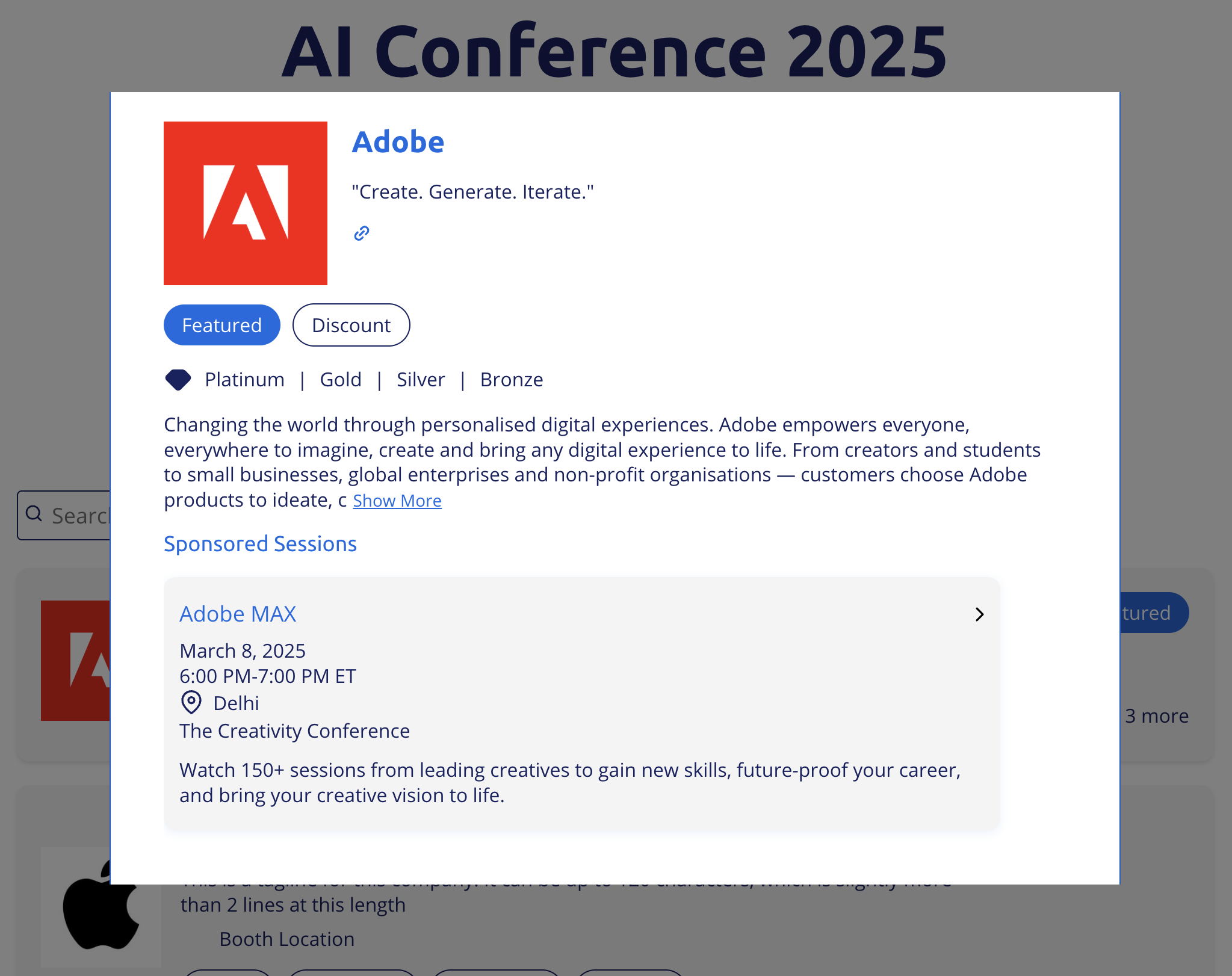
Attendees can identify sponsor-led sessions without leaving the exhibitor context, reducing friction and improving session discovery.
Key Details to Know
The Sponsored Sessions section appears only when the exhibitor has sponsored sessions associated with them.
You can style the sections according to your needs using the website editor.
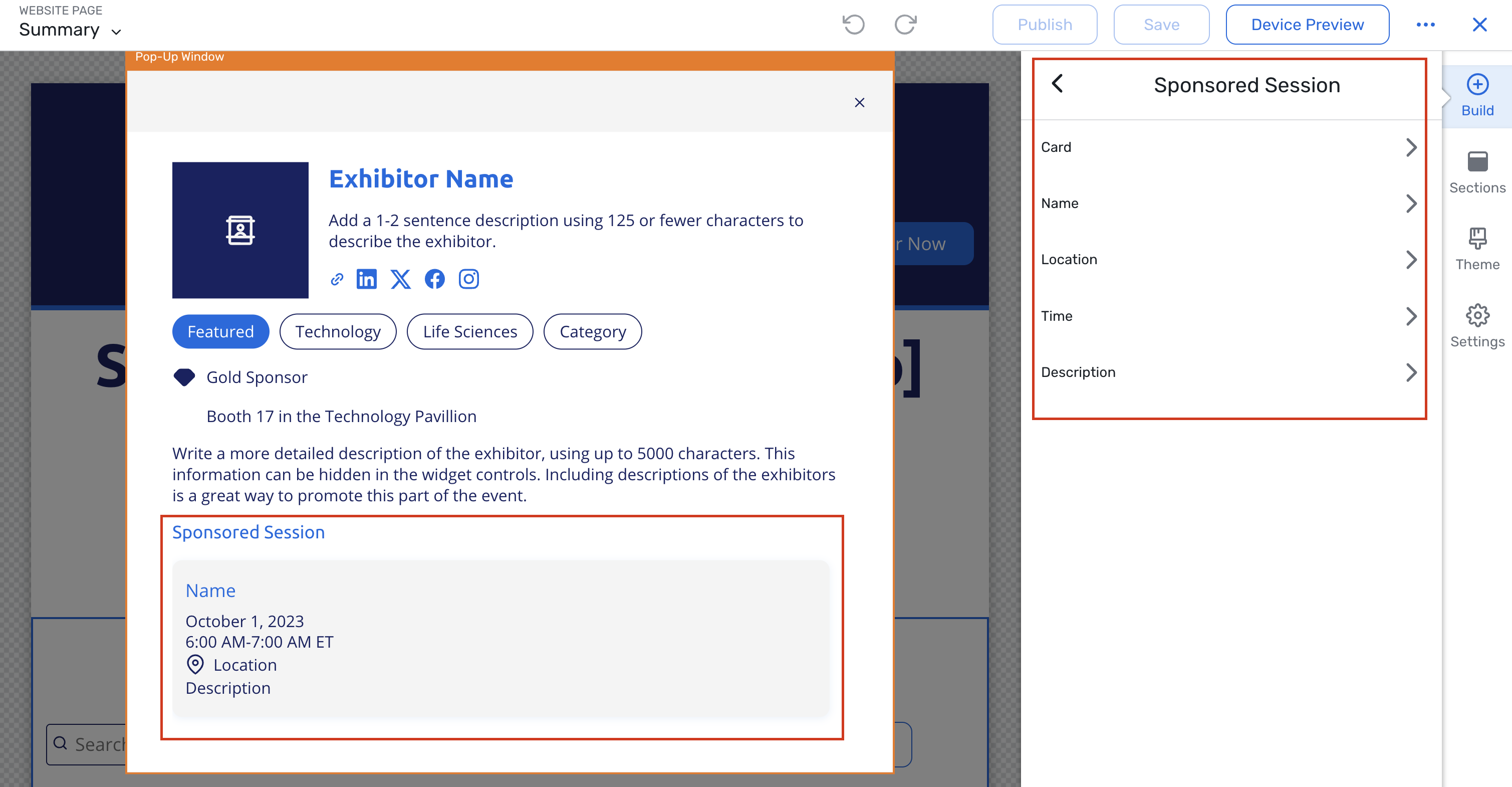
Multiple sponsored sessions per exhibitor are supported; all eligible sessions will be listed.
Dynamic Segments: Hotel & Air Travel Data Support
You can now create Dynamic Segments using attendee travel information, making it easier to coordinate hotels and flights without manual tracking or spreadsheets.
Managing attendee travel is one of the most operationally complex parts of planning an event. By bringing hotel and air data into Dynamic Segments, you gain real-time visibility into travel readiness and can communicate more effectively - without manual tracking or last-minute scrambling. This leads to smoother arrivals, fewer errors, and a more seamless experience for both planners and attendees.
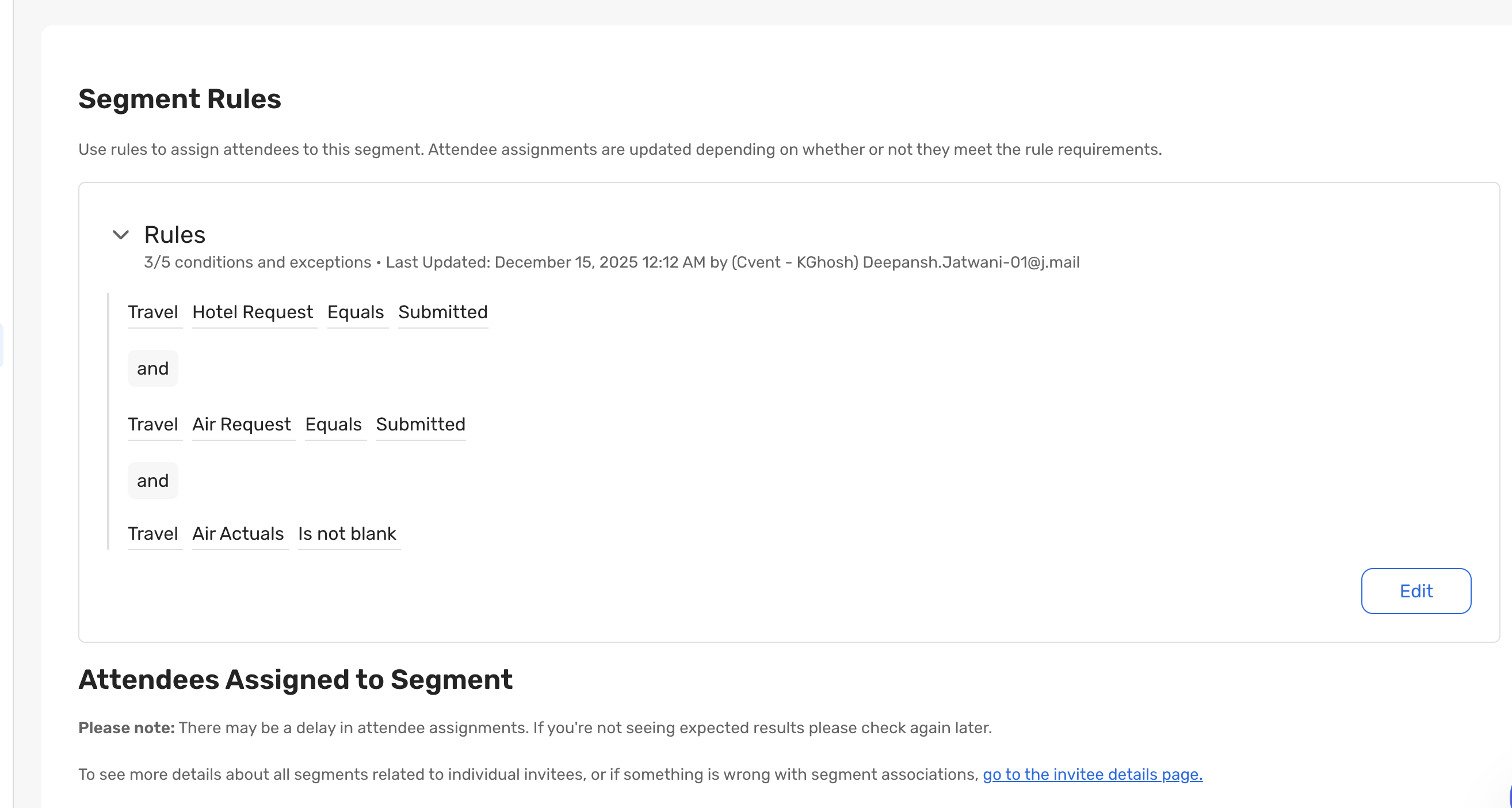
With this release, you can segment invitees based on Hotel Requests, Air Requests, and Air Actuals using a defined set of supported operators. Segments update automatically as travel data changes, enabling timely communication, improved logistics coordination, and a smoother attendee experience.
New Dynamic Segment Category: Travel Information
(Available when Registration and Travel are enabled for the event)
Hotel Requests
Supported operators:
Equals – Filter by a specific hotel request status
Includes any of – Match invitees across multiple hotel request statuses
Is not blank – Return invitees who have submitted any hotel request
Supported via:
Cvent Hotel Request Form
Two-Way Passkey Integration
Air Requests
Supported operators:
Equals – Filter by a specific air request status
Includes any of – Match invitees across multiple air request statuses
Is not blank – Return invitees who have submitted any air request
Supported via:
Cvent Air Request Form
Air Actuals
Supported operator:
Is not blank – Return invitees who have air actuals on file (reserved or cancelled)
Supported via:
Cvent Group Flight System
Cvent Air Actuals Form
Concur Travel System, PNR, etc.
Automatic Updates
Segments refresh automatically as travel data changes
Travel-based segments work seamlessly with emails, communications, and operational workflows
Key Benefits
Simpler Travel Coordination
Quickly identify which attendees have submitted travel requests or confirmed flights without needing to export reports or maintain manual lists.Targeted, Relevant Communication
Ensure that attendees only receive travel-related messages that are relevant to their current travel status.Reduced Operational Risk
Real-time segmentation helps prevent missed follow-ups, last-minute confusion, and logistical errors.Lower Administrative Overhead
Dynamic, self-updating segments replace spreadsheets and one-off reports, allowing you to focus on delivering events.
Example Use Cases
Hotel Accommodation
Identify attendees who have submitted hotel requests to share check-in instructions, hotel policies, or on-site support details.
Follow up with attendees who have not yet provided hotel information to reduce last-minute accommodation issues.
Air Travel & Arrival Planning
Identify attendees who have submitted flight requests to provide guidance on booking or travel timelines.
Track attendees with confirmed flight details to share arrival instructions, ground transportation information, or venue access details.
Targeted Travel Communication
Send travel-specific emails only to attendees who have provided hotel or flight information.
Reduce noise by ensuring attendees without travel needs don’t receive unnecessary travel communications.
Deliver timely reminders and updates as attendee travel details change.
Operational Readiness & On-Site Execution
Share real-time travel readiness lists with internal operations, registration desks, or travel vendors.
Identify attendees arriving by air to plan welcome desks, signage, or on-site assistance.
Reduce last-minute coordination by having live visibility into who and how they are travelling.
Updates to List Event Questions & Get Question Choices Rest APIs
This new feature allows you to access additional internal data. You can now retrieve Internal Notes for List Event Questions and view the "Other" and "N/A" responses in the Get Question Choices REST APIs, facilitating more comprehensive internal processes and decision-making.
With this update, you can:
Access Internal Notes directly from the List Event Questions endpoint, enabling better tracking and documentation of question-specific details.
Retrieve "Other" and "N/A" options for Question Choices through the Get Question Choices endpoint, ensuring all possible responses are considered in planning processes.
REST API Endpoint for Alternate Travel Answers for Attendees
The new REST API endpoint for alternative travel answers enables you to retrieve answers to alternative travel questions for attendees. This endpoint addresses the challenge of accessing responses for registrants who chose not to submit a travel request. As a result, you can efficiently sync all registration data between Cvent and other systems, enhancing the event planning capabilities and improving the attendee experience.
Things to Note
The new endpoint is GET /events/{eventId}/event-travel/alternate-answers
It returns a structured JSON response containing attendee IDs and their corresponding alternate travel answers categorized by type (hotelRequest, airRequest, airActuals, groupFlight)
The response includes the question text along with the question ID and the answer value
The endpoint returns the answers for primary registrants and their guests
Detailed documentation for the endpoint can be found on the Cvent Developer Portal.
REST API - GET Endpoint for Membership items
You will now be able to fetch information for "Membership items" associated to your events. This endpoint is designed to provide better flexibility and control, enhancing your ability to manage membership items more effectively.
Things to Note
For each Membership Item associated with the event, the endpoint returns a consolidated view of membership attributes like -
Membership type
Membership item
Membership contact type
Duration
Price for new members
Price for existing members (renewal)
Currency
Membership items Code
Associated General Ledger (GL) codes details
Description
Registration type restrictions
Auto-close date
Additional information/note
You will be able to filter the data using :
Membership item IDs
Registration types associated with the membership items in the event
Detailed documentation for the endpoint can be found on the Cvent Developer Portal.
Ongoing Product Copy Updates and Automation
We are continually making improvements to our copy to modernize legacy text, align terminology across products, and create a more cohesive, standards-aligned experience across the platform. Changes include, but are not limited to, field names, labels, helper and placeholder text, error messages, alt text, and other UI strings across customer‑facing and admin surfaces. These updates follow our Content Design guidelines and standards and will continue to ship regularly.
We will continue to update UI copy (e.g., field names, button labels, helper text, alt text, error strings) as part of our standard product iteration.
Copy adjustments may be small, targeted, and delivered on a rolling basis rather than tied to a single feature release.
Why We’re Making These Changes
Improve readability and comprehension for diverse audiences.
Strengthen accessibility (for example, descriptive alt text and clearer error messaging).
Enhance localization quality and reduce ambiguity in translations.
Align terminology across product areas for a more consistent experience.
Impact
If you use UI‑based automation tools or scripts that locate elements by visible text (e.g., “button text equals Submit”), copy changes can cause selectors to fail and may break automation flows.
Depending on the automation framework you use (e.g., RPA tools, Selenium, Cypress, Playwright, macro recorders), any dependency on visible strings, placeholder text, or error messages is considered brittle and subject to breakage.
Who Is Affected
Any changed non-customized text (customized text is not affected).
Additional Resources
Cvent Community: Do you have any questions about the updates we've rolled out this window? As always, get questions answered in the Community via the Open Forum.
Beta Program Opportunities: Help us make Cvent Products better by being the first to test products before they're widely available. Join Beta Programs.
Q4 Quarterly Product News Webinar: If you missed our Q4 Product News Update webinar, catch up on all things product via the recording. Watch On-Demand Here.