- DATE:
- AUTHOR:
- Cvent Product News Team

Plan & Promote Releases for July 22, 2026
Registration
Microsoft Dynamics 365 Integration
The Cvent and Microsoft Dynamics 365 integration helps organizations streamline event operations, automate data synchronization, and track event ROI across systems.
Quick overview
Event attendance is one of the strongest buying and engagement signals a contact can send, yet that signal is often lost when event data lives in a separate system from where sales and marketing teams work. By connecting Cvent with Microsoft Dynamics 365, organizations bring event participation directly into the records their teams already use, turning event activity into measurable business outcomes across the customer lifecycle.
Measure event impact and ROI by tying event and session participation to the Contacts and Cvent Event Attendees in Microsoft Dynamics 365, giving leadership a clear view of how the events program contributes to pipeline and revenue.
Accelerate follow-up by getting qualified event attendees to sales teams faster, with registration status, session interest, and activity available directly in the CRM.
Build richer contact profiles by enriching Microsoft Dynamics 365 records with event and session engagement data, enabling more informed conversations and better segmentation.
Deliver more targeted outreach by using Marketing List membership, attendance status, and session-level interest to drive relevant pre-event and post-event campaigns from within Microsoft Dynamics 365.
Eliminate manual data entry by automatically synchronizing event, session, and attendee information, reducing duplicate work, improving data accuracy, and ensuring no attendee slips through the cracks.
Align sales and marketing around a single, consistent source of event engagement data, keeping both teams working from the same view of attendee behavior across mission-critical systems.
How it works
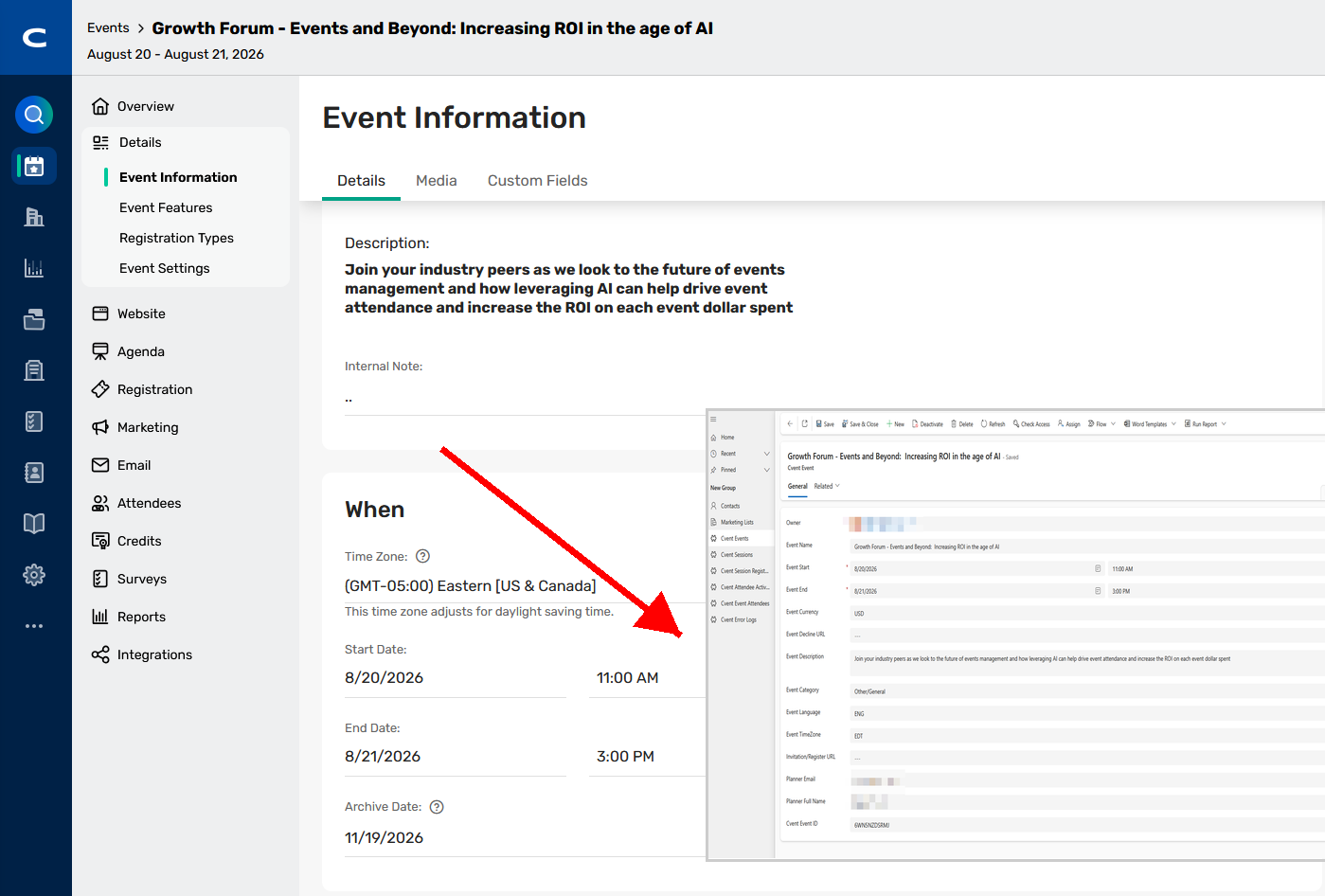
Creates and updates Events in Microsoft Dynamics 365 as Cvent Events are created or updated
Creates and updates Sessions in Microsoft Dynamics 365 as Cvent Sessions are created or updated
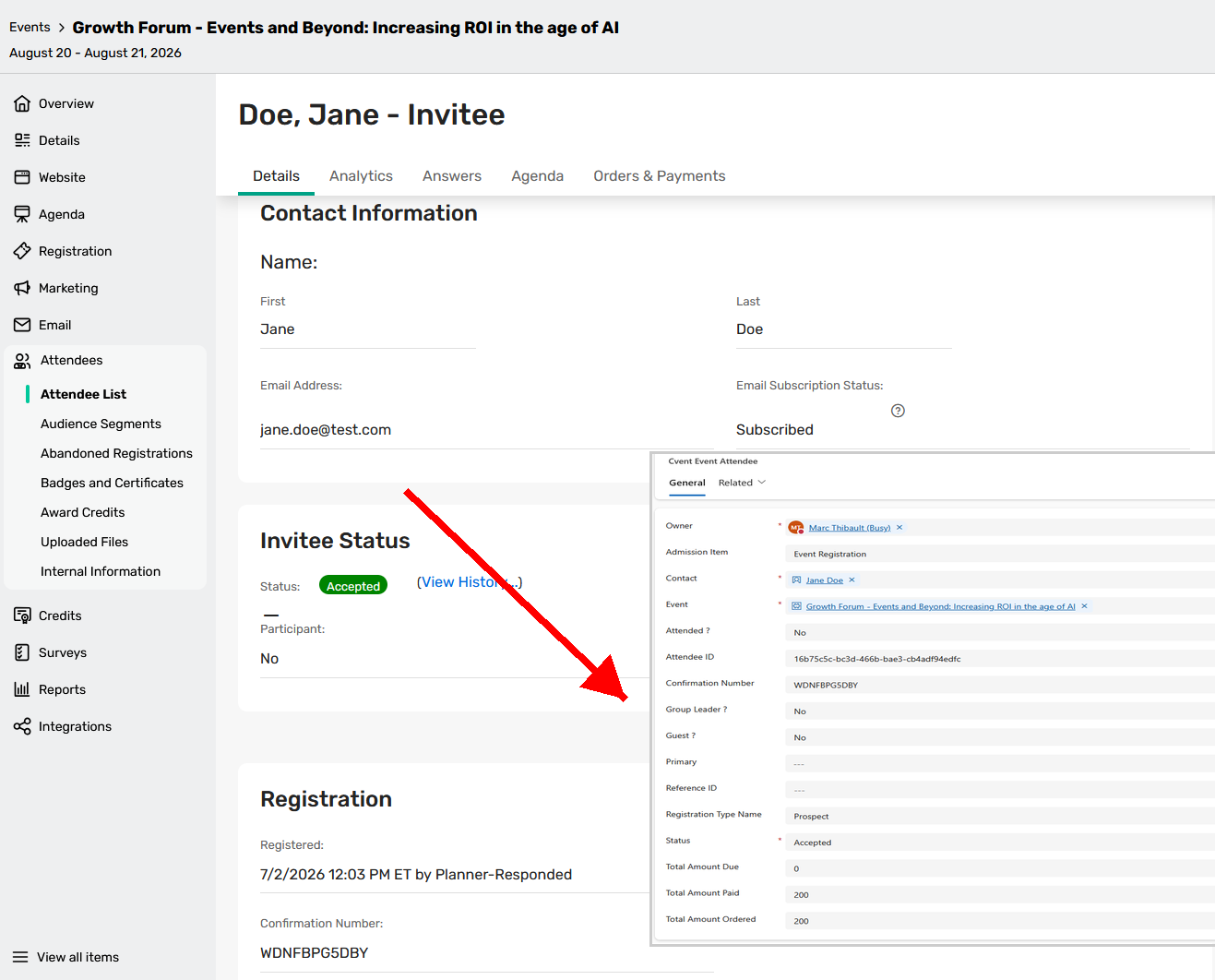
Adds Microsoft Dynamics 365 Marketing List members as Cvent Event Invitees
Searches for existing Contacts in Microsoft Dynamics 365 in a hierarchical fashion by:
Microsoft Dynamics 365 Contact record ID
Email address
Writes Cvent Attendee records with Event details to matched Cvent Event Attendee records in Microsoft Dynamics 365
Maps Cvent Session Registrations with Session details to Cvent Session Registration records
Records Cvent Attendee Activities to the Cvent Attendee Activities custom entity
Show Total Amount Paid and Total Amount Due for each Attendee on the Cvent Event Attendee record
Basic field mapping is provided, and you can map custom contact fields in Cvent via the Integration Tile.
Registration Import for Pay-As-You-Go Registration Events
We are expanding Registration Import capabilities to support customers using Pay-as-you-go Registration, allowing organizers to bulk-register known audiences without requiring a contracted Event license.
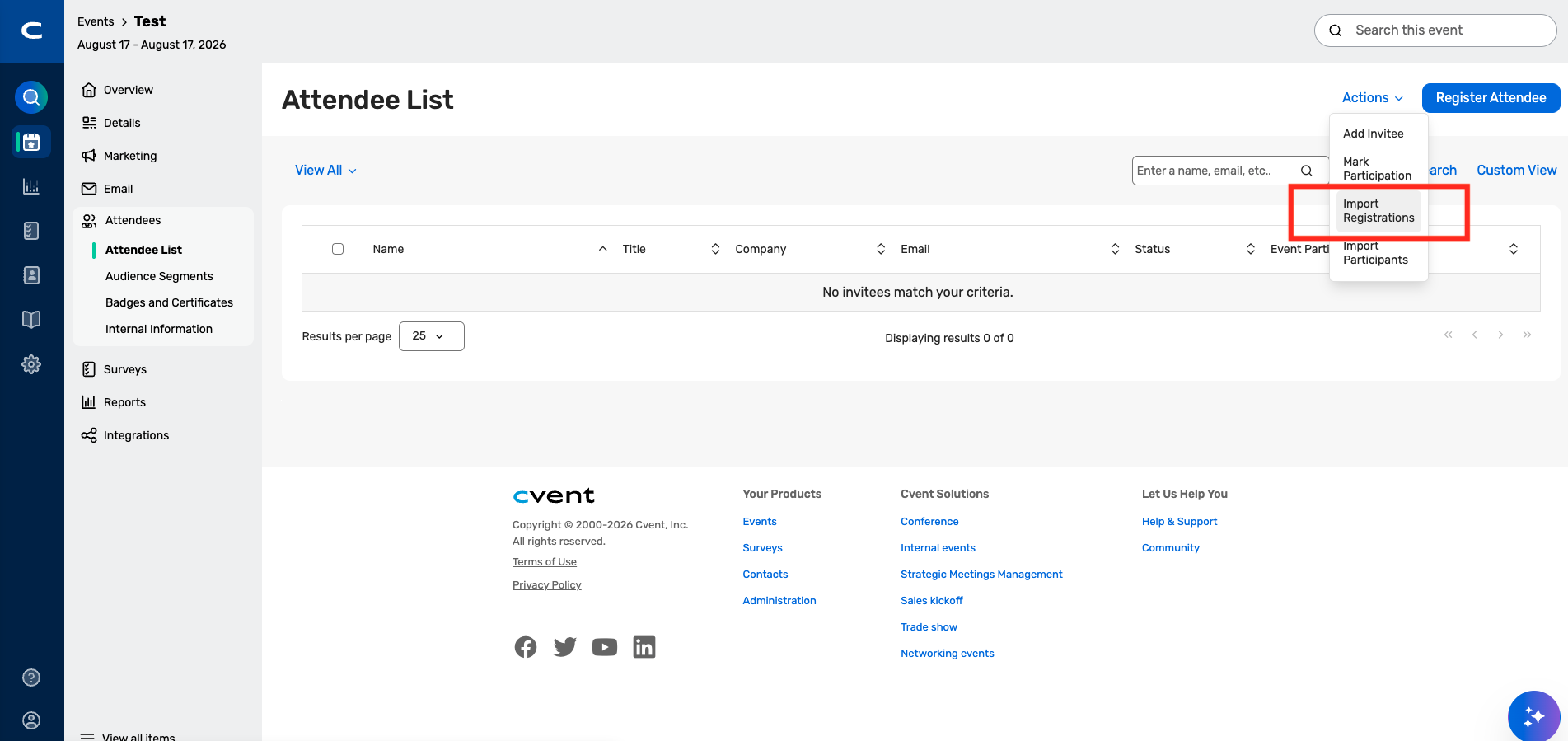
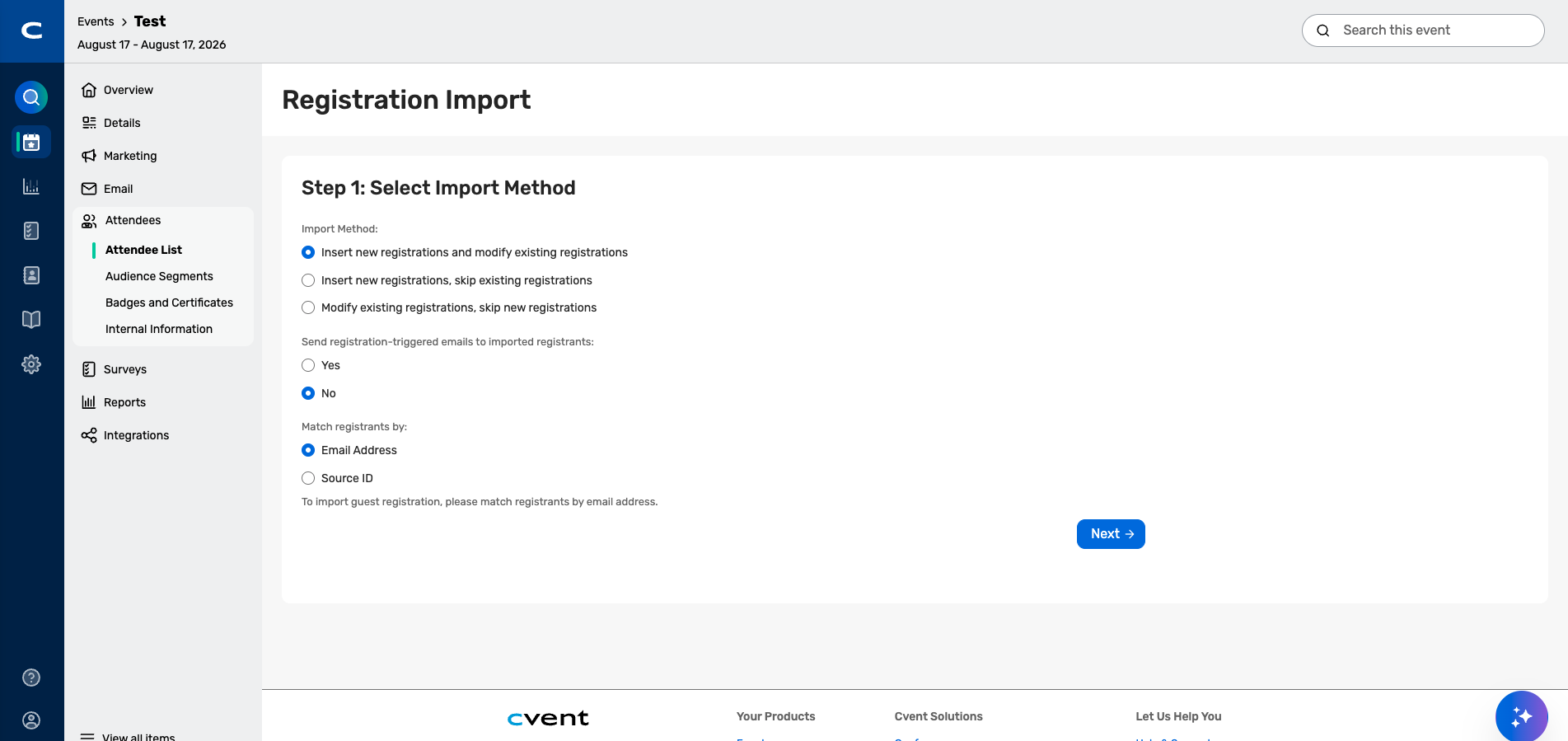
With this release, you can use the same guided Registration Import wizard available to contracted Event customers today: download a template, paste in their attendee list, map fields, and submit.
Imported attendees are created as accepted registrations and are immediately available in OnArrival and Attendee Hub, just like registrations created through the standard invitee flow.
Key capabilities include:
Bulk registration creation: You can now import registrations using the existing Import Registrations wizard, eliminating the need for manual one-by-one entry or internal exception requests.
Consistent OnArrival and Attendee Hub experience: Imported attendees are treated as accepted registrations and are immediately available for check-in, badge printing, and digital event access.
Registration import is available only after Registration has been opened for a Pay-as-you-go event.
Screenshots
Payments
Cvent Payments Transactions Summary Report
The new Cvent Payments Transactions Summary report is now available. The new summary report aligns reporting to billing statement periods so you can more quickly compare report output with billing statements and complete reconciliation with less manual effort.
Previously, you had to work solely from their PDF billing statements and manually consolidate information into Excel.
The new report can be found in Admin > Reporting > Report Templates. Planners can find it by searching for the report name or by browsing the Financial Reports category. The report is designed for accounts with a Cvent Payments merchant account and is not shown for accounts using other merchant account types or those that only have CPS.
The report is available as an export, making it easy for you to review and share summary-level financial data for reconciliation workflows.
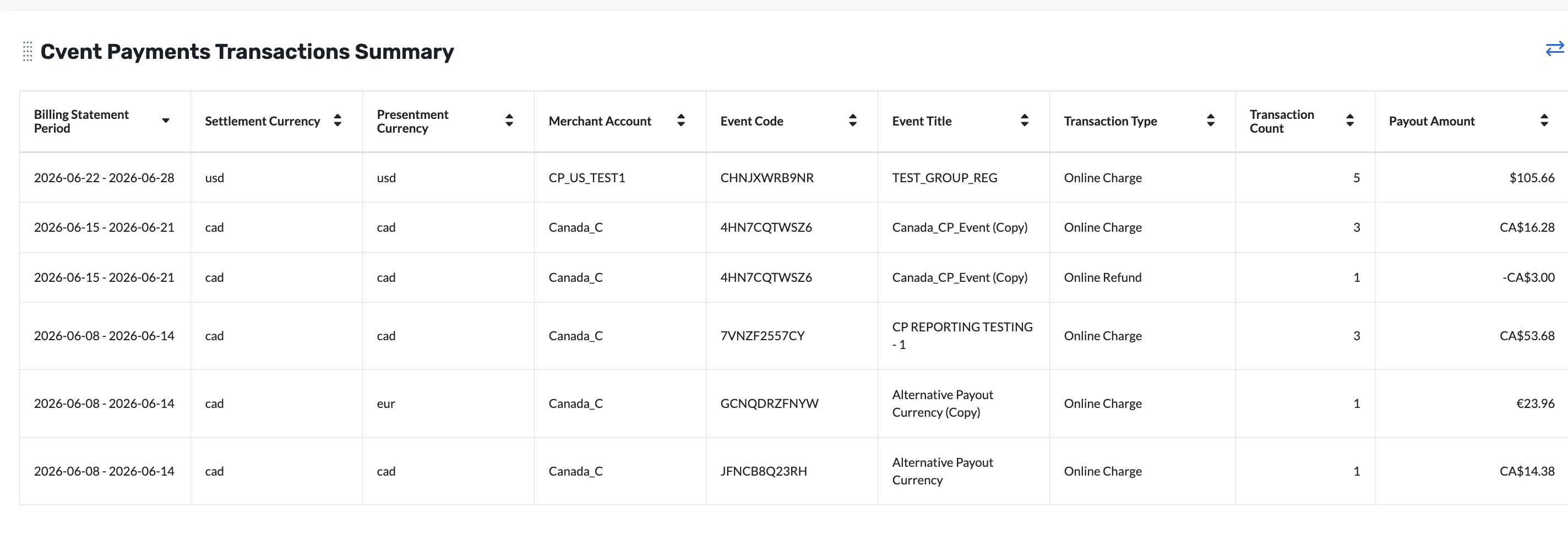
The report highlights the financial fields you need most for reconciliation, including revenue, fees, reserve changes, taxes, totals, and payout-related currency details. It also includes event and transaction context, such as billing statement period, event code, event name, transaction type, and transaction count. Filtering is available (e.g., by merchant account, currency, or event) to facilitate further efficiency and consolidation.
Additional Resources
Cvent Community: Do you have questions about the updates we've rolled out this window? As always, get questions answered in the Community via the Open Forum.
Beta Opportunities Page: Help us make Cvent Products better by being the first to test products before they're widely available. Join Beta Programs.
UX Research Panel: Be part of a select group of users who will help guide the future of Cvent's products. Join the UX Panel.