- DATE:
- AUTHOR:
- Cvent Product News Team

Plan & Promote Releases for March 11, 2026
Registration
New Navigation for Users
A faster, cleaner way to navigate Cvent. We’re excited to introduce a brand-new navigation experience that makes it easier than ever for you to find what you need and get to work on your events.
The new, more responsive navigation helps you get started faster, jump into your day quickly, and move between key workflows with fewer clicks. By streamlining the layout, we’ve freed up valuable screen space, giving you more room to focus on building and managing your events. Updated, bolder visuals create a cleaner, more modern interface that feels easier and more enjoyable for planners to use every day.
We’ve also reorganized menus to better reflect how you think about your events throughout the entire event lifecycle. This makes it easier to understand how different tools are connected and when to use them at each stage of planning and execution.
This new navigation is designed to help you find what you need faster, reduce friction, and keep you focused on what matters most: delivering great events.
Watch this Intro Video to the New Navigation
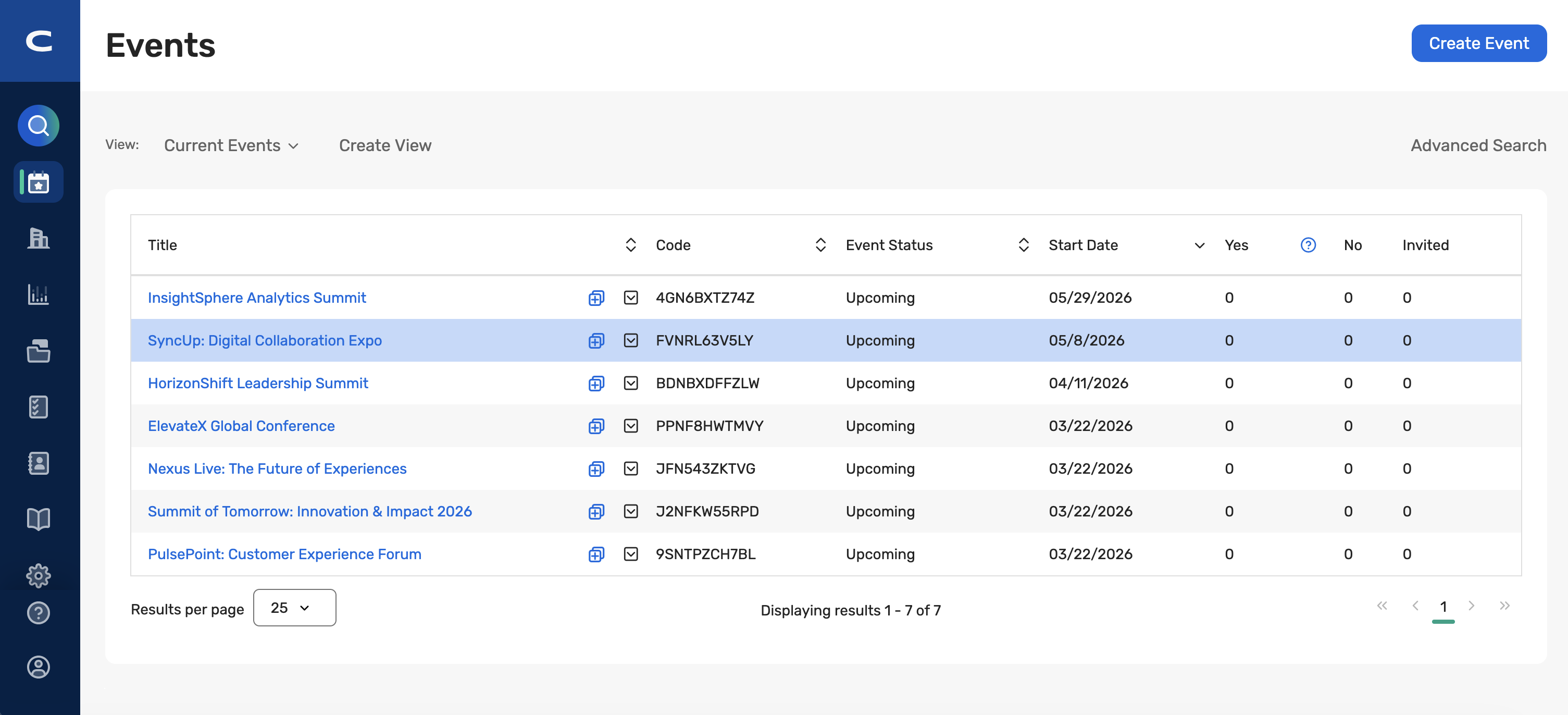
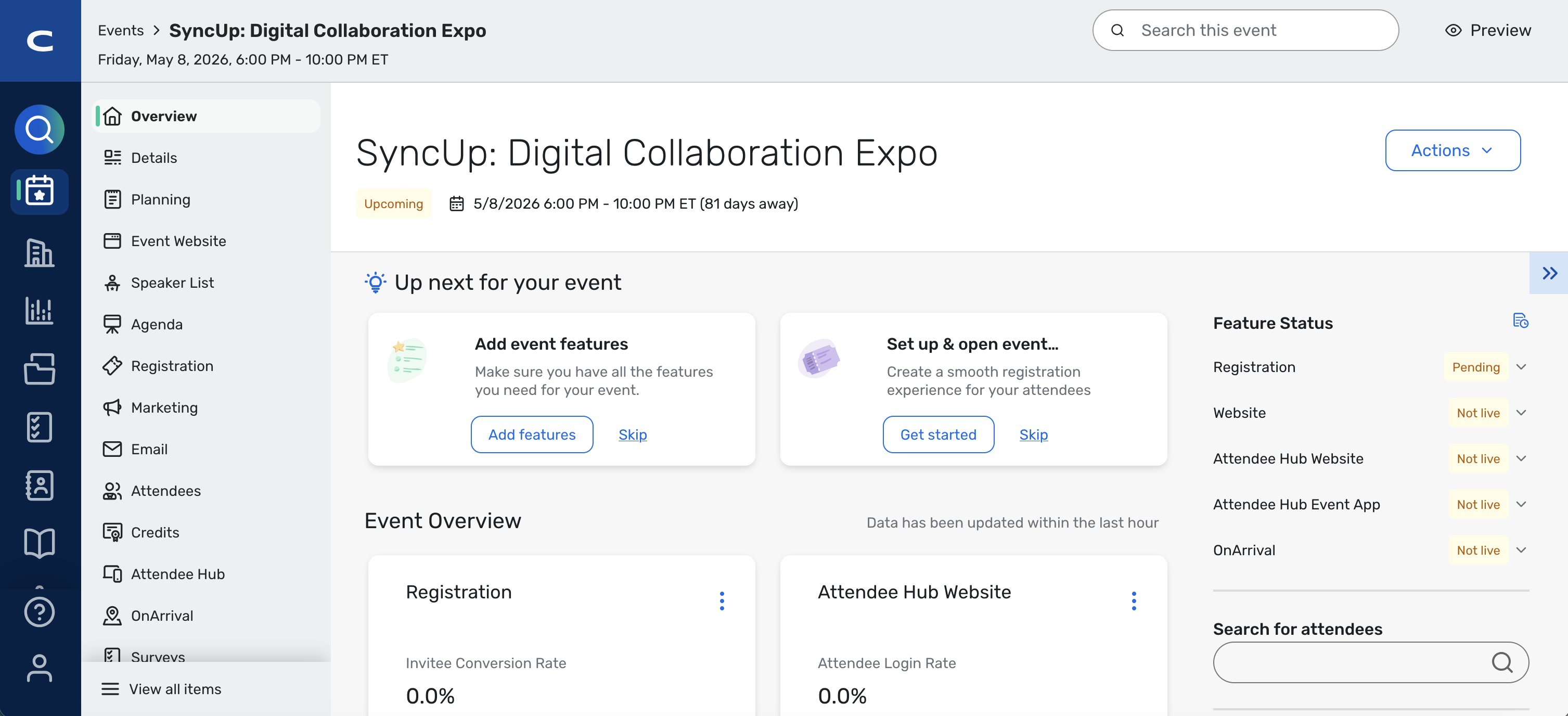
Key capabilities include:
Left-Based Navigation: Navigation moves to a left bar-based global nav that is always available and optimized for user workflows.
App Switcher in the Menu: The app switcher has been removed and integrated into the main navigation to simplify user navigation and reduce steps.
Reorganized Menu Items: Top-level items are reorganized into clearer, more intuitive groupings that better mirror how users think about their work.
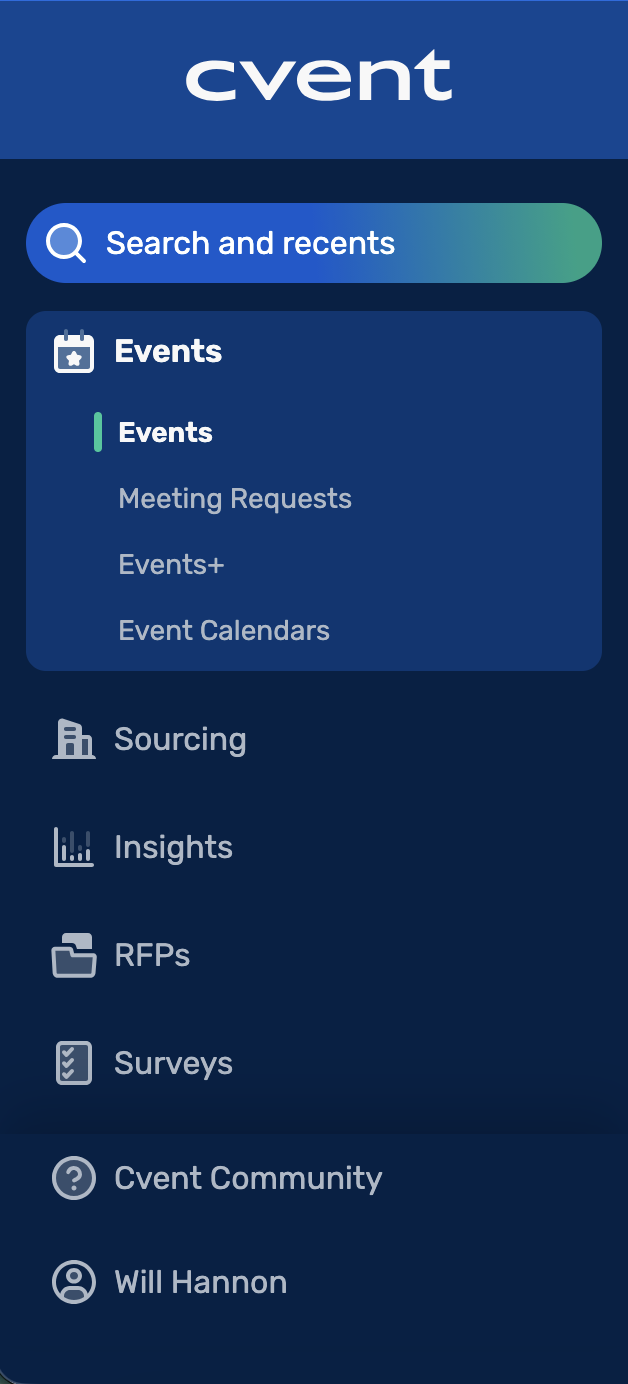
Ability to View All Items: At the event level, you can click to see everything in the event in one place, providing faster access to key event-specific areas directly from the navigation.
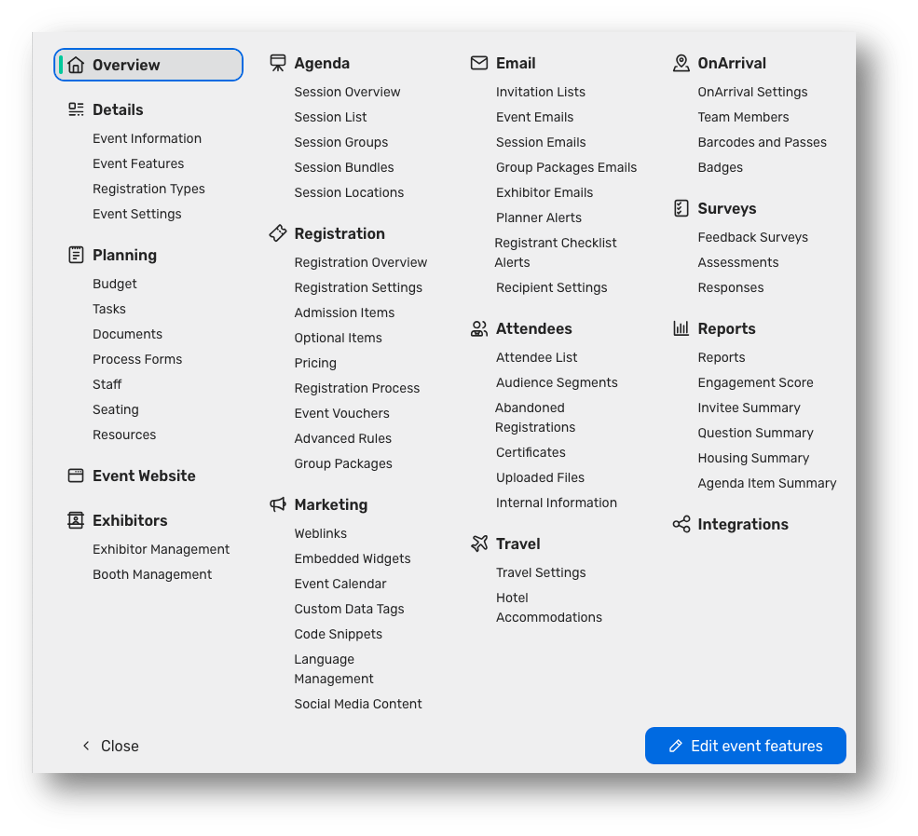
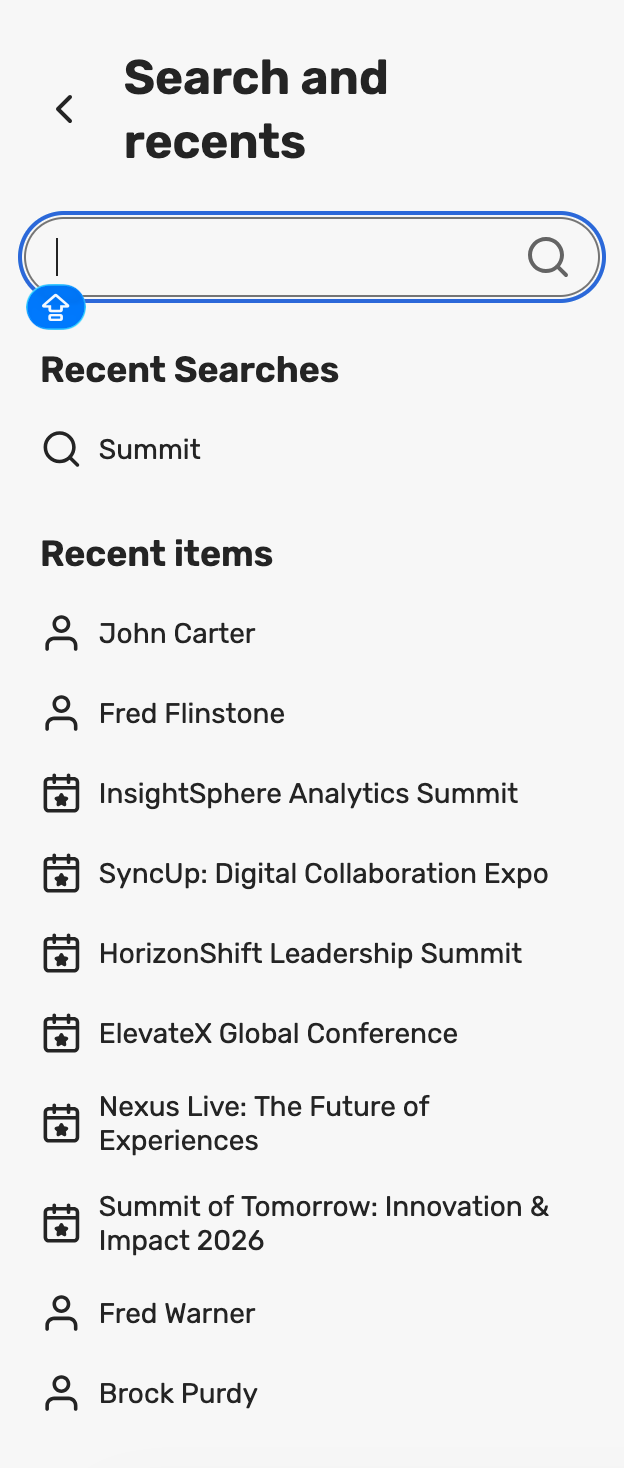
Search and Recent Items Together: Search and Recents are combined into a single, unified entry point so users can quickly search or jump back into recently accessed items from one place.
Updates to Menus
As part of the new navigation, we have also updated the structure of some of the menus, making related capabilities easier to find and manage together. The following changes have been made:
Events
A new Events section consolidates event‑centric experiences (e.g., Events, Webinar, Essentials, Meeting Requests, Events+, and related views).
Suppliers
Sourcing is renamed to Suppliers, with access to RFPs, reports, and related supplier management tools.
Insights
Insights is moved to its own top‑level navigation item, highlighting program‑level reporting, such as Program Insights and Program Reports.
Contacts
Address Book is renamed to Contacts, with supporting features like Membership & Dues and Data Privacy housed under the same umbrella.
Library
A new Library section pulls templates and libraries out of Admin and into a dedicated home for reusable assets, including Files & Assets, Media, Videos, Documents, Questions, Custom Fonts, and Templates (themes, events, surveys, emails, budgets, RFPs, etc.).
These changes to the structure are designed to make it easier for you to find workflows while surfacing the most widely used capabilities in more logical groupings.
What is the Release Plan?

11 March 2026 – 11 April 2026
The new navigation experience will be released, but users will be defaulted to the old navigation.
A banner at the top of the screen will invite them to try the new navigation. They can switch freely between the new and old navigation using the banner.
11 April 2026– 11 June 2026
Users will be defaulted to the new navigation.
They will still be able to switch back to the old navigation via the same banner.
After 11 June 2026
The new navigation becomes the only option going forward.
Switching back to the old navigation will no longer be available.
Who will be affected by the New Navigation?
All users on the platform will receive access to the new navigation. The update will be applied to both Hotel Cloud and Event Cloud customers on the same date and time, ensuring a consistent experience across the platform, regardless of which tool or solution they use.
Event Planning Documents - Retrieval via REST API
The new Event Planning Documents REST API allows you to retrieve all planning documents attached to an event via REST. With this endpoint, external systems (such as data warehouses, compliance tools, and custom integrations) can securely and scalably retrieve event‑level planning documents and their metadata.
With this update, you can:
Retrieve all planning documents for an event via a single REST endpoint
Use "List Event Planning Documents" under Event's category to fetch all documents stored under the event’s Planning section in one call, aligned with our modern REST patterns.Access rich metadata for each document
For every planning document, the API returns key details such as name, MIME type, size, upload date, last modified date, category, description, and who uploaded/last modified the file, making it easier to drive auditing, reporting, and internal workflows.Download files via secure, time‑limited links
Instead of permanent public URLs, integrations receive signed CDN URLs with a platform‑standard TTL (around 60 minutes). This helps protect sensitive documents while still supporting automated jobs and downstream systems that need file content.Filter and paginate for efficient integrations
The endpoint supports filters (e.g., bymimeType,uploaded,lastModified,category,name) and token‑based pagination with a configurablelimit(up to 200), so integrators can tune calls for nightly syncs, delta loads, or high‑volume events.
Two-Way Passkey Integration: Assignment of Room Blocks for Known Invitees Using Access Codes
With this enhancement to the two-way Passkey Integration, you can now assign known invitees to specific Passkey room blocks. This grants an additional level of flexibility beyond existing mapping based on Registration Path or Admission Item. Previously, the limited mapping options forced you to create additional paths/admission items if you needed to send different registrants to different room blocks based on their attendee types.
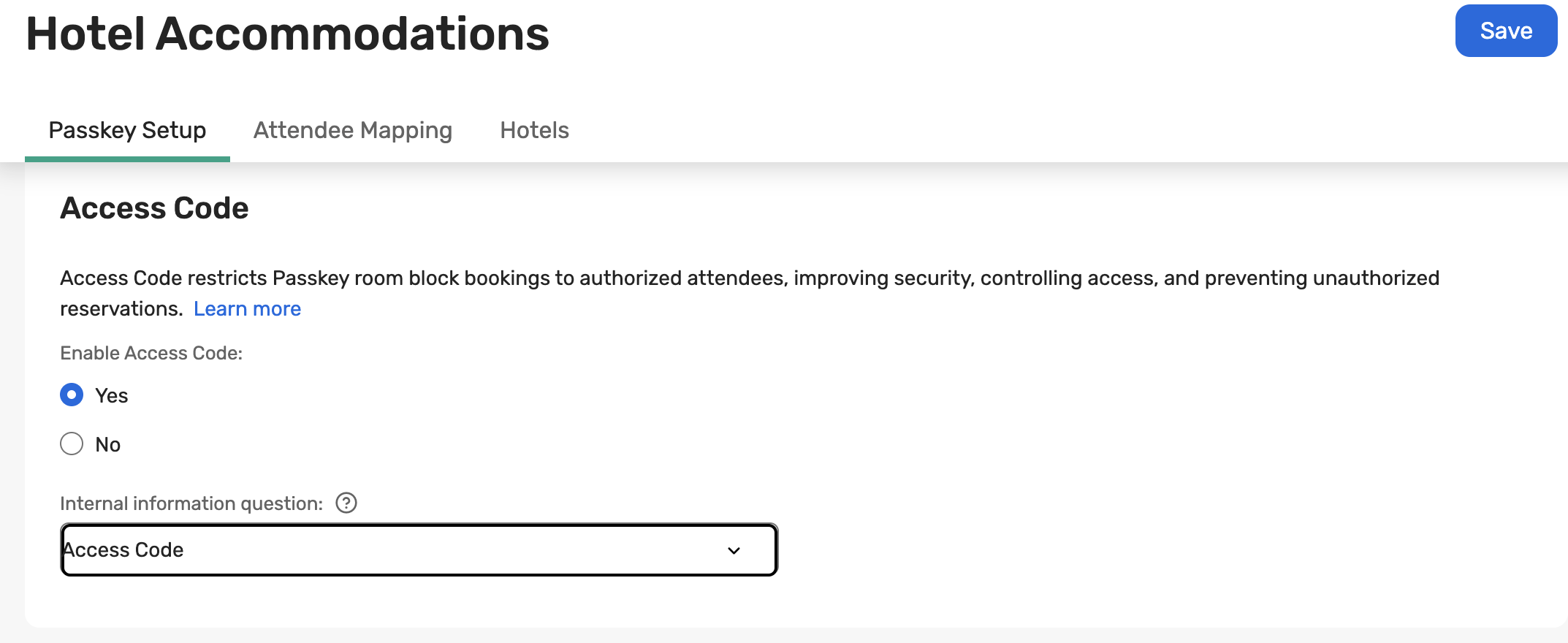
This enhancement to the Passkey Integration enables you to store a Passkey access code on each invitee using the Internal Information questions and have Cvent automatically assign the correct Passkey attendee type at registration completion. This reduces duplicate configurations and saves time for those who need to allocate known invitees across different hotels and sub-blocks while keeping a common registration experience.
You can configure which internal information question stores the access code:
Important Notes:
The Internal Information–based mapping works along with the existing Registration Path/Admission Item mapping; effectively, it acts as an override when the internal question has a value, and falls back to Registration Path/Admission Item when it does not.
The value in the Internal Information answer must exactly match the access code configured for the Passkey attendee type for the mapping to be applied.
The Attendee Type is assigned as soon as the registration is completed. So, the internal information question must already contain the correct access code before the invitee completes registration; otherwise, the system will use the Registration Path/Admission Item mapping instead. So, if you update the access code value for an invitee after they register, the attendee type already assigned to them will not be updated. The attendee type for existing reservations can be changed by logging into the Passkey event.
Bulk Session Tagging Enhancements
Managing tags for large, complex agendas used to mean painstaking, session‑by‑session updates and a constant risk of inconsistent categorization. This release transforms session tagging from a tedious chore into a fast, scalable workflow.
With Bulk Session Tagging, you can now:
Apply tags in bulk to up to 200 selected sessions in a single action, dramatically reducing manual effort for large events.
Associate up to five tags per session, giving each session rich, consistent categorization while maintaining clear and manageable limits.
Search and filter sessions by tags during tagging, making it easy to quickly find, update, and validate the right sessions.
Rely on faster, more robust performance for bulk tagging actions, thanks to architectural improvements in the Content Tagging Service designed specifically for high‑speed processing at this scale.
You can now confidently use tags as a primary organizing tool for your agendas—without worrying that tagging large catalogs will slow you down or introduce inconsistencies.
Important Notes
Bulk tagging capacity
Tag up to 200 sessions at once in a single bulk action.
Each session supports up to five tags, helping keep categorization powerful but controlled.
Better findability while tagging
Search for sessions and filter by tags within the tagging experience to quickly locate sessions that need updates and confirm that tags are applied consistently across the agenda.
Performance
The Content Tagging Service has been enhanced to handle high‑speed processing of bulk tag associations at this new scale
Before vs. after
Before: Tagging large numbers of sessions was slow and repetitive, often requiring individual updates
After: You can operate at scale—curating and maintaining a well‑tagged session catalog in a fraction of the time, with clear rules and reliable performance.
Additional Resources
Cvent Community: Do you have questions about the updates we've rolled out this window? As always, get questions answered in the Community via the Open Forum.
Beta Opportunities Page: Help us make Cvent Products better by being the first to test products before they're widely available. Join Beta Programs.
UX Research Panel: Be part of a select group of users who will help guide the future of Cvent's products. Join the UX Panel.
Quarterly Product News Webinar: Register now for our upcoming Q1 2026 Product News webinar planned for March 4. Secure your Spot.