- DATE:
- AUTHOR:
- Cvent Product News Team

Plan and Promote Releases for January 28, 2026
Registration
Payment Minimum for Post-Registration Payments
You can now configure a separate minimum partial payment amount specifically for post-registration payments, giving attendees more flexibility in how they pay down their remaining balance over time.
Previously, you were limited to a single partial payment minimum that applied to both initial checkout and any subsequent post-registration payments. This often forced attendees to make relatively large follow-up payments, even when they wanted to offer a more gradual payment schedule after making the initial deposit. This enhancement allows you to define a different minimum for post-registration payments, enabling attendees to pay down their balance in smaller, more manageable amounts while still collecting a strong deposit upfront.
What's Changed?
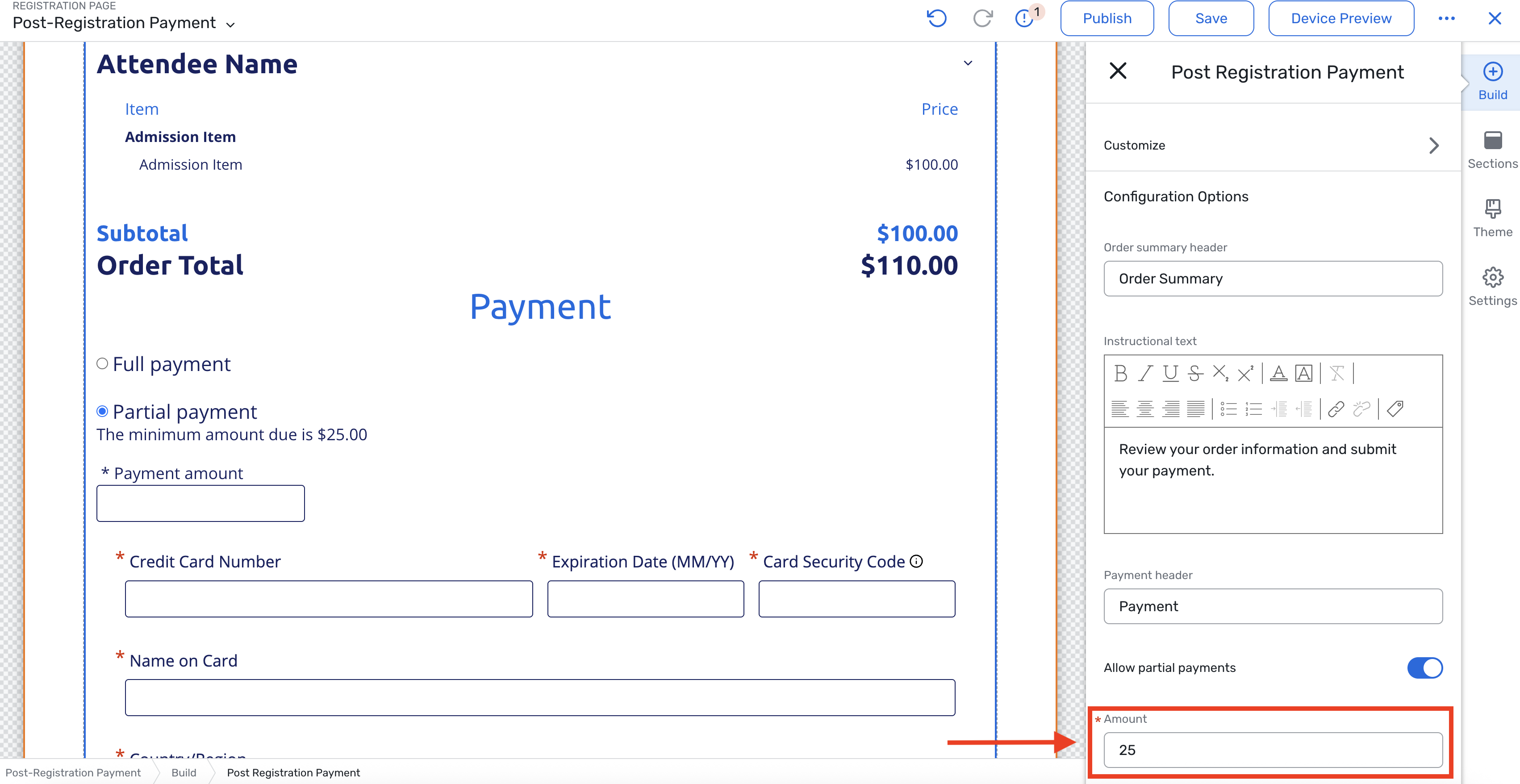
The Post-Registration Payment widget now features its own minimum partial payment amount field, accessible under the "Allow partial payments" setting.
By default, the Post-Registration Payment widget still inherits the partial payment minimum from the main registration payment widget, just as it does today. If planners don’t update the value, it will remain consistent with updates on the registration payment widget.
Once you edit the post-registration payment minimum, that value becomes independent: future changes to the main registration payment widget’s minimum will no longer overwrite the post-registration payment minimum.
Reminders about Existing Partial Payment Functionality
If partial payments are enabled for the main payment widget, it is auto-enabled for the post-registration payment widget.
With "Allow partial payments" enabled on the post-registration payment widget, registrants can continue making partial payments at or above the minimum amount specified until no amount is due.
If the remaining amount due is less than the minimum partial payment, attendees will need to pay the full amount.
Partial payments can be disabled for post-registration payments. If the "Allow partial payments" setting is turned off, attendees are required to make a payment for the remaining full amount.
Exhibitor Management
Hide Booth Staff by Default
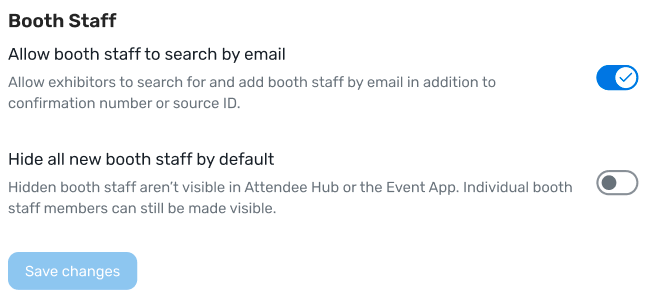
This new setting for Exhibitor Management enables you to determine whether newly added booth staff are visible to attendees in the Attendee Hub. Previously, you had to manage visibility separately for each booth staff member. With this update, you can select the default visibility setting for booth staff when they are added, providing a quicker option for large-scale changes.
Important Things to Know
This setting is "off" by default.
After this setting is enabled, any newly added booth staff are automatically hidden.
This setting will not retroactively change the visibility status for existing booth staff.
Planners and exhibitor admins may still change the visibility status per booth staff.
This setting can be found in the settings page of Exhibitor Management and cannot be managed during the exhibitor import process.
Additional Resources
Webinar Invite: Must Know Event Trends for 2026 – Join us Thursday, January 15, to learn more about the top event industry trends of 2026. Register Here.
Q4 Product News Webinar: If you missed our Q4 round-up webinar, listen on demand HERE.
Cvent Community: Do you have questions about the updates this window? Get questions answered via the Community Open Forum.
Beta Opportunities: Help us test products/features before they're launched. Join Beta Programs.