- DATE:
- AUTHOR:
- Cvent Product News Team

Trade Show Solutions Releases for October 21, 2026
Products covered under Trade Show Solutions are iCapture and Jifflenow.
Reminder: The Jifflenow release dates will have slightly different launch dates from the Cvent cadence in the near future, as we continue to align product release development work. This post features four Jifflenow releases, and one iCapture release.
Jifflenow
Copied On Demand Reporting Templates
Expected Release: October 1, 2026
Find attendee registration status at a glance—no exports or spreadsheets needed.
What’s Changed
A new Registration Status filter in Event User Management lets admins find attendees who are Registered, Unregistered, or Not Registered.
Use it for both internal and external attendee lists, and combine it with existing filters like name or role.
It’s available in the web experience with no setup required for admins who can access User Management.
Benefit
Skip spreadsheet exports, find unregistered attendees right away, and keep headcounts current as registrations change—so you can act early and reduce the last-minute scramble.
CC Archive Email Support
Expected Release: October 16, 2026
It's now easier to meet internal email-archiving requirements by automatically copying outbound notifications to your company archive—without changing the attendee experience.
What’s Changed
When your archive address is configured, Jifflenow will BCC every outbound email, including confirmations, reminders, cancellations, calendar invites, and notifications.
Archiving covers emails sent to both external attendees and internal users.
Your Customer Success Manager will manage the archive address in Company Basic Settings.
The BCC address won’t be visible to recipients, and email content and delivery will remain unchanged. Accounts without an archive address configured won’t be affected.
Benefit
Keep a copy of Jifflenow communications in your company archive automatically—no manual forwarding and no changes to your existing email workflow or the recipient experience.
Permanently Delete Meetings
Expected Release: October 23, 2026
Remove test entries and duplicates for good—one meeting at a time or in bulk—and keep your meeting reports focused on real activity.
What’s Changed
Meeting Managers can permanently delete upcoming meetings from the Jifflenow web platform, individually or in bulk. Deleted meetings are removed from dashboards, meeting lists, and reports.
When a future-dated meeting in Pending or Active status is deleted, attendees automatically receive a cancellation ICS to update their calendars.
Each deletion is recorded in event history, including what was deleted, when, and by whom.
Benefit
Spend less time cleaning up reports and more time acting on accurate meeting data. Bulk deletion makes it easier to clear test entries and duplicates, while automatic calendar updates help keep attendees in sync.
Important: Deletion is permanent. Meeting Managers can’t delete past or ongoing meetings, and should use this feature intentionally—not as a substitute for cancellation.
Forwarded Invite Participant Tracking
Expected Release: October 23, 2026
Track accepted forwarded calendar invites automatically, so your Jifflenow meeting records reflect who’s actually attending.
What’s Changed
When someone accepts a forwarded ICS invite, they’re automatically added to the meeting and receive future updates.
The meeting requestor gets an email with the new participant’s details and a link to edit the meeting.
If adding the participant exceeds room capacity, the requestor is alerted. The participant is still added.
Each acceptance is recorded in meeting history. The feature is off by default and can be enabled for individual events.
Benefit
Invites don’t always stay with the original guest and now the accepted guest is added to the Jifflenow meeting and kept in the loop on future updates, while the requestor gets the context to follow up or adjust plans. If the room is over capacity, that’s flagged before the meeting—not discovered when guests arrive. The result: a clearer attendee list, fewer surprises, and more confidence in meeting logistics.
iCapture
Lead Form Controls
Expected Release: October 22, 2026
Customize lead forms and kiosk settings yourself—putting the controls you need in your hands, without relying on support.
What’s Changed
Set contact fields for each event and choose which are required or optional.
Choose a scrolling form or page-by-page questions, and manage kiosk settings—including the reset timer, screen saver, back button, and auto-redirects—in one place.
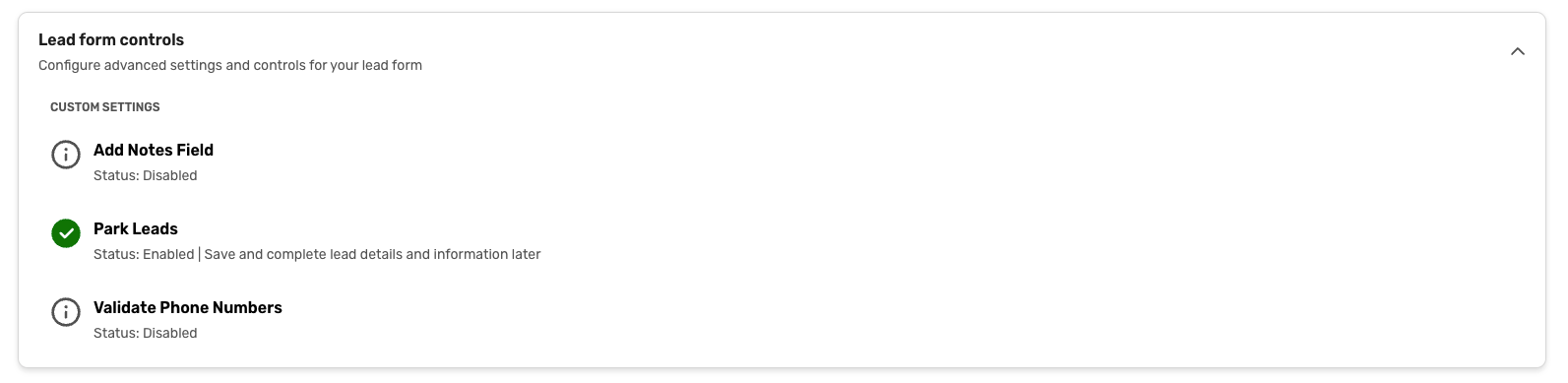
Turn the notes field on or off and place it at the top or bottom of the form.
Edit answer values and form styling, add your logo, change button colors, and enable phone number validation.
Use a refreshed Lead Form Setup experience designed to improve usability and performance.
Benefit
The controls are in your hands. Customize lead forms and kiosk settings for each event yourself, so you can create the experience you want without relying on support.
Salesforce Email Activity Logging
Expected Release: October 22, 2026
iCapture emails, now visible in Salesforce. Sales can see event follow-up right on the related Lead or Contact record.
What’s changed
Booth emails, automated follow-ups, and delayed emails sent through iCapture are logged as completed Salesforce Tasks.
Each Task includes the sender, event, full email body, and any included resources.
Choose which lead forms log email activity. If you have multiple Salesforce integrations, each enabled integration creates its own Task.
Logging uses Salesforce’s standard Task object—no custom fields, objects, or field mapping to configure.
Benefit
Give sales a clearer view of event outreach without asking them to leave Salesforce. Turn on email logging in your Salesforce integration settings and on the lead forms you want to include.
Additional Resources
Cvent Community: Do you have questions about the updates we've rolled out this window? As always, get questions answered in the Community via the Open Forum.
Beta Opportunities Page: Help us make Cvent Products better by being the first to test products before they're widely available. Join Beta Programs.
UX Research Panel: Be part of a select group of users who will help guide the future of Cvent's products. Join the UX Panel.