- STAGE:
- Development
- PROJECTED DONE:
- Q3 - 2026
iCapture: Lead Form Controls
Expected Release: Q3 2026
We’re enhancing Lead Form Setup to give you more precise control over how leads are captured for each event.
These updates will roll out automatically to all users; no action or enablement is required on your end.
With this release, you’ll be able to:
Configure contact fields on a per-event basis, including which contact fields are required vs. optional. This makes it easier to tailor lead capture to each event’s goals—for example, using fewer required fields for high-volume events and more detailed required fields for high-value experiences.
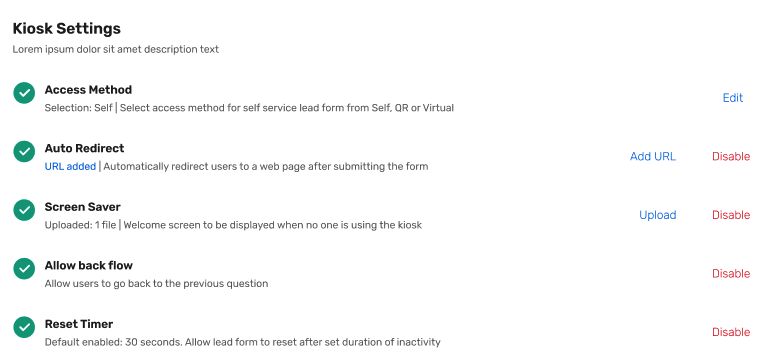
Configure more settings that control how the kiosk itself functions. You’ll be able to choose between a scrolling lead form or page-by-page questions layout, and configure kiosk behavior in one place with options for the reset timer, screen saver, back button, and auto-redirects from the Kiosk Settings section.
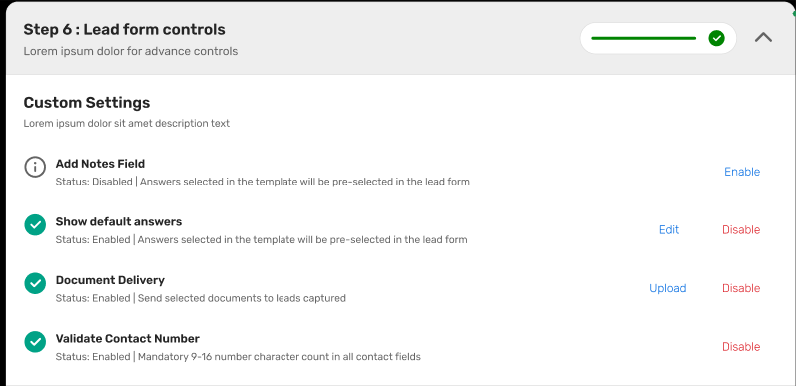
Configure the add notes field; move it to the top or bottom of your lead form, turn it on/off on an event level
Edit or Update answer values on each lead form;
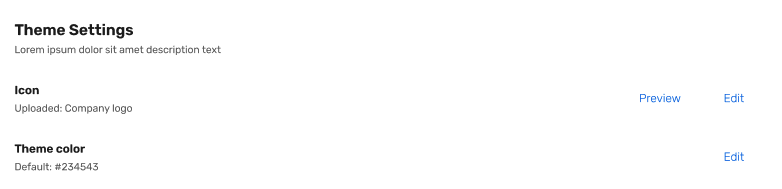
Edit theming; upload your logo, change button colors
Enable Phone number validation controls
You’ll also see a refreshed Lead Form Setup experience as part of our ongoing modernization work, with an updated look and feel that aligns with the rest of the iCapture and Cvent platform while improving overall usability and performance.