- STAGE:
- Development
- PROJECTED DONE:
OnArrival Settings Redesign
OnArrival Settings are being redesigned for simplicity so every configuration option has a clear, logical home. Instead of scrolling through one long page, you now can navigate focused sections that each own a specific part of your setup. Check-in steps are easier to spot, faster to toggle, and - for the first time - configurable at the individual session level so every part of your agenda can have exactly the right experience.
Your existing configurations carry over automatically - nothing needs to be reconfigured. This guide walks you through what's new and where everything moved.
At the bottom of this page, you can see the old settings and where things will be moving.
OnArrival Settings
Check-in Features
Features
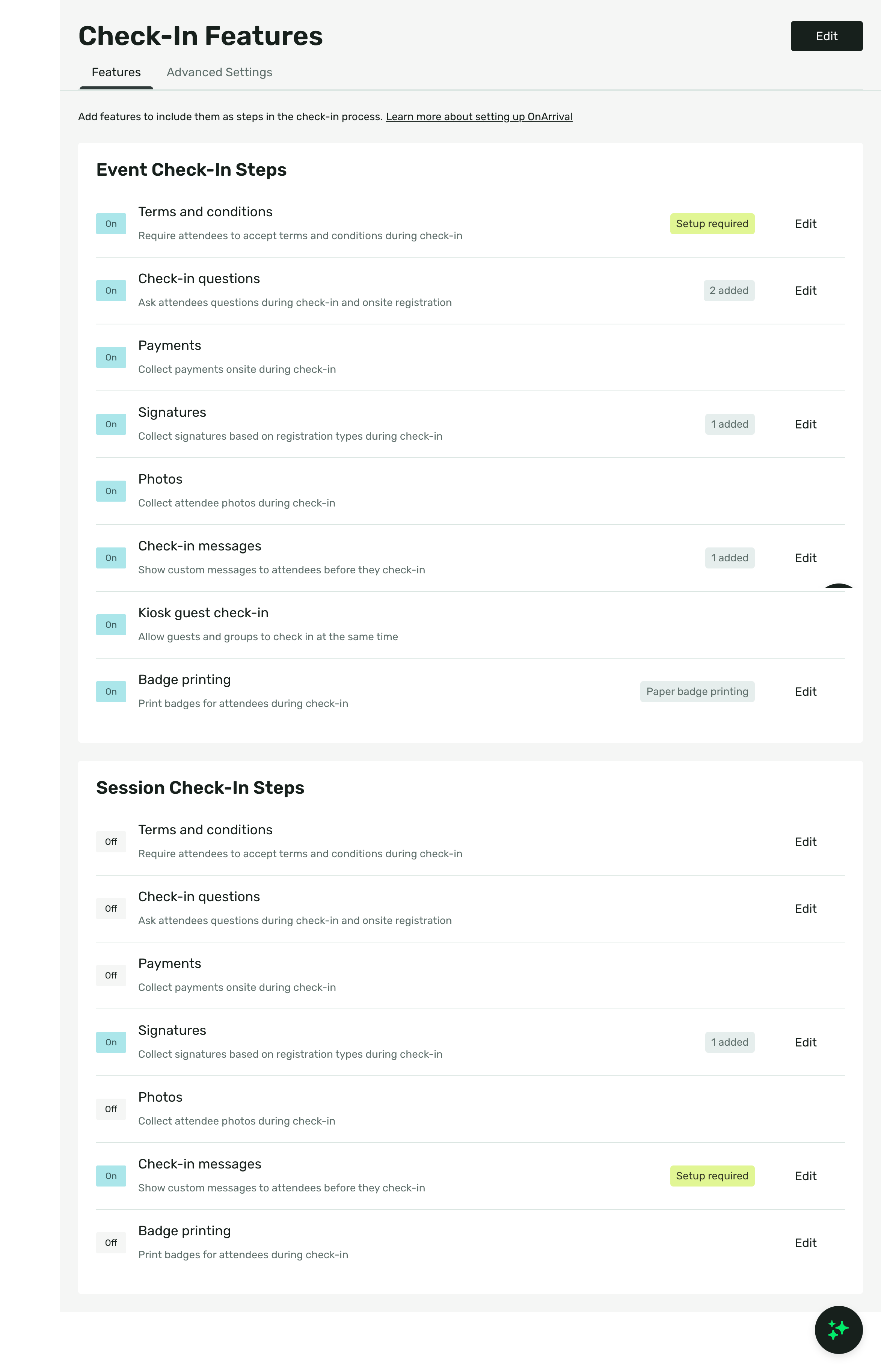
Your new home for every step in the check-in flow. Toggle each step on or off and edit its configuration inline .
Steps and configuration available at the event AND session level:
Terms and Conditions (OnArrival Premium)
Signature (OnArrival Premium)
Photos (OnArrival Premium)
Check-in Messages (OnArrival Premium)
Kiosk Guest Check-In (OnArrival Premium)
Badge Printing (OnArrival Premium)
For the first time, those same steps are configurable at the session level too, with OnArrival Premium. Sessions can have its own check-in experience - sessions default to your event-level setup, so you only adjust the ones that need something different.
Advanced Settings
Controls now grouped into four clear sections within Check-in Features.
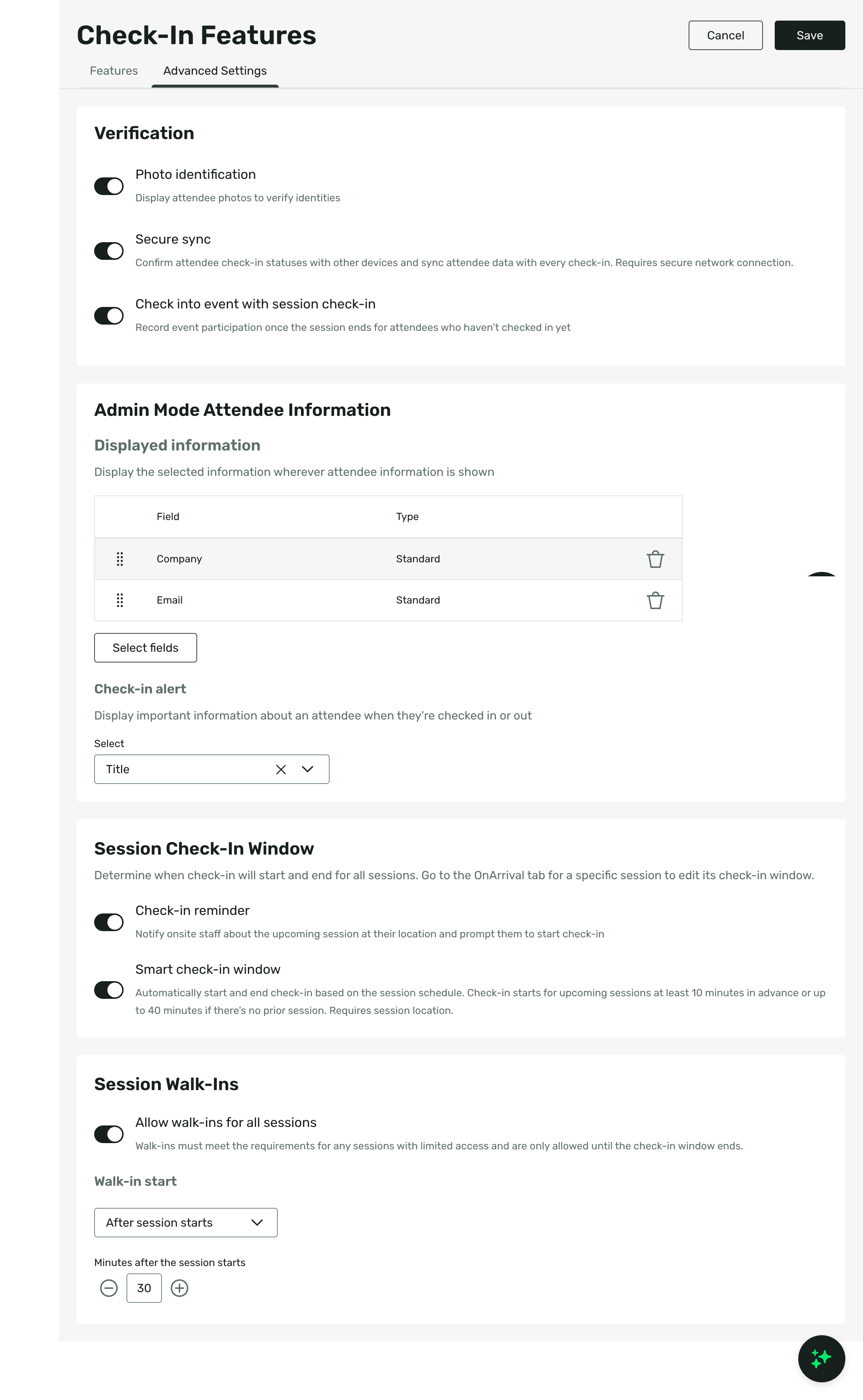
Verification - Photo Identification, Secure Sync, Check into Event with Session Check-In (OnArrival Premium), and Tap to Pay.
Admin Mode Attendee Information - Choose what displays in the attendee list, success screen, and guest list. Set up a Check-in Alert to surface important attendee information as an additional screen during check-in.\
Session Check-Ins (OnArrival Premium)- Set when session check-in opens and closes using Smart timing or manual controls. Add a reminder to notify staff when it's time to begin.
Session Walk-Ins (OnArrival Premium)- Control whether walk-ins are allowed across all sessions, when spots open up, and how many minutes before or after a session starts attendees can join.
Registration
All onsite registration options in one place. Choose between Simple Registration for a lightweight guided flow or Full Registration to use your registration website onsite. Kiosk Registration (OnArrival Premium) is configured separately - toggle it on, choose the registration mode, select which paths are allowed, and configure the fields attendees fill in. The Self-Registration QR Code is here too.
Kiosk
(OnArrival Premium)
Three dedicated tabs for everything that displays on the kiosk.
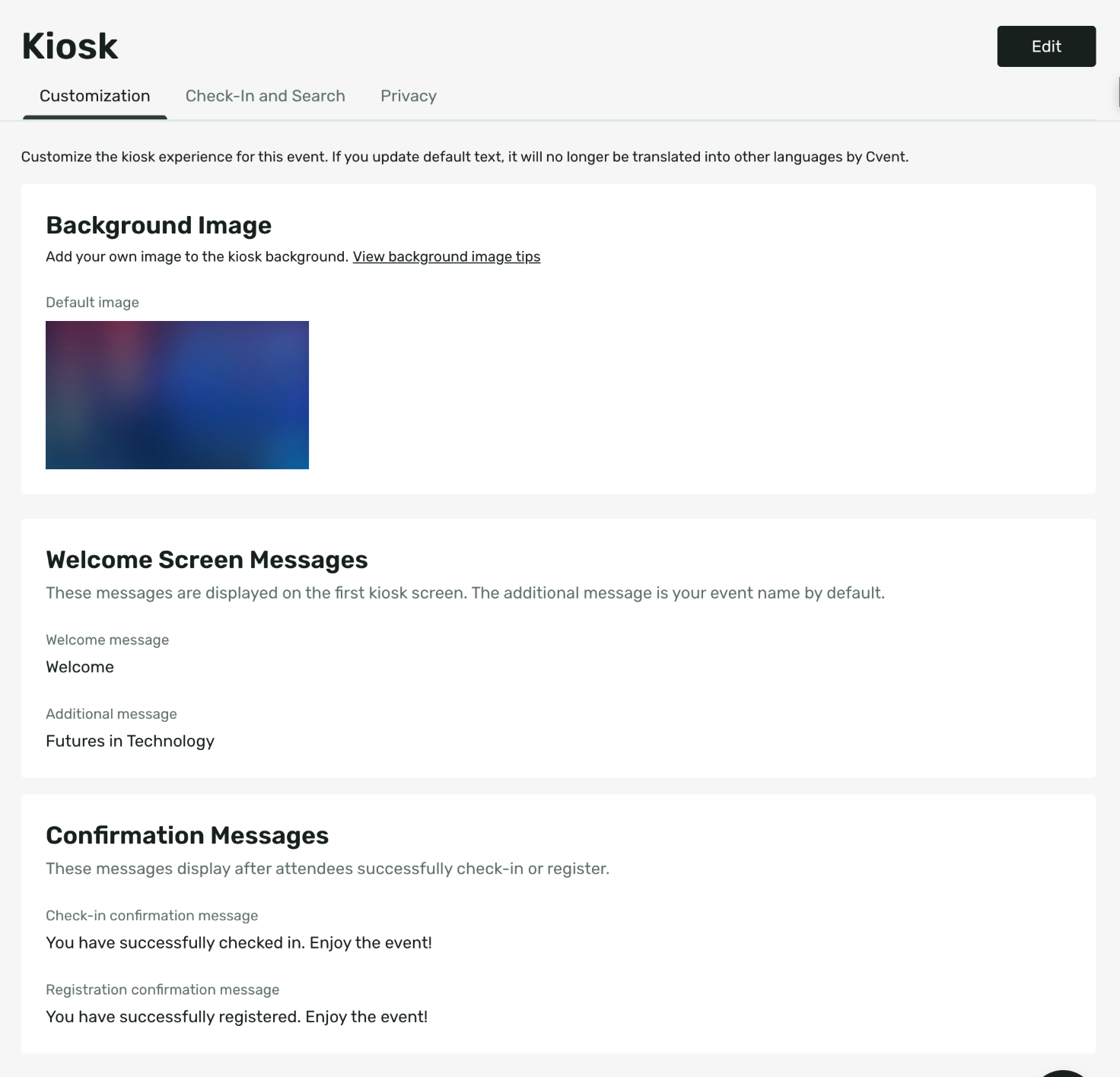
Customization
Background image, welcome message, additional message, and confirmation messages for check-in and registration.
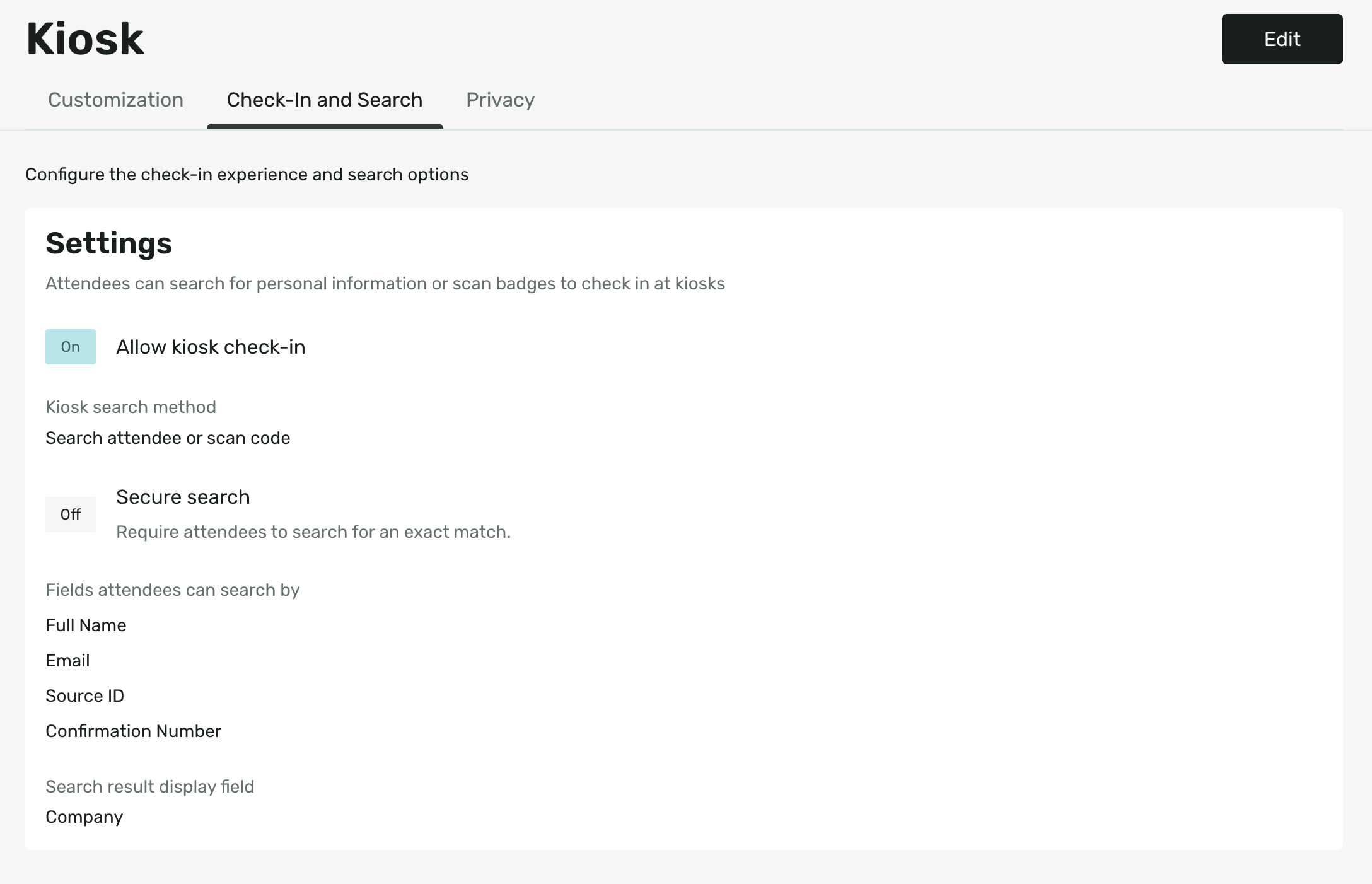
Check-in and Search
Kiosk check-in on/off, search method (search/scan/search and scan), secure search, search fields, and search result display field.
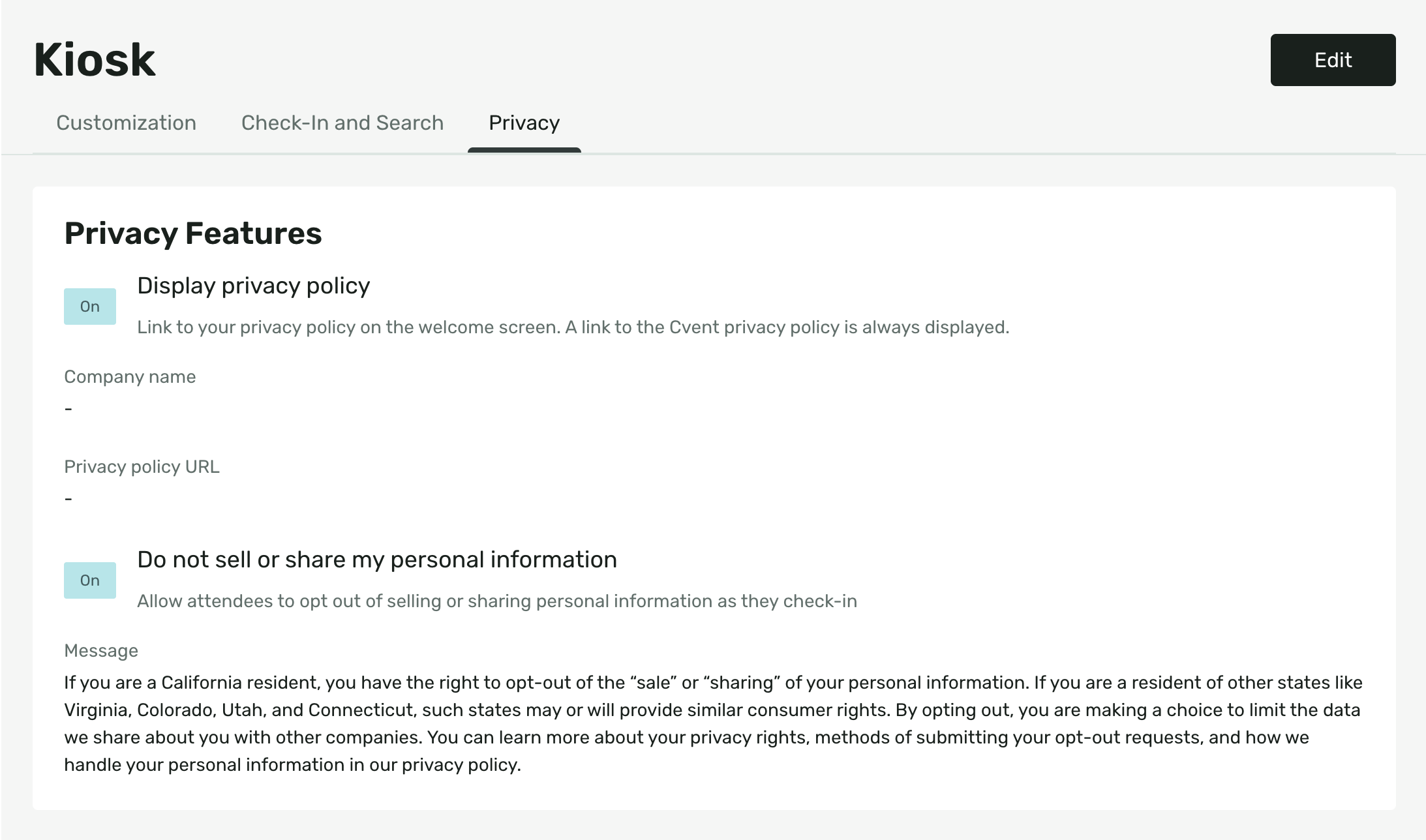
Privacy
Display privacy policy on kiosk, which requires company name, policy URL. Optional Do Not Sell or Share opt-out with editable consent text which shows when registering new attendee.
Badge Printing
(OnArrival Premium)
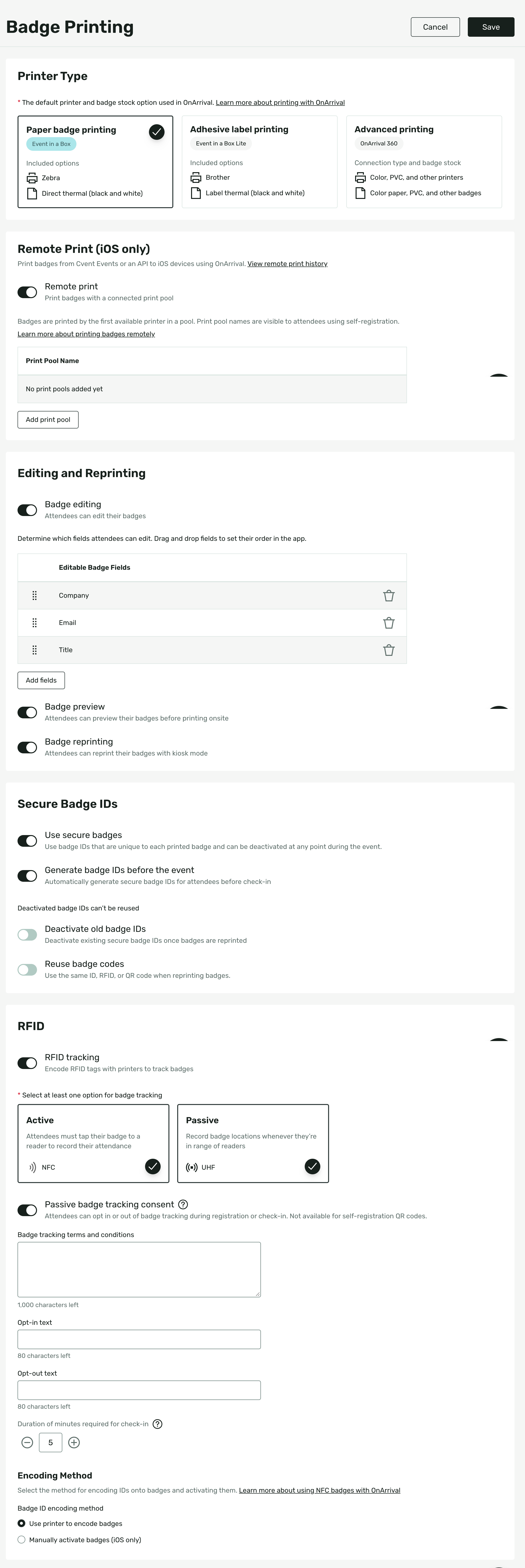
Everything badge-related in one dedicated section.
Badge Printing
Select your printer type based on your hardware - Paper Badge Printing (Event in a Box, Zebra), Adhesive Label Printing (Event in a Box Lite, Brother), or Advanced Printing for color PVC badges, advanced printing, and AirPrint (requires OnArrival 360).
Remote Print (iOS only)
Route badge print jobs from Cvent Events to iOS devices via named print pools. Badges print to the first available printer in a pool. Pool names are visible to attendees using self-registration so they know where to collect their badge.
Editing and Reprinting
Toggle badge editing on or off and configure which fields attendees can edit, with drag and drop ordering. Enable badge preview so attendees can see their badge before it prints, and badge reprinting so attendees can reprint via kiosk mode.
Secure Badge IDs
On by default for all customers. Control whether badge IDs are generated before the event, deactivated on reprint, or reused when reprinting.
RFID
Requires OnArrival 360. Choose Active (NFC) for tap-based short-range tracking or Passive (UHF) for long-range tracking - both require RFID-capable printers and badge stock. When using UHF, Passive Badge Tracking Consent is an option to let attendees opt in or out of tracking at check-in, with customizable consent text. Encoding method allows you to choose whether your printer encodes NFC onto badges at print time, or whether badges are activated manually after printing via tap or iOS activation.
Your Old Settings, and Where They Are Now

Old Setting | New Location |
|---|---|
Check-In Verification | |
On/Off (event check-in) | Check-in Features > Features > Event Check-In Steps |
Secure Sync | Check-in Features > Advanced Settings > Verification |
Payment collection | Check-in Features > Features > Event Check-In Steps > Payments |
Photo collection | Check-in Features > Features > Event Check-In Steps > Photos |
Photo identification | Check-in Features > Advanced Settings > Verification |
Check into event with session check-in | Check-in Features > Advanced Settings > Verification |
Attendee List and Alert Info | |
Attendee List display fields | Check-in Features > Advanced Settings > Admin Mode Attendee Information |
Email display field | Check-in Features > Advanced Settings > Admin Mode Attendee Information |
Check-in Alert | Check-in Features > Advanced Settings > Admin Mode Attendee Information |
Badge Printing | |
Enable OnArrival Badge Designer | Badge Settings > Badge Printing |
Printer Type | Badge Settings > Badge Printing > Printer Type |
Associate Badges | Badge Settings > Badge Printing |
Editable badge fields (First Name, Last Name, Company) | Badge Settings > Badge Printing > Editing and Reprinting |
Remote Print | |
Remote Print on/off | Badge Settings > Badge Printing > Remote Print |
Print pool names | Badge Settings > Badge Printing > Remote Print |
Kiosk Mode - General Settings | |
Attendee Search on/off | Kiosk > Check-In and Search |
Secure Search | Kiosk > Check-In and Search |
Search fields (Confirmation Number, Email, Full Name, Source ID) | Kiosk > Check-In and Search |
Search result display field | Kiosk > Check-In and Search |
QR Code Scanning on/off | Kiosk > Check-In and Search |
Badge Printing in kiosk on/off | Kiosk > Check-In and Search |
Badge Editing in kiosk on/off | Kiosk > Check-In and Search |
Guest check-in on/off | Check-in Features > Features > Event Check-In Steps > Kiosk Guest Check-In |
New Registrations on/off | Registration > Kiosk Registration |
Registration types allowed at kiosk | Registration > Kiosk Registration |
Registration fields (Required, Optional, Hidden) | Registration > Kiosk Registration |
Kiosk Mode - Background Image | |
Background image (Default / Custom) | Kiosk > Customization > Background Image |
Welcome message | Kiosk > Customization > Messages |
Additional message | Kiosk > Customization > Messages |
Check-in confirmation message | Kiosk > Customization > Confirmation Messages |
Registration confirmation message | Kiosk > Customization > Confirmation Messages |
Privacy Features | |
Display Privacy Policy on/off | Kiosk > Privacy |
Company Name | Kiosk > Privacy |
Privacy Policy URL | Kiosk > Privacy |
Do Not Sell or Share My Personal Information on/off | Kiosk > Privacy |
Consent message text | Kiosk > Privacy |
Badge Features | |
RFID Attendance on/off | Badge Settings > Badge Features |
Badge Tracking Consent on/off | Badge Settings > Badge Features |
Consent question text | Badge Settings > Badge Features |
Secure Badge ID / Reuse EPC/QR codes | Badge Settings > Secure Badge IDs |
Pre-generate Secure Badges | Badge Settings > Secure Badge IDs |
Session Check-In Window | |
Smart Check-in Window on/off | Check-in Features > Advanced Settings > Session Check-In Window |
Manual check-in start time | Check-in Features > Advanced Settings > Session Check-In Window |
Manual check-in end time | Check-in Features > Advanced Settings > Session Check-In Window |
Check-in Reminder on/off | Check-in Features > Advanced Settings > Session Check-In Window |
Session Walk-Ins | |
Allow walk-ins for all sessions | Check-in Features > Advanced Settings > Session Walk-Ins |
When to open spots | Check-in Features > Advanced Settings > Session Walk-Ins |
Minutes before session starts | Check-in Features > Advanced Settings > Session Walk-Ins |
Recurring Session Questions | |
Ask questions again at each session on/off | Check-in Features > Advanced Settings > Session Check-In Window |
Universal Check-In | |
Universal Check-In on/off | Check-in Features > Advanced Settings > Universal Check-In |
Registration type | Check-in Features > Advanced Settings > Universal Check-In |
Admission item | Check-in Features > Advanced Settings > Universal Check-In |
Required fields for check-in | Check-in Features > Advanced Settings > Universal Check-In |
Unchanged | |
Barcodes and Passes | Barcodes and Passes |
Team Members | Team Members |