- DATE:
- AUTHOR:
- The Supplier & Venue Solutions Product News Team

Attract Group Business Releases for April 22, 2026
Cvent Supplier Network
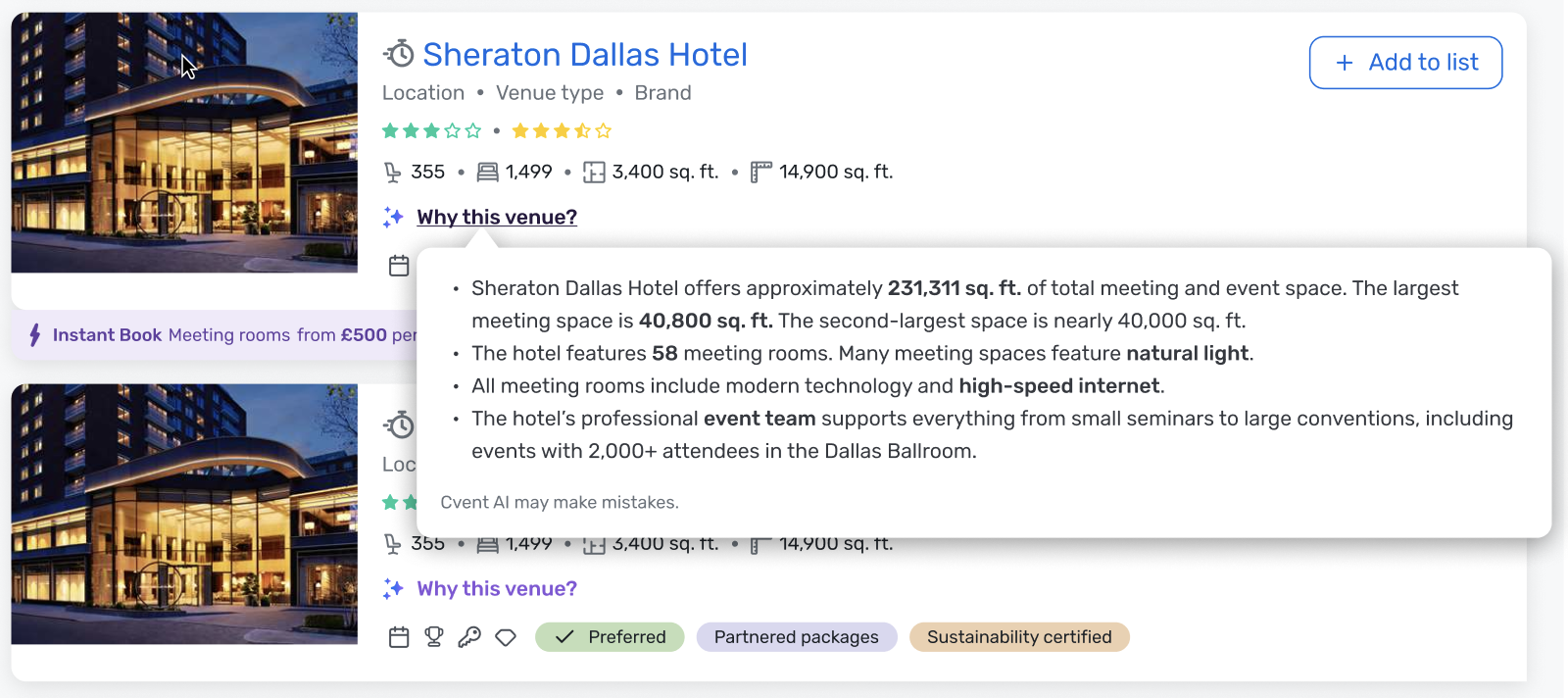
“Why This Venue” AI Summary on CSN Search
Expected Release Date: 04/22/2026
What's Changed: For planners using CSN AI Search 2.0 on desktop, a new “Why this venue?” button will appear on venue cards in the Search Results Page. When clicked, it triggers an on-demand, AI-generated summary that explains why that specific venue is a strong match for the planner’s search prompt, using the content in your CSN profile.
This feature is available only to logged-in planners with AI Search 2.0 access and includes a standard disclaimer: “Cvent AI may make mistakes,” setting appropriate expectations about AI accuracy.
Benefit: This update increases planner trust and confidence in AI-driven search results by clearly connecting your venue’s attributes to a planner’s specific needs. Venues with complete, high-quality, and up-to-date CSN profiles are better positioned for compelling “Why this venue?” explanations, which can lead to faster shortlisting and more qualified planner interest. To maximize value from this feature, ensure your CSN profile is as complete and optimized as possible so AI has the strongest inputs to work with. Review your key profile fields like descriptions, meeting space details, amenities, policies, and other rich content.
Product Visual:
Planner Navigator (Group Pipeline Intel)
Recurring Meetings in Planner Navigator
Expected Release Date: 04/22/2026
What's Changed: We’re adding new ways for you to spot and work recurring business in Planner Navigator’s Organizations You Know view.
With this update, you can:
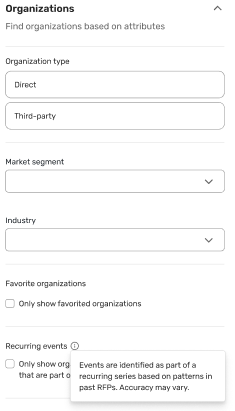
Use a new recurring meetings filter in Organizations You Know to focus on organizations that have sent multiple, related RFPs to your venue(s).
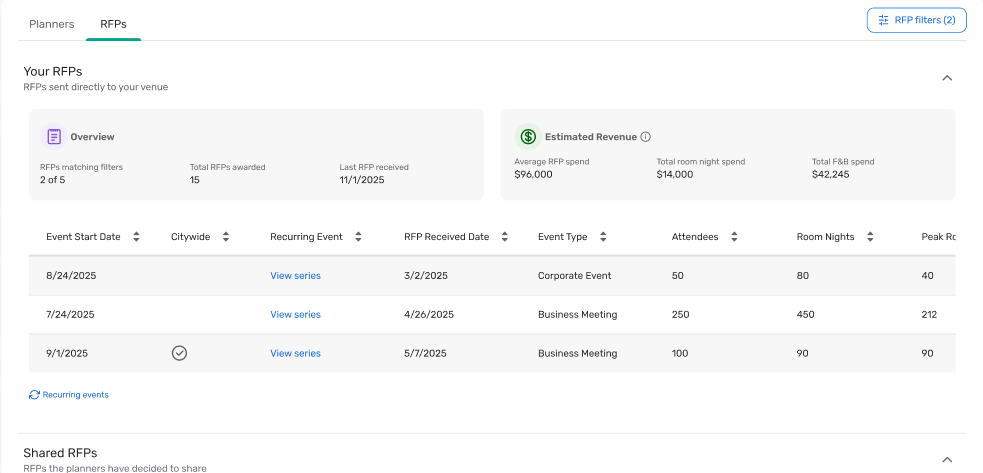
Quickly see which RFPs are part of a recurring series using a new Event History column in the Your RFPs section of the Organizations You Know detailed view.
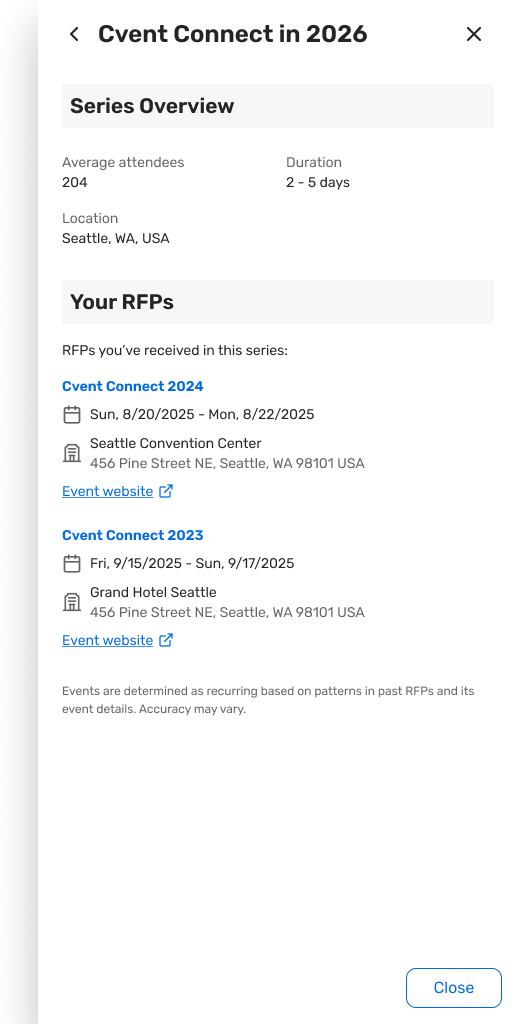
Open a new Recurring Series panel from that Event History column to review high-level series details (like typical duration, format, and locations) and a history of other RFPs in the series you can access.
This enhancement is available to all Planner Navigator users
Benefit: These updates make it easier to uncover and prioritize repeat business, so you can focus your time on the accounts most likely to book again.
Key benefits include:
Identify recurring meetings faster: Spot organizations that send annual conferences, regional meetings, and other repeat events to your venue(s) without manual digging.
See “built-in” future potential: Use recurring series indicators to prioritize leads where there’s a higher chance of future opportunities, like annual or alternating-location events.
Get a clearer account picture in one place: Bring more planner and RFP intelligence into Planner Navigator so you can better understand account health and long-term value.
Reduce manual detective work: Let Planner Navigator automatically group related RFPs based on organization, segment, room needs, and event naming patterns, so you spend less time piecing things together by hand.
How to Access It:
In Planner Navigator:
Open Organizations You Know.
In the Organizations section of the filter panel, apply the new recurring meetings filter to show only organizations with recurring series sent to your venue(s).
In the Your RFPs section of the detailed view, use the new Event History column to see which RFPs are part of a recurring series for that organization, then click the value to open the Recurring Series panel.
Recurring events filter:
Organizations You Know - Event History Indicator and Series Panel
Visit our Community with questions
Do you have questions about anything we’ve rolled out this window?
As always, get questions answered in the Community via the Open Forum.