- DATE:
- AUTHOR:
- The Supplier & Venue Solutions Product News Team

Attract Group Business Releases for October 22, 2026
Cvent Supplier Network
Automate Venue Profiles
Expected Release Date: 10/22/2026
What's Changed: We’re introducing Venue Content APIs that let suppliers and supplier partners update venue profiles on the Cvent Supplier Network programmatically through a direct integration. The APIs cover:
Venue details, including name, type, and other identifying information, plus capacity and space specifications for meeting and exhibit spaces.
Attraction information, ratings, need-date ranges, venue and space images, and venue amenities and facility details.
Meeting room content, including room details, dimensions, capacities, amenities, rates, visibility, and images.
Venue Lead Catcher details to help manage how venue inquiries are handled.
Benefit: Connect your systems to keep venue profiles current without relying on manual updates. Fresh, accurate information can help planners find your venue and understand what you offer.
Spend less time on manual profile maintenance with a more scalable, automated update process.
Help planners find your venue in Cvent Supplier Network search with up-to-date profile details.
Enhance SEO performance and AI-driven search capabilities with current venue content.
Updated Sustainability Filters
Expected Release Date: 10/21/2026
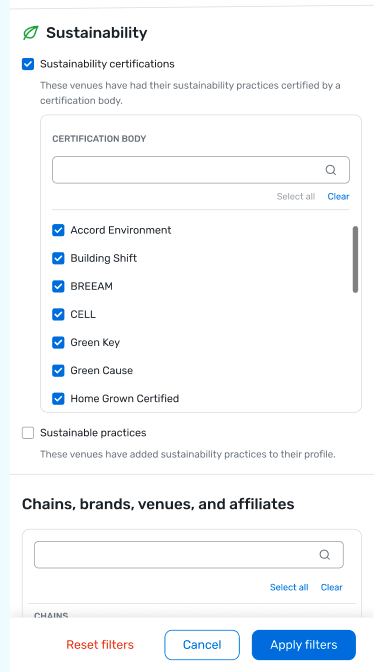
What's Changed: Your venue can now be identified in CSN search results through the sustainability information in your profile.
If you’ve completed the Sustainability FAQs, planners can find your venue under Sustainable Practices.
If your venue has at least one valid sustainability certification, it will appear under Sustainability Certified Venues. Planners can also filter by certifying agency.
This new Sustainability filter replaces the existing Sustainable Practices filter. Updated sustainability indicators on eligible venue result cards will reflect the information you provide in your Sustainability FAQs (the same details planners can review in your profile) instead of an indicator that doesn’t show what your practices are.
Benefit: Show planners what your venue is doing and help them find your venue when sustainability is part of their search. Your profile information and relevant certifications can appear in the search experience, giving planners useful context as they compare venues.
Completed Sustainability FAQs help planners discover your venue under Sustainable Practices and learn about the efforts you describe.
A valid sustainability certification can help planners find your venue under Sustainability Certified Venues; they can also filter by certifying agency.
Updated indicators bring sustainability information to eligible venue result cards.
Visual Element:
Planner Navigator (Group Pipeline Intel)
Event Radar
Expected Release Date: 10/22/2026
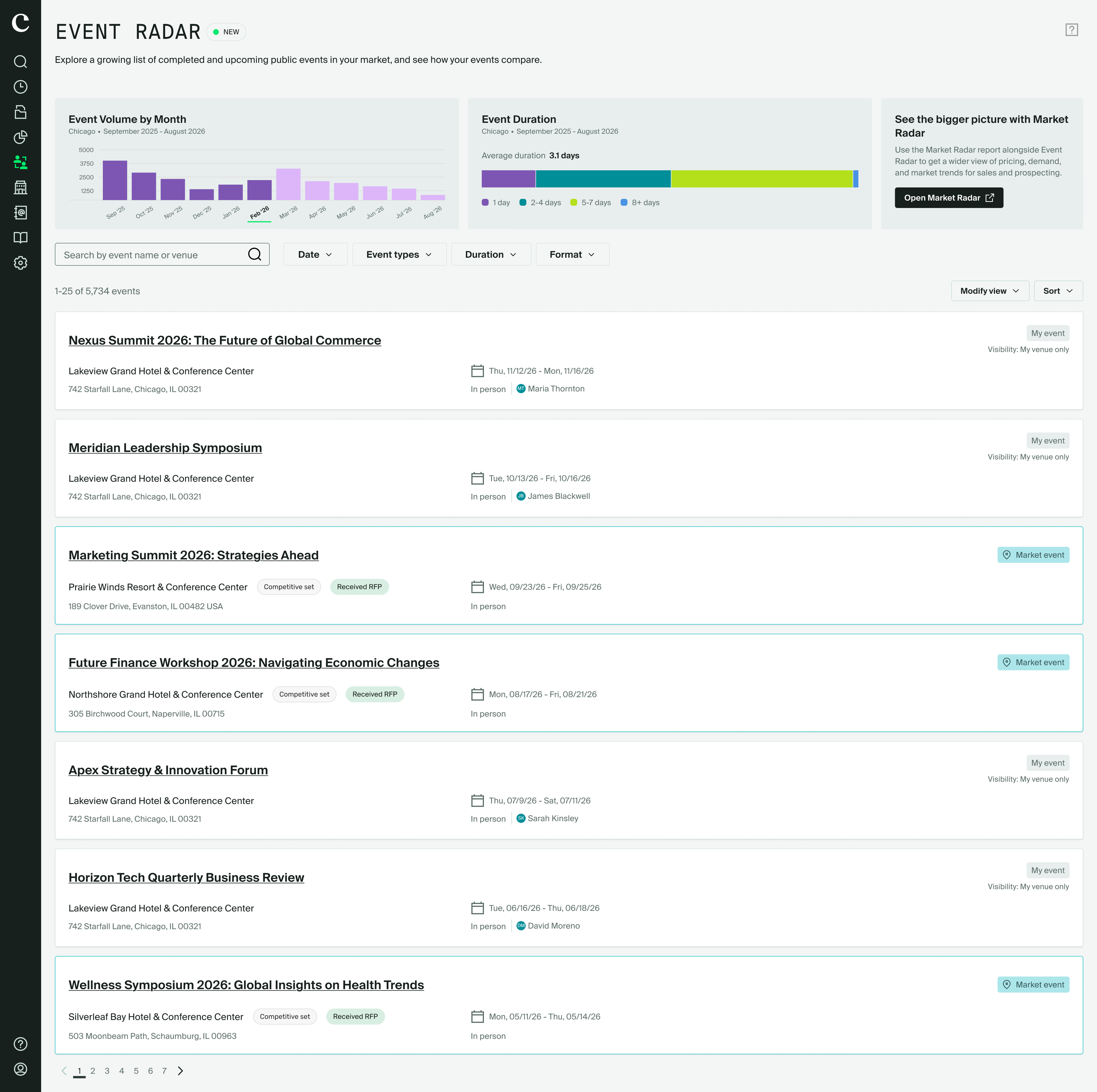
What's Changed: Event Radar adds a searchable view of event activity in your market to Planner Navigator. If you’re a property-level user with GPI access, you can explore your awarded and upcoming events alongside publicly available competitor events.
View all events, just your events, or market events.
Sort events from newest to oldest or oldest to newest, and search by event name, venue, or planner when that information is available to you.
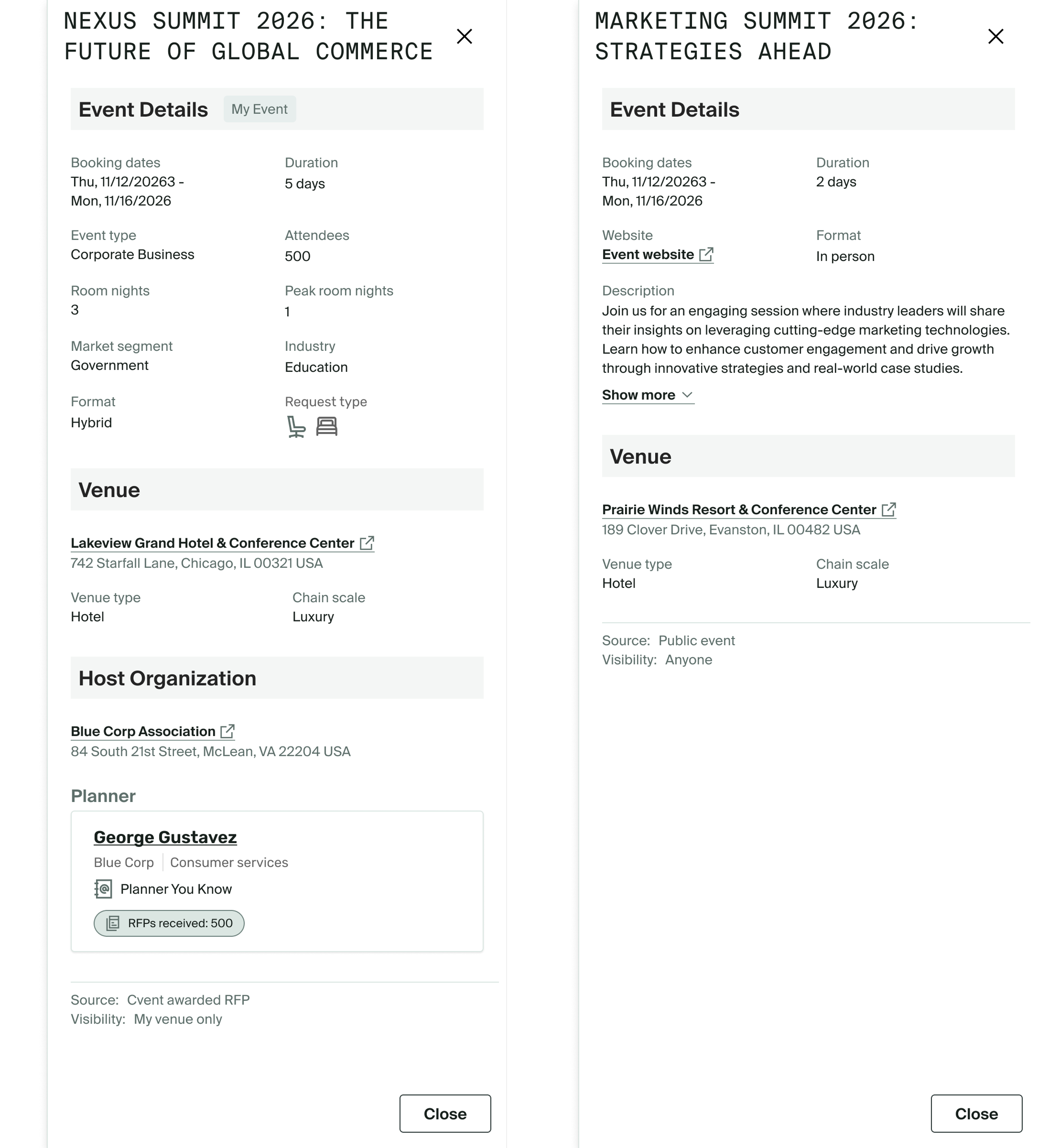
Select an event to see more details. The information shown depends on whether it’s your event or a market event; the source and visibility are identified in the details.
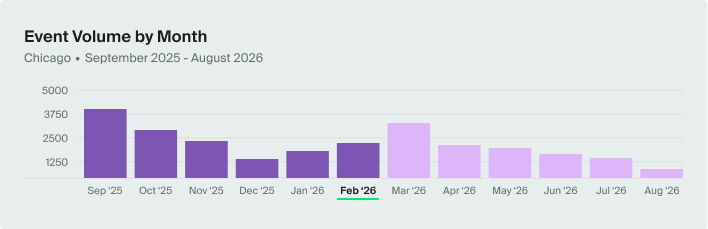
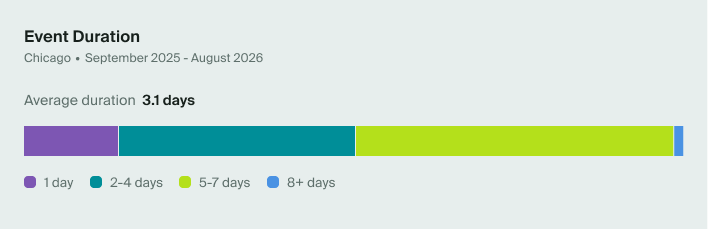
See market trends in two charts: event volume by month and a breakdown of event duration. Both cover the past six months and the next six months. Because these charts use aggregated, anonymized data, they aren’t affected by your event-list filters.
Open your home market automatically—no additional setup is needed at launch.
Event Radar is available from the Planner Navigator navigation menu. You can also move between Event Radar and Market Radar to connect specific event activity with a broader view of your market.
Benefit: Get a clearer picture of the events happening around your property in one place. Use market activity and event details to spot relevant opportunities and plan more targeted outreach.
Visual Element:
Event Radar Dashboard:
Event Volume by Month: See how many events are happening across your market over the past 6 months and the next 6 months.
Event Duration Mix: Understand the breakdown of short, mid, and long-duration events in that same window.
Event List:
Connection to Market Radar:
Visit our Community with questions
Do you have questions about anything we’ve rolled out this window?
As always, get questions answered in the Community via the Open Forum.