- DATE:
- AUTHOR:
- Cvent Product News Team

Exchange Solutions Releases for February 11, 2026
Cvent Passkey
Hotel & Room Filters for Multi-Room Booking
Overview
When searching for reservations within an event, you can now quickly narrow results by hotel and room type. These new filters make it easier to find specific reservations and simplify bulk actions—such as modifications or cancellations—by grouping reservations by hotel and/or room type. You’ll save time and effort when managing reservations, especially when performing bulk operations across multiple bookings.
What’s New
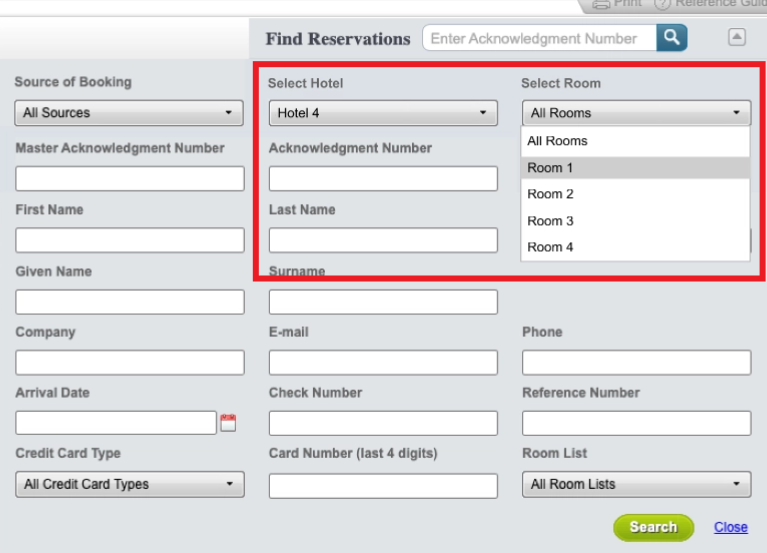
New filter options have been added to the Advanced Search within the MRB (Multi-Room Booking) tool.
You can now select a hotel and optionally a room type to refine your reservation search results.
How It Will Help
Improved flexibility: You can now filter reservations by hotel and/or room type alongside existing advanced search parameters.
Cleaner user experience: Easily avoid sorting through large reservation lists or paging through results to find the hotel and room you need.
Important Notes
The Hotel and Room filters work in combination with other advanced search filters.
The Room filter dynamically updates based on the selected hotel.
If only one hotel is available for the event or accessible to you, it will be automatically pre-populated.
RezHUB Room List Download Simplification
Overview
The RezHUB Room List Download workflow lets non-integrated hotels retrieve and manage reservations for Passkey events. Now, Event Organizers can also export detailed room lists directly from RezHUB.
With this enhancement, users can select specific hotels after choosing an event—making it easier to download targeted room lists and manage reservations efficiently.
What’s New
Event Search: Quickly find and select the events you want to work with.
Selection Counter: Easily see how many events are selected.
Hotel Selection Step:
Choose one or multiple hotels associated with the selected event(s).
Download room lists containing only the reservations for those hotels.
Refined Export: The download workflow and file format remain unchanged; the enhancement adds hotel filtering for more precise exports.
How It Works
Go to RezHUB → Delivery → Download Room List.
If accessed from a specific event, it will be pre-selected; additional events can be added.
Use the event search to find relevant events; select up to 10 (counter displays the number selected).
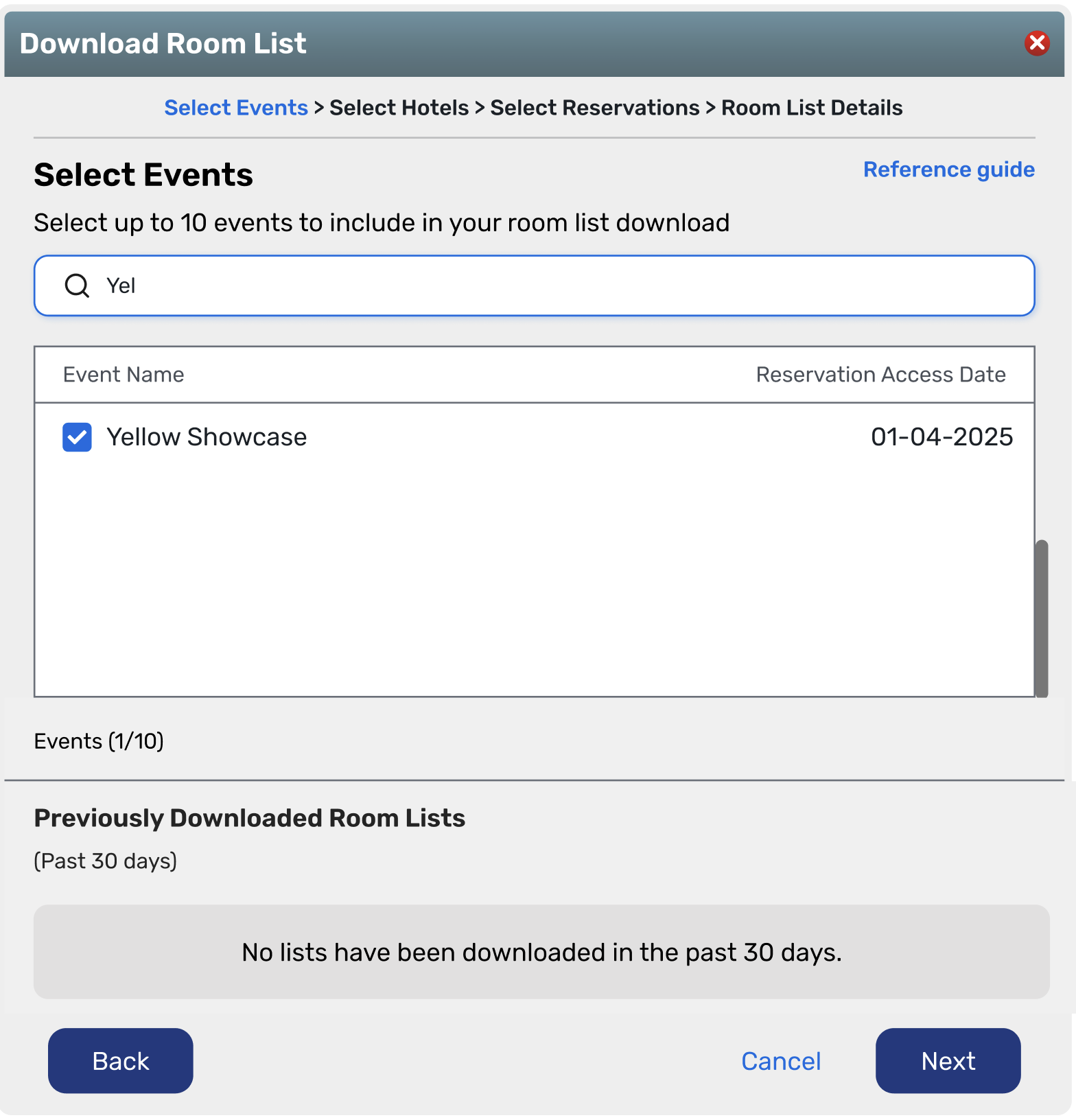
Select Hotels: Choose one or more hotels associated with your selected events to include in the room list.

Targeted Export: The downloaded room list will include only reservations for the event(s) and hotel(s) you selected.
Important Notes
Event Selection Limit: Up to 10 events can be selected per download.
Selection Counter: A counter appears beneath both the event and hotel selections to help confirm your choices.
Date Change: Planner Portal Update - Share Event Summaries with External Stakeholders
New Release Date: 02/11/2026
You can now share or download summaries of your closed events directly from the new Passkey Planner Portal — making it easy to keep stakeholders informed, even if they don’t have Planner Portal access. Read more.
Vendor Marketplace
Start Vendor Sourcing through Meeting Requests
Expected Release Date: 01/28/2026
Overview
We’re excited to introduce Vendor Marketplace, powered by Reposite, designed to enhance your vendor sourcing experience. This new capability enables seamless connectivity between meeting requests and Reposite, making it easy for you to begin vendor sourcing directly from a submitted meeting request.
Key Highlights
A new “Vendor RFP” option is now available under the “Create” button within meeting requests, allowing you to quickly initiate the vendor sourcing process.

Seamless navigation to Reposite to create or view RFPs initiated from meeting requests.
An “Associated Vendor RFPs” table under the “Link” tab in meeting requests provides a quick view of all created RFPs, with a one-click “Go to RFP” option to access them directly in Reposite.
The Reposite project and its RFPs are linked to both the meeting request and its associated event, giving you a single place to manage all related planning information.
Prerequisites
Your account and users must have access to both Meeting Requests and Reposite.
Reposite SSO must be enabled for your account and users.

Additional Resources
Cvent Community: Do you have questions about the updates we've rolled out this window? As always, get questions answered in the Community via the Open Forum.
Beta Opportunities Page: Help us make Cvent Products better by being the first to test products before they're widely available. Join Beta Programs.
Quarterly Product News Webinar: Stay tuned for our upcoming Q1 2026 Product News webinar planned for March 4.