- DATE:
- AUTHOR:
- Cvent Product News Team

Plan & Promote Releases for August 5, 2026
Products covered under Plan & Promote are Registration, Abstract Management, Speaker Resource Center, Exhibitor Management, and Payments.
Registration
Credit Management — Create Credit Through Credit Rule Creation Workflow
We are expanding Credit Management capabilities to allow you to create new credits directly from within the credit rule workflow, eliminating the need to navigate to Admin before configuring a rule.
With this release, those creating or editing a credit rule can now create a new credit on the fly in the "Select Credit" modal. Instead of requiring pre-existing credits in Admin > Events > Credits, you can choose "Select a new credit" to define and persist a credit inline, right where they need it. The newly created credit is automatically saved at the account level and immediately available across all other events. This is particularly valuable for first-time credit users or planners setting up a new event where no credits exist yet in the account.
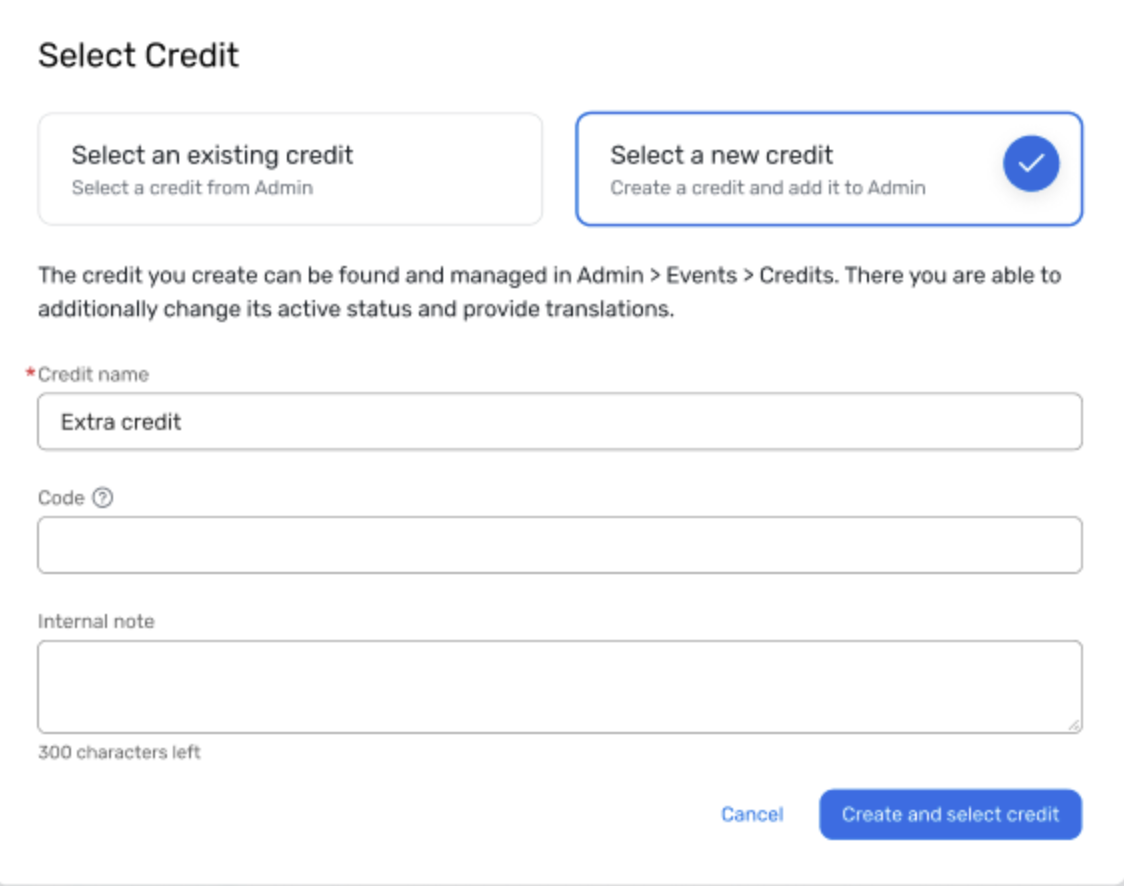
Key capabilities include:
Inline credit creation from the rule workflow: Create a new credit directly in the Select Credit modal when building or editing a session or event credit rule, eliminating the need to leave the workflow and navigate to Admin first.
Account-level persistence: Every credit created through the inline flow is automatically saved in Admin > Events > Credits, behaving identically to credits created from Admin and available for reuse across future events and rules.
Seamless modal experience: The Select Credit modal presents two clear options — "Select an existing credit" and "Select a new credit", with smart defaults based on whether the account already has credits configured.
Permission-aware access: Only planners with credit creation permissions see the "Select a new credit" option. Planners who can use credits but not create them see a clear message directing them to their account admin.
Inline validation and error handling: Field-level validations for credit name, code, and internal note are enforced in real time. Backend errors, such as duplicate names or codes, surface directly within the modal, keeping previously entered data intact so planners can adjust and retry without re-entering information.
Things to Know
Credits created through this inline flow appear in Admin > Events > Credits like any other credit. Managing active/inactive status and adding translations remain Admin-only actions.
If you create a credit through this modal but do not save the credit rule, the credit still persists in Admin and is available for future use.
Date Change
Self-Serve Setup for Custom Planner & Envelope Domains (SPF Only) will now be released TBD. Learn more about this release.
Additional Resources
Cvent Community: Questions about the above updates? As always, get answers in the Community via the Open Forum.
Beta Opportunities Page: Try new features and products out before full launch availability. Join Beta Programs.