- DATE:
- AUTHOR:
- The Supplier & Venue Solutions Product News Team

Attract Group Business Releases for May 6, 2026
Cvent Supplier Network
CSN Total Guest Room Pricing Updates
Expected Release Date: 05/06/2026
What's Changed: To support the FTC rule on unfair or deceptive fees, we’re updating how Total Guest Room Cost is calculated and displayed to planners in CSN proposals, so it’s clearer what’s included in the guest room price. These changes apply to all CSN suppliers, and will appear on your CSN proposals for RFPs that include sleeping rooms.
Now, when you respond to these RFPs in CSN:
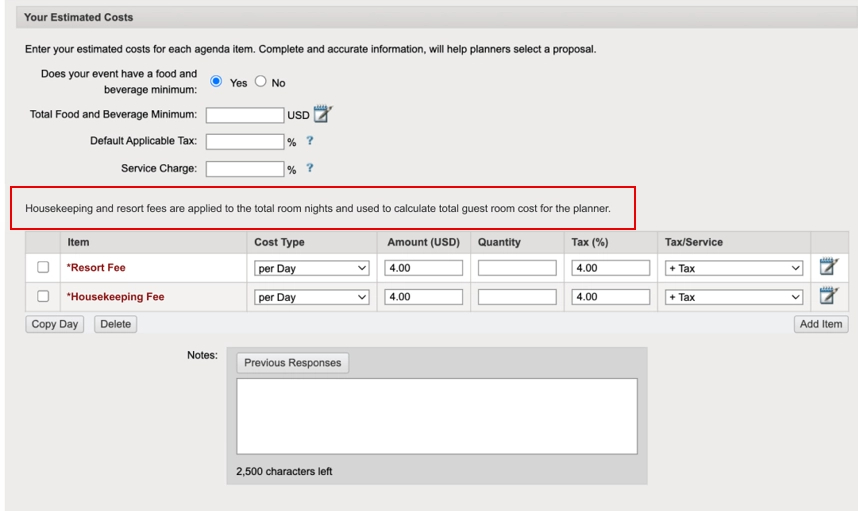
You’ll be required to provide Resort Fee and Housekeeping Fee values where they apply.
The total for each fee will be calculated based on total room nights and clearly displayed to planners.
The Total Guest Room Cost shown to planners will include the guest room rate plus these fees across all nights.
We’re also clarifying best practices for how you enter rates and fees so the pricing planners see is accurate and easy to understand.
Benefit: These updates help you present more transparent, easy-to-understand pricing so planners know exactly what’s included in their guest room costs.
Key benefits include:
Clearer fee transparency: Planners can see how resort and housekeeping fees contribute to the total cost, reducing confusion and back-and-forth questions.
Better compliance alignment: The update supports the FTC rule on unfair or deceptive fees by surfacing mandatory fees directly within the Total Guest Room Cost.
Flexible pricing options for suppliers: You can choose how to quote—either separating base rate and fees or offering an all-in rate, without risking double-counting fees.
How to Quote Guest Room Pricing
To make sure planners see the correct Total Guest Room Cost, use one of these approaches when responding to CSN RFPs:
Option 1: Keep Rate and Fees Separate (Recommended)
Guest Room Rate: Enter the base room price only (do not include resort or housekeeping amounts in this rate).
Estimated Costs: Enter Resort Fee and Housekeeping Fee as per room, per night.
Use values like complimentary / waived / included / N/A only when they accurately reflect your property’s offer.
With this approach, Cvent automatically adds these fees to the room rate and shows planners the Total Guest Room Cost.
Option 2: All-In Room Rate (if you prefer to quote a fully bundled room rate
Guest Room Rate: Include the resort and housekeeping amounts within the room rate you enter.
Estimated Costs: Set Resort Fee = N/A and Housekeeping Fee = N/A so those fees aren’t added again on top of your all-inclusive rate.
This prevents accidental double-counting and ensures planners see a single, accurate total.
CSN Reporting Updates
Expected Release Date: 05/06/2026
What's Changed: Enhanced table widgets, new gauge and donut charts, and the ability to download report charts as images are being released in CSN Reporting. For a full overview of these release details, view the full Improve Group Business Releases for May 6, 2026.
Visit our Community with questions
Do you have questions about anything we’ve rolled out this window?
As always, get questions answered in the Community via the Open Forum.