- DATE:
- AUTHOR:
- The Supplier & Venue Solutions Product News Team

Manage Group Business Releases for March 11, 2026
Cvent Passkey
Access Multi-Room Booking from Passkey Manage
Expected Release Date: 03/11/2026
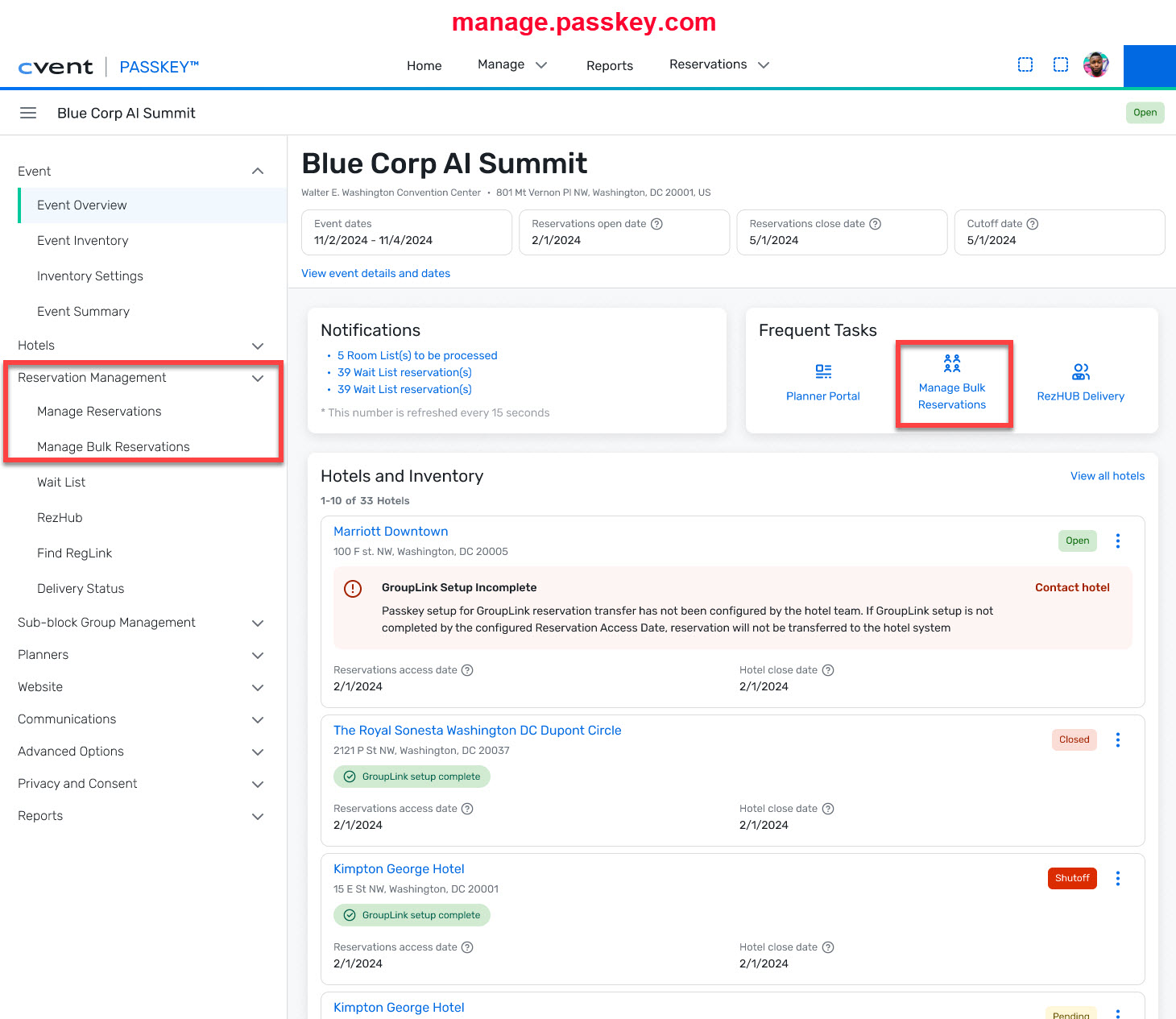
What's Changed: Event organizers can now access the Multi-Room Booking (MRB) tool directly from Passkey Manage (manage.passkey.com):
A new “Manage Bulk Reservations” link has been added to the left navigation of each event in Passkey Manage, allowing users to open the MRB tool for that event.
The MRB tool is also available from the Frequent Tasks section on the Event Overview page.
The “Find” link in the left navigation has been renamed to “Manage Reservations”; functionality remains the same and still allows users to find reservations.
The MRB tool opens in a separate browser tab when launched from Passkey Manage.
Previously, the Multi-Room Booking tool was only available through the Planner Portal, requiring additional steps to manage bulk reservations. Now, organizers can work with bulk reservations from the same place they already manage their events in Passkey Manage.
Benefit: This enhancement makes it faster and easier for event organizers to create, modify, or cancel multiple reservations at once within a Passkey event. Key benefits include:
Streamlined workflows: Access the Multi-Room Booking tool directly from Passkey Manage without navigating through the Planner Portal.
Improved efficiency: Quickly handle bulk reservation changes in fewer steps, saving time on daily tasks.
Better usability: Manage reservations where you already manage your events, with clear navigation labels like “Manage Bulk Reservations” and “Manage Reservations.”
This update supports event-level planners, stakeholders, and sub-block group contacts who frequently work with group and sub-block reservations.
Visit our Community with questions
Do you have questions about anything we’ve rolled out this window?
As always, get questions answered in the Community via the Open Forum.