- DATE:
- AUTHOR:
- Cvent Product News Team

Plan & Promote Releases for September 2, 2026
Products covered under Plan & Promote are Registration, Abstract Management, Speaker Resource Center, Exhibitor Management, and Payments.
Registration
Event Insights Capability - Cvent Assistant
The Cvent Assistant now includes an Insights capability — so you can ask questions about your event data in plain language and get clear, trusted answers, without running reports or exporting to Excel.
Ask about registration pace, session attendance, revenue performance, check-in trends, or audience breakdowns, and the Assistant returns a focused answer in seconds. It understands your data, respects your existing permissions, and meets you where you're already working in Cvent.
What you can do with the Insights Capability
Ask anything about your event data in plain language. Questions like "How is registration trending this week?", "Which sessions are at risk of overcrowding?", or "What's my revenue compared to last year's event?" return accurate answers drawn directly from your event.
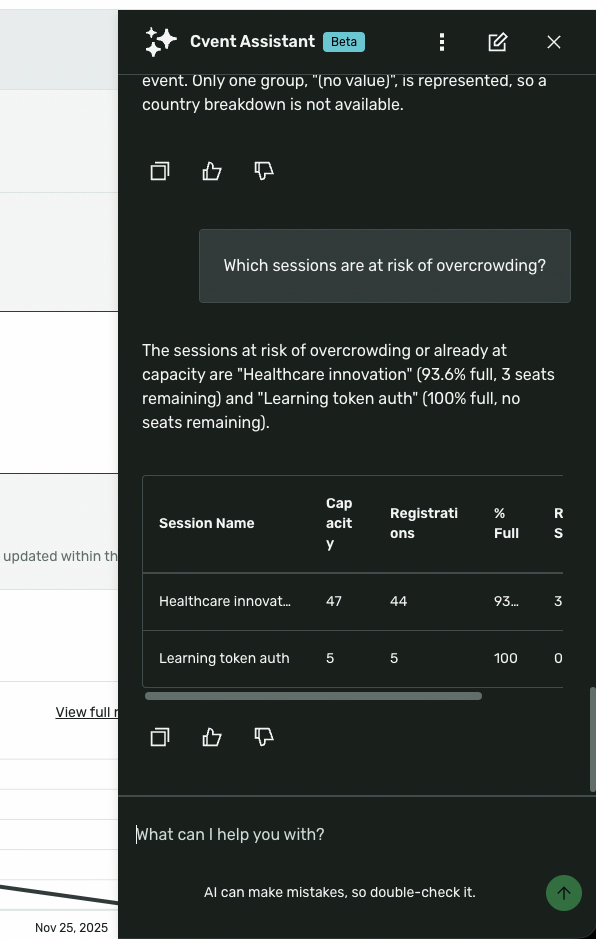
Get answers across the full event data model. The capability covers registration (summary, over time, by type, by session, by custom field), check-in, session attendance and capacity, revenue, abandoned registrations, payments, email campaign performance, audience segments, and budget.
Drill into what matters. Filter by admission item, audience segment, session, date range, email type, or registration status. The Assistant understands contextual filters — "how many IT Leaders are on the waitlist?" — without you having to configure a report template.
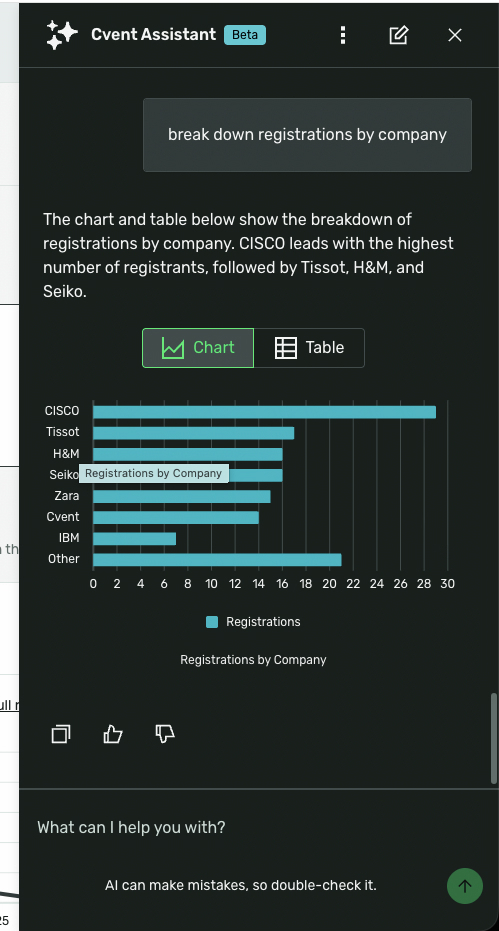
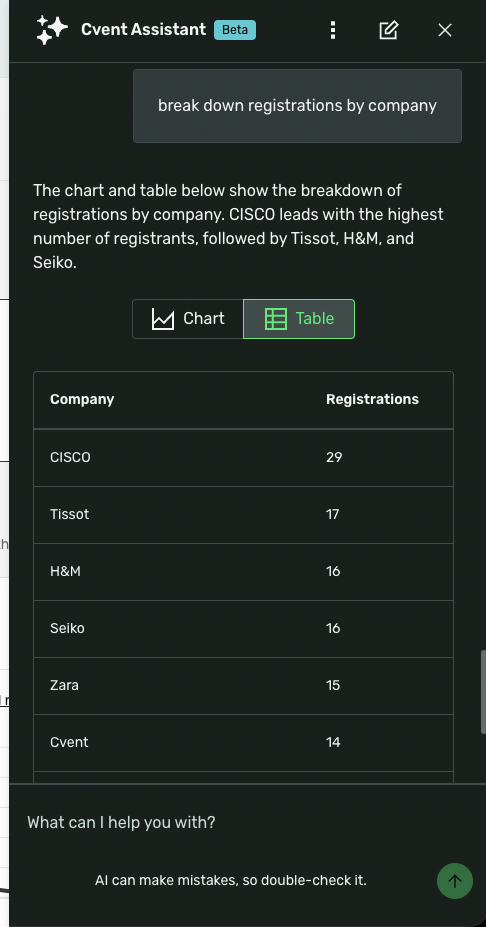
See the data your way. Answers return as clear text summaries and tables. For questions about trends, breakdowns, and pacing, the Assistant automatically renders a chart alongside the text output — giving you a visual read without extra steps.
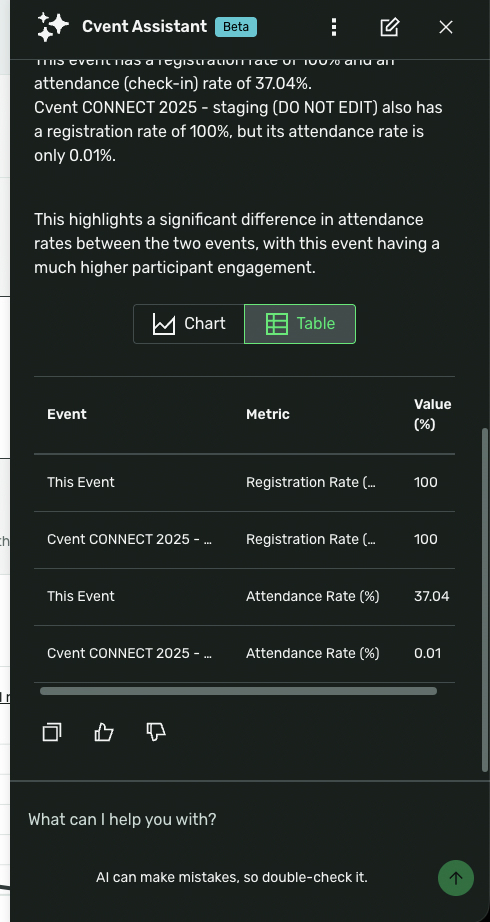
Compare across events. Ask how this year's registration or attendance compares to a prior event, and the Assistant returns the side-by-side without you needing to specify every parameter.
Things to Know
Permission-aware by design. The Assistant uses your existing planner permissions. It only returns data you already have access to, and never aggregates across events or accounts you can't see.
Deterministic data retrieval. Answers are backed by direct API calls to Cvent's event data — not generated text. Registration counts, revenue figures, and attendance numbers are pulled from the same underlying source as your standard Insights pages.
Context-aware within your session. The Assistant understands which event you're working in and carries the context of your conversation so you can follow up naturally.
Charts are rendered automatically for the right questions. For questions about trends, breakdowns, and pacing, the Assistant renders a chart alongside the text output. Chart type is selected to match the data — line charts for over-time trends, bar charts for breakdowns and comparisons.
The Insights capability does not currently answer questions about travel data, CSN, or Meeting Request Forms (MRF). These are planned for future phases.
Discover More Section
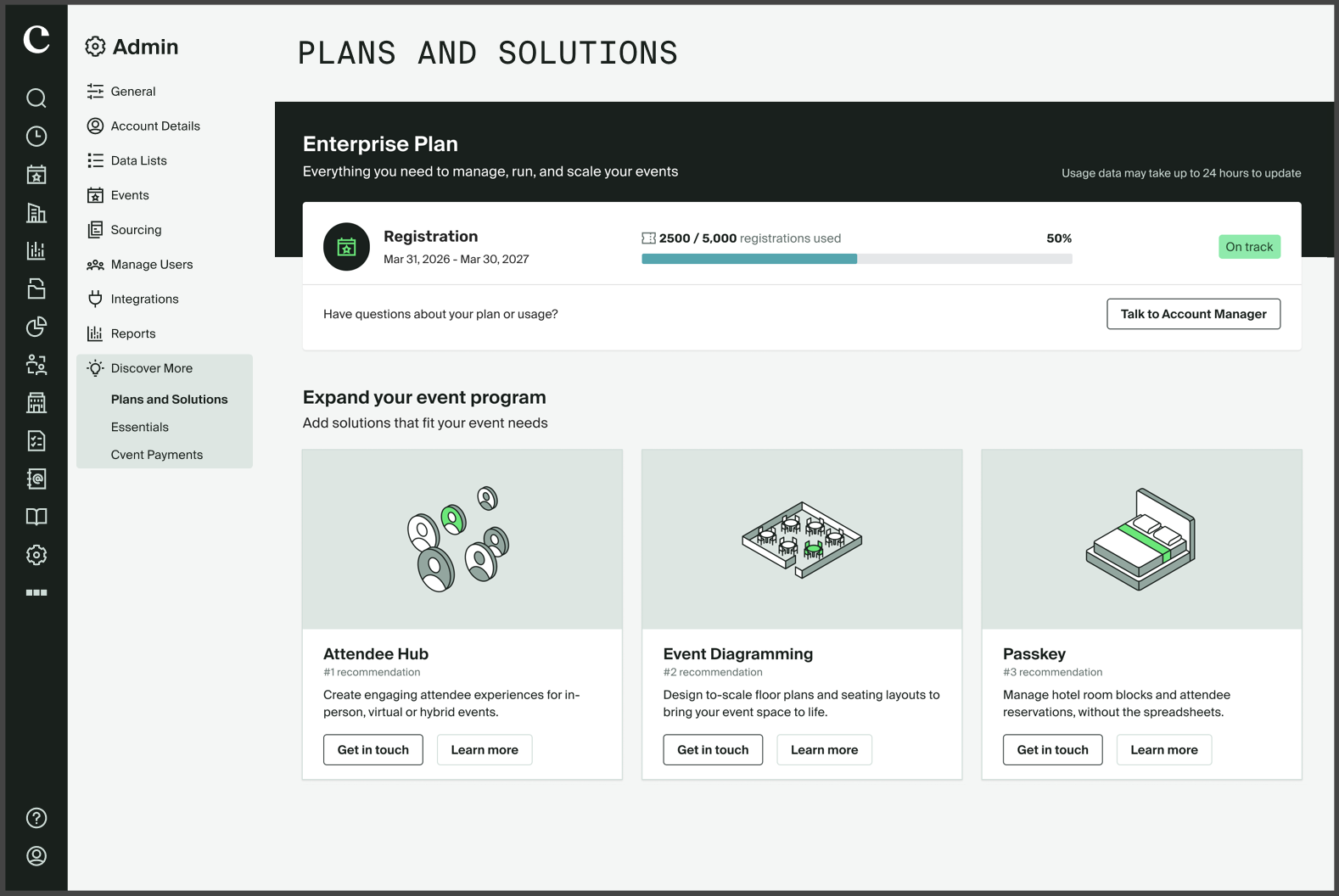
We're introducing the Discover More Section - a personalized, in-app experience that helps each account see where you stand on your current plan and discover the Cvent products you're most likely to benefit from, directly within the platform. The hub brings two things together:
Usage view that shows how much of their contracted allotment the account has consumed - from healthy usage through to nearing or exceeding their entitlement
Recommendation cards that are dynamically generated and tailored to each account based on what they've contracted and how they're using Cvent today.
KEY FEATURES
1) Plan, Entitlement & Usage at a Glance
The Discover Hub shows what you already own, along with usage (for example, 2,500 of 5,000 registrations used), so you can see exactly where you stand. A “Talk to Account Manager” button sits right alongside, making it easy to start a conversation about usage.
2) Recommendations for your Events
The “Expand your event program” section surfaces the top 3 net-new personalized solutions for your event program. Alongside, there is a "Learn More" link to learn more about the respective offering and a "Get in touch" button to talk to your account team.
3) Guided Product Education via “Learn More”
Each recommended solution opens a detailed “Learn More” panel that outlines high-level information about the product, so you can evaluate without leaving the hub.
New User Role for Contract Usage Visibility
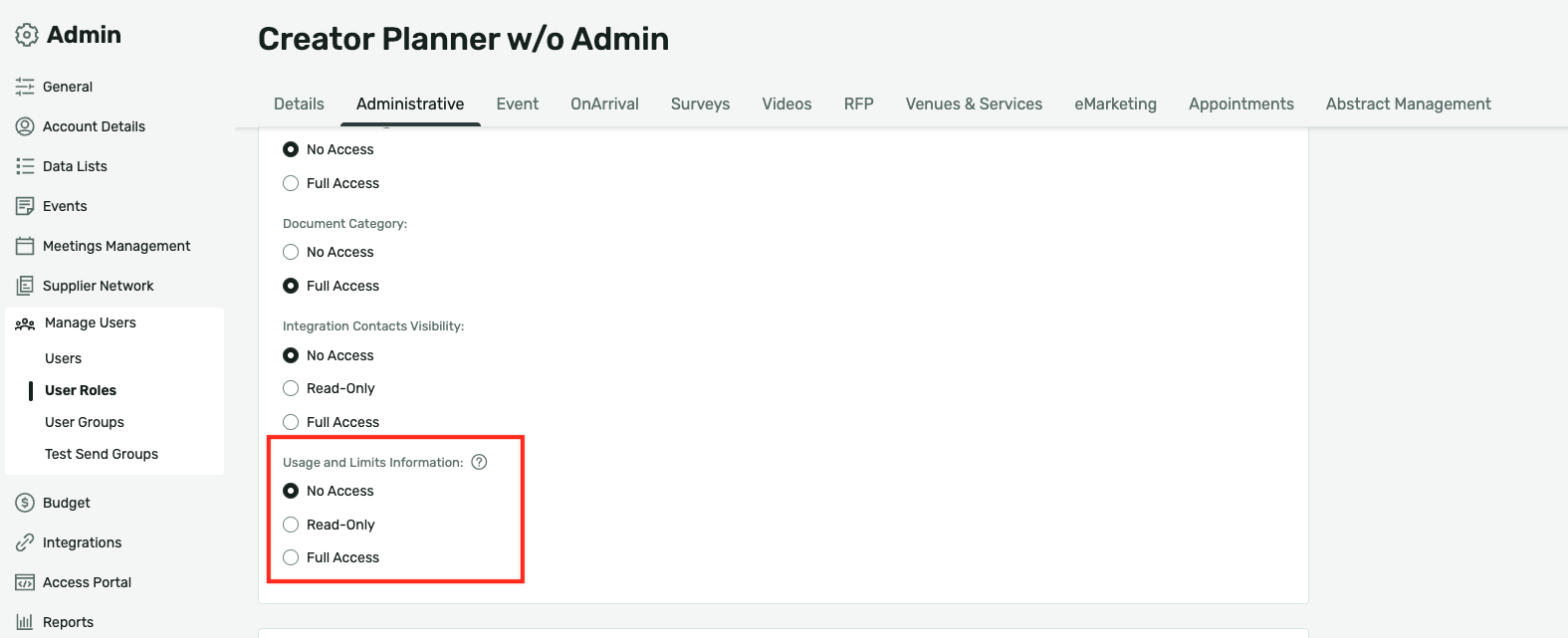
We are introducing a new Usage and Limits Information permission within user role management, giving administrators granular control over who can access contract and usage information across the Cvent platform.
With this release, administrators can now explicitly define access at the user role level, ensuring that sensitive usage and consumption data is visible only to the right people within their organization.
Things to know:
This release introduces the Usage and Limits Information permission. Administrators can begin configuring it for the appropriate user roles now, ahead of future releases where it will gate access to contract and usage information across the product.
This permission is configured at the user role level under the Administrative tab in role management.
Three access tiers are available: No Access, Read-Only, and Full Access.
Default settings:
All Administrators receive Full Access by default.
For custom roles, non-admin users receive No Access by default.
Key capabilities include:
Granular access control Administrators can assign one of three access levels (No Access, Read-Only, or Full Access) to each user role, ensuring contract and usage data is appropriately governed.
Org-wide consistency Permissions will apply across the product wherever usage and limits information is/will be surfaced, providing a consistent governance experience regardless of where users navigate.
Data Privacy Templates
Configuring privacy settings shouldn't be something you do from scratch or audit after the fact. Data Privacy Templates give account administrators a single place to define approved privacy and security settings and have them applied automatically across Standard Events from the moment an event is created.
The result is control without rigidity. Planners start with the right configuration already in place. Administrators retain override access when an event genuinely requires it & when policy changes, one template update propagates to every associated event, rather than tracking down and fixing individual events.
This is the first release in the broader Micro Templates initiative, which standardizes repeatable elements of event creation. Data Privacy Templates establish the foundation, with Theme and Email Pack templates planned next to help organizations create more consistent, on-brand event experiences over time.
What do you need to know?
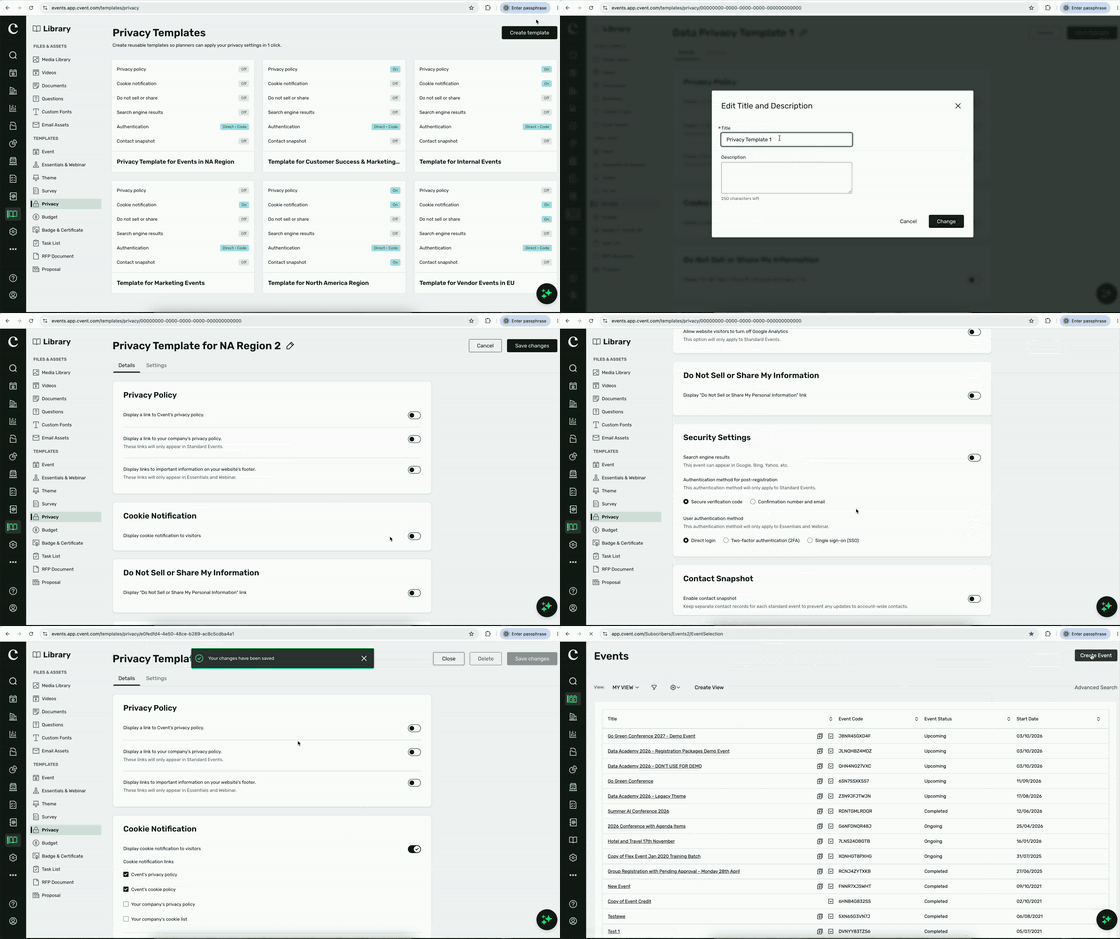
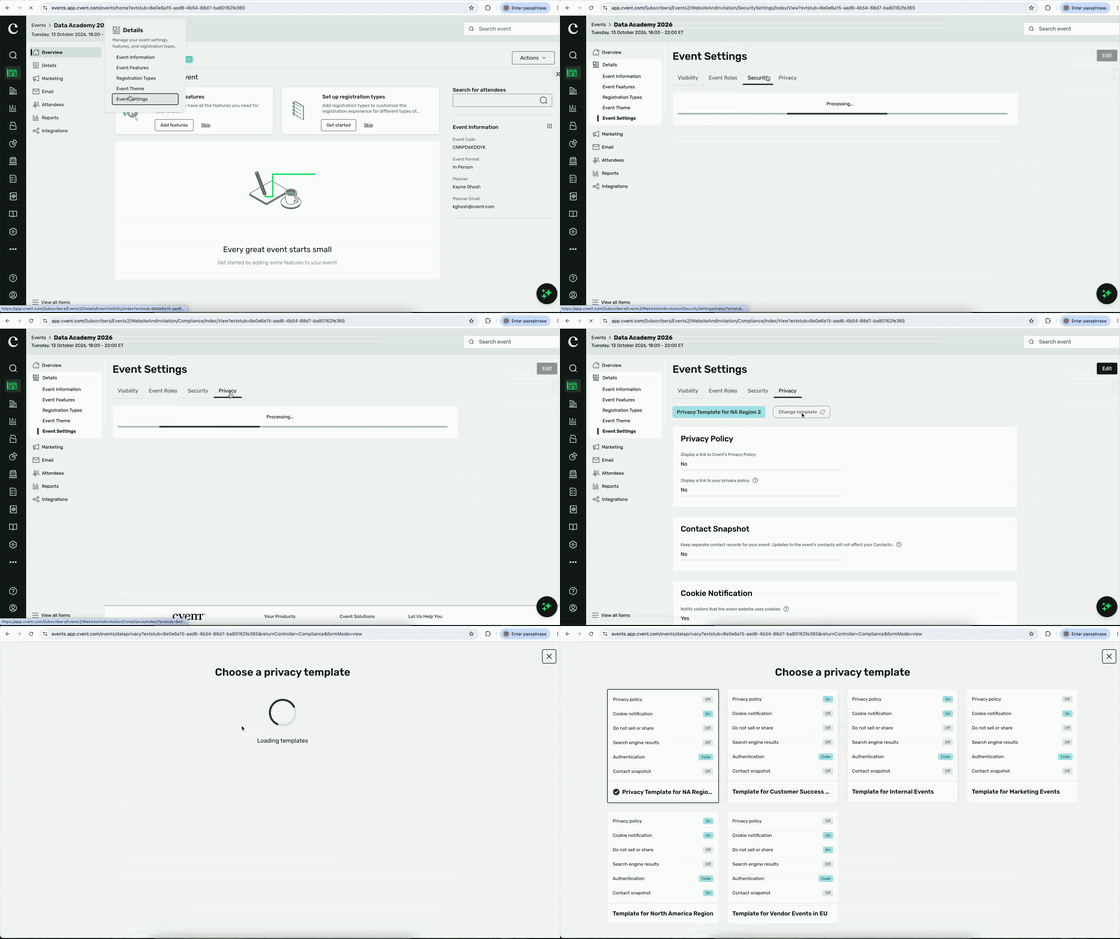
Find Data Privacy Templates in Library > Templates > Privacy.
When creating a template, administrators can set visibility criteria using Event Custom Fields, Event Format, or Event Category (Webinar, Essentials, or Standard Events). Privacy Templates can be used across all three event types after they are created, subject to account-level visibility criteria.
Templates can include privacy policy links, cookie notifications, “Do Not Sell or Share My Personal Information” configuration, search engine settings, Google Analytics cookie controls, and post-registration authentication settings.
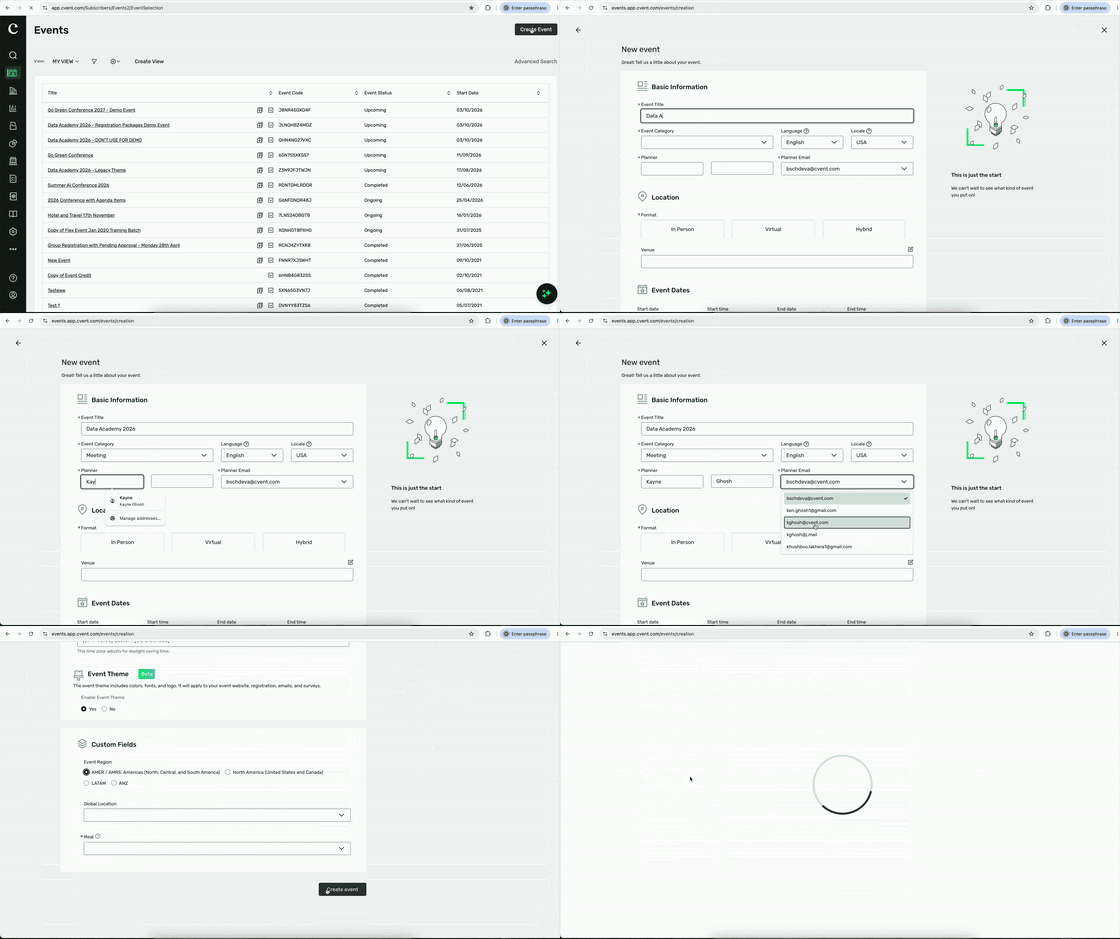
During event creation, a template is automatically applied when one template matches the event’s visibility criteria. When multiple templates qualify, planners choose from the qualifying options from the new stepper in the event-creation wizard.
Existing-event workflows are supported, too. Planners can go to Event Settings > Security or Privacy to apply a Data Privacy Template or change one that was previously applied.
Template-controlled fields are locked at the event level. Users with Full Access to existing Templates User Role permission can override these fields; users with No Access can use the templates in new event creation & existing events but cannot modify the templates.
Updates to a Data Privacy Template automatically update associated events. If a template is deleted, previously applied values remain in the event, but the related fields become unlocked.
For Webinar and Essentials customers, existing Privacy Templates have moved from Essentials & Webinars > Data Privacy to Library > Templates > Privacy. A redirect guides users from the former location.
Use cases
Standardize privacy across a portfolio: Define approved privacy and security settings once and use them across eligible Standard Events.
Move faster without losing control: Give planners a ready-to-use starting point instead of requiring them to configure the same settings event by event.
Keep active events aligned: Update a template and automatically carry those changes to associated events instead of auditing and fixing events one by one.
Support the right level of flexibility: Keep non-negotiable privacy settings locked by default, while allowing authorized administrators to override them when an event requires a change.
Publishing Insights to Access Portal
We are expanding Cvent's reporting capabilities to make event insights directly available within the Access Portal, giving all portal users visibility into the data that matters most to their event or events program experience.
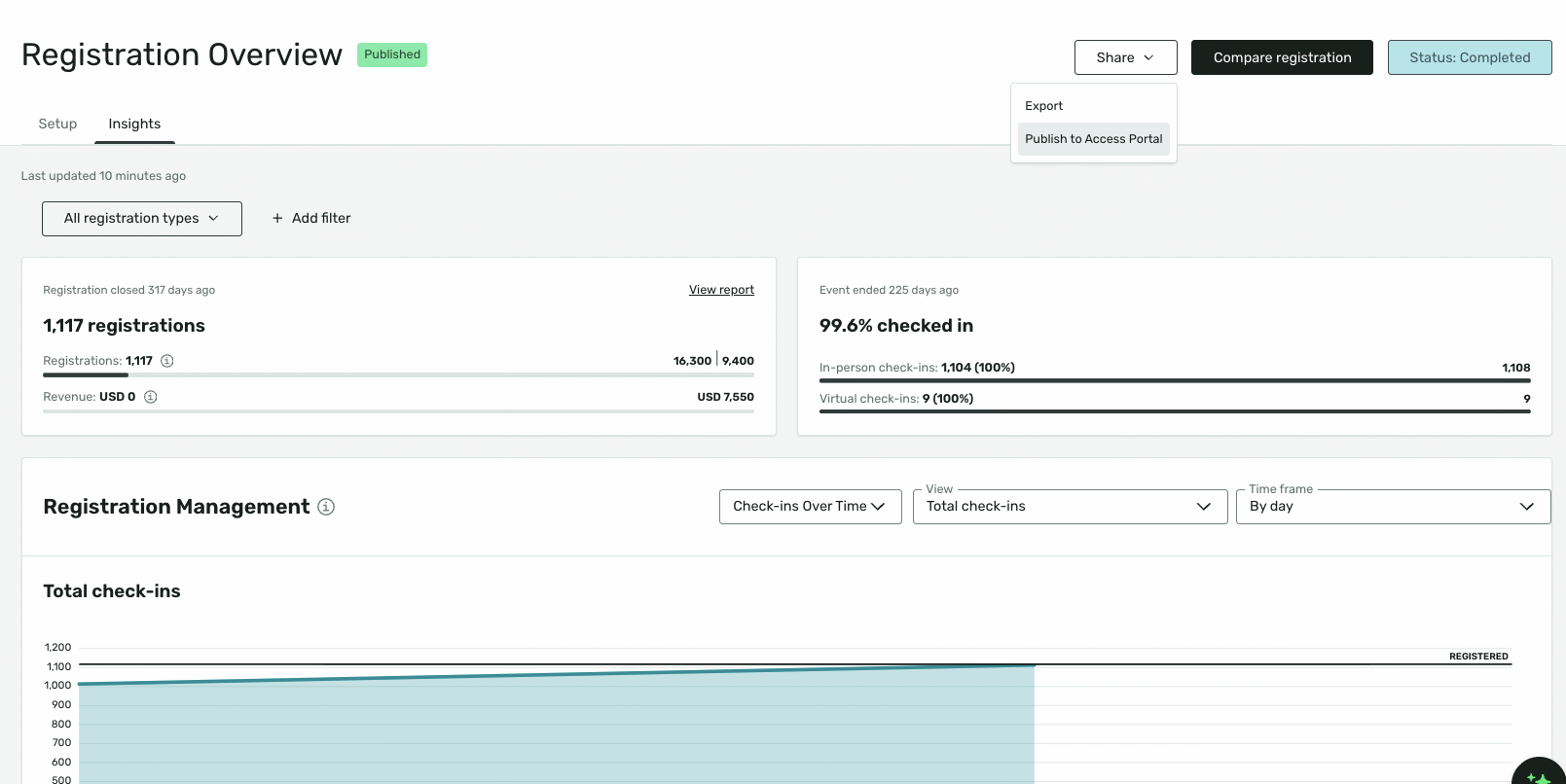
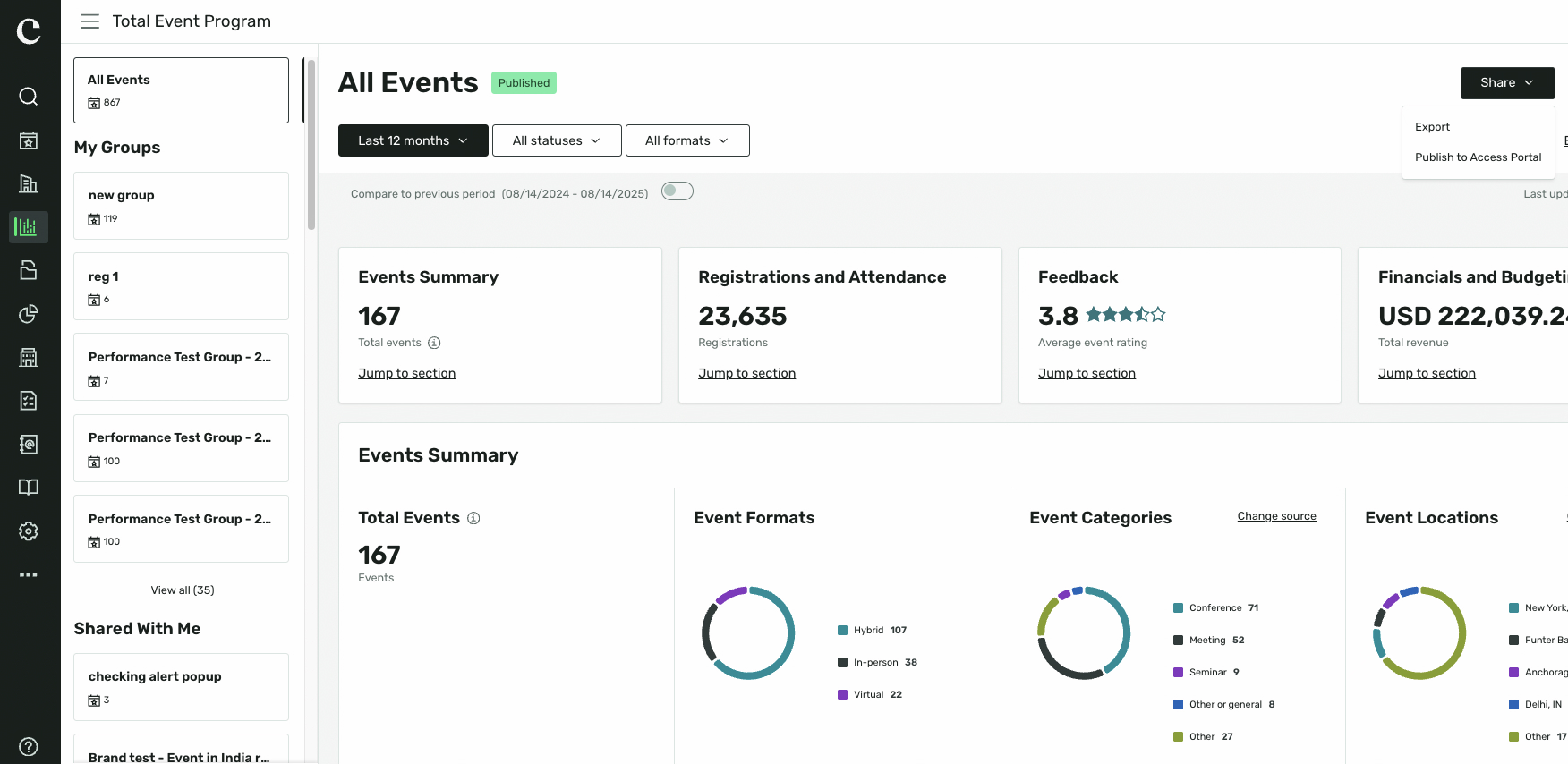
With this release, event organizers can now publish Registration Overview, Session Overview, and Cross Event Insights directly to the Access Portal, where account and other portal users can view them without leaving the portal experience. Instead of insights remaining siloed within planner-facing tools, key event data is now surfaced in context. Access to published insights is controlled through permissions, ensuring organizers retain full governance over what is visible and to whom.
Key capabilities include:
Registration Overview in the portal. Account and portal users can view registration-level data directly within the Access Portal, reducing the need to manually share reports or export data on request.
Session Overview in the portal. Session-level engagement data is now surfaced alongside the session reports portal users already interact with, giving them a clearer picture of session activity and participation.
Cross Event Insights in the portal. Organizations running multiple events can expose cross-event trend data to portal users, supporting transparency and enabling informed engagement across an event portfolio.
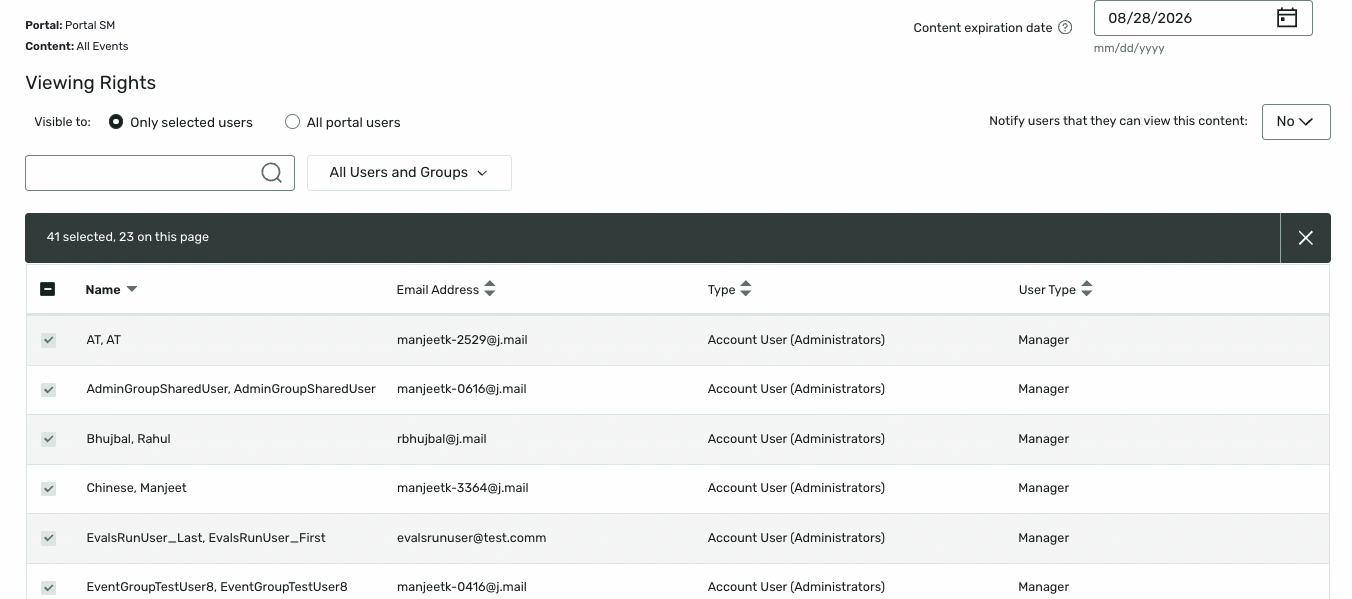
Permission-based access control. Planners and administrators control which insights are published and who can see them, ensuring sensitive or internal data is never surfaced without explicit authorization.
Centralized insights experience. All published insight types appear within a unified location in the Access Portal, creating a consistent and predictable viewing experience for portal users across event types.
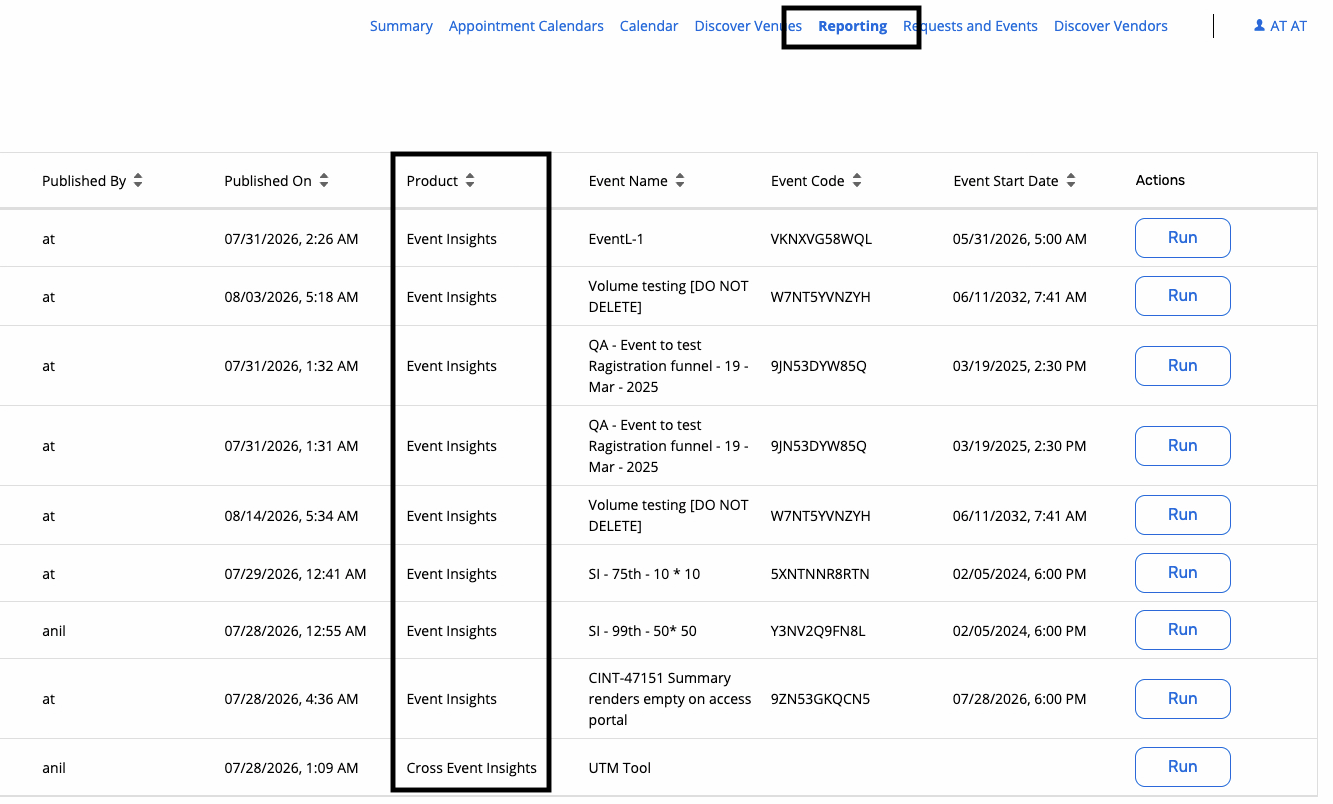
Things to Know
Access to published insights is permission-based — insights are not visible to portal users by default and must be explicitly enabled by an authorized planner or administrator.
Each insight type (Registration Overview, Session Overview, Cross Event Insights) is published independently; organizers can choose which to surface on a per-event basis.
Portal users can only view insights that have been published specifically for them — no cross-event data is shared without intentional configuration.
Mobile Number Country Code Enhancements
You can now set a default country for the standard mobile number field in Registration. This gives attendees a more relevant starting point when entering their phone number and helps support accurate international contact details.
What’s new
Set a default country: When configuring the standard mobile number field, select the country that should appear by default for attendees. If you do not want to collect the country code as part of the mobile number field, you can set "No country code" as the default.
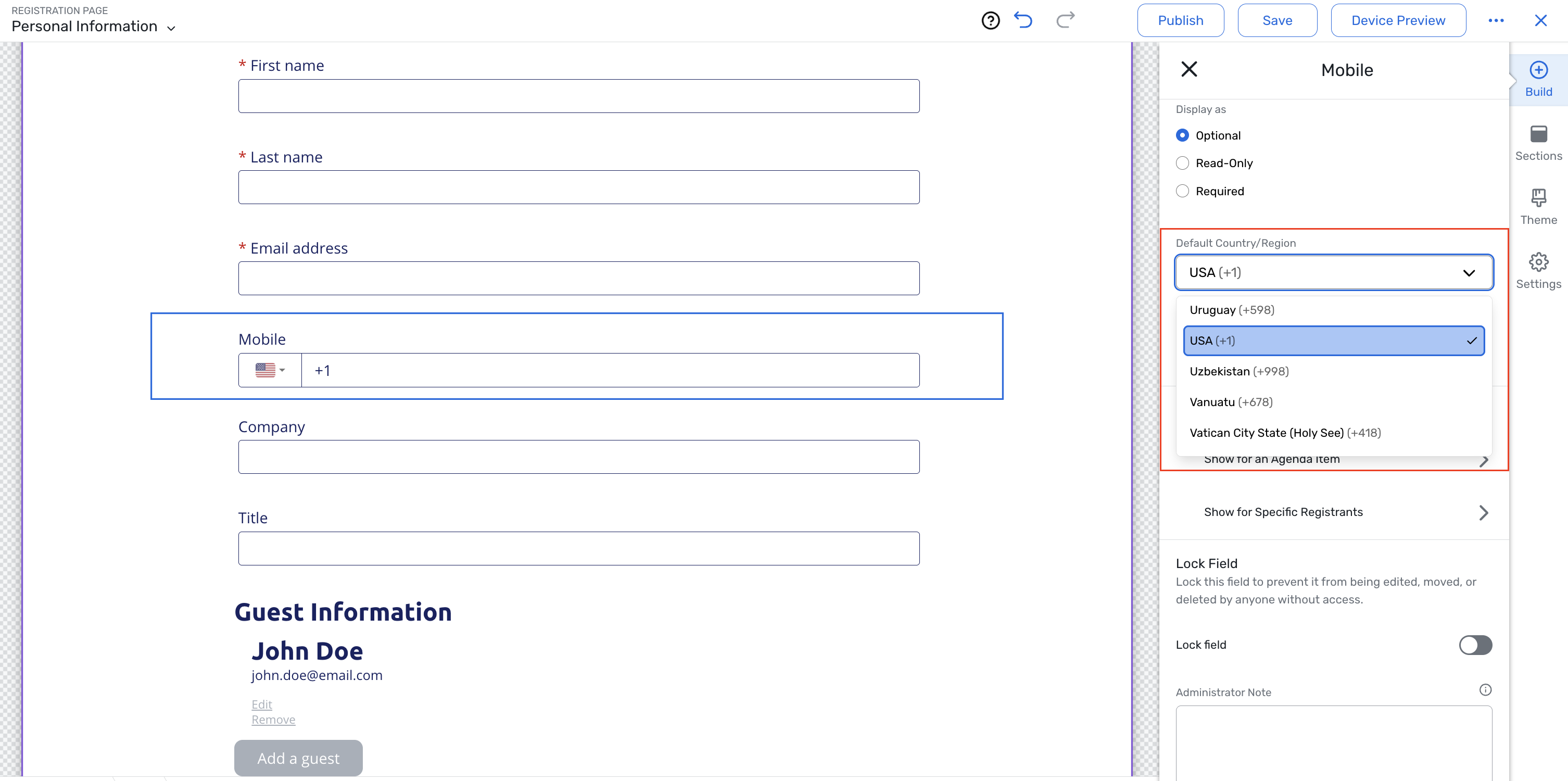
Use event locale as a fallback: If no default country is selected, the field continues to use the event locale.
Clearer country detection: The field now identifies a country code only when an attendee begins their entry with a
+. This prevents the first digits of a local number from being interpreted as a country code.No-country code state: When an attendee enters a number without a
+country code, the field shows a no-country state so the attendee can select the appropriate country if needed.
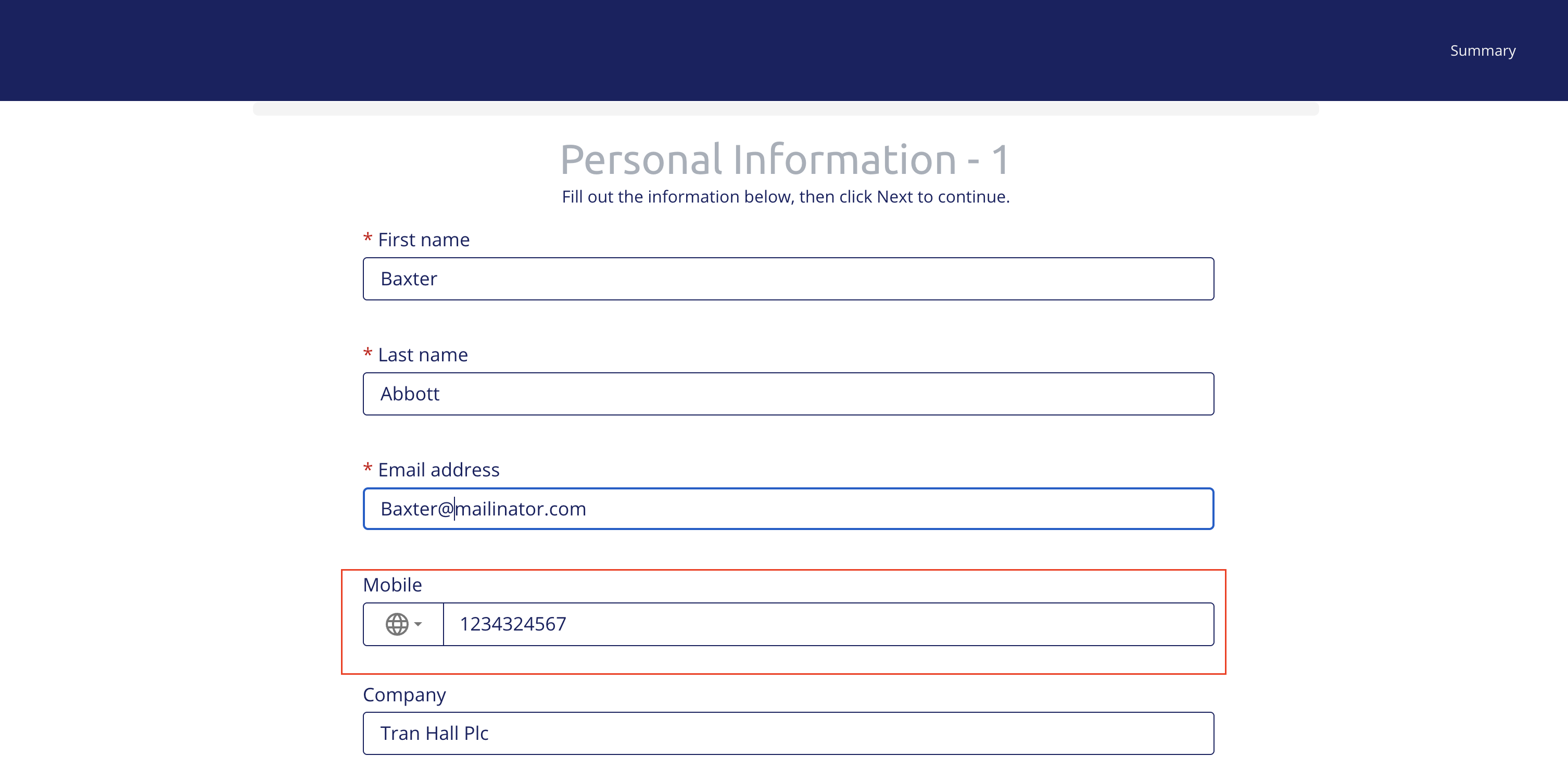
How it works
When an attendee arrives on the registration form, they see the default country. If they enter a phone number beginning with "+",the system recognizes the country code and updates the country selection accordingly. If they enter a number without "+",their entry is treated as a mobile number rather than automatically changing the country.
This update makes it easier to collect mobile numbers that reflect an event’s audience, especially when the event’s country does not match its configured locale.
Date Change
Auto-Enabled Waiting Room for High-Demand Registrations, Powered by Queue-it will now be released September 2nd. Read more about this release.
Allow Group Leaders to Duplicate their Selections will now be released September 2nd. Read more about this release.
Section Templates User Permissions will now be released September 2nd. Read more about this release.
Additional Resources
Cvent Community: Questions about the above updates? As always, get answers in the Community via the Open Forum.
Beta Opportunities Page: Try new features and products out before full launch availability. Join Beta Programs.